
I’ve watched writers blame Claude whenever an article tanked in search. In most cases, the AI wasn’t the problem. The workflow was.
The difference between content that ranks and content that doesn’t isn’t the tool — it’s whether you know what you’re doing with it. Claude is one of the most capable models available for SEO writing. But hand it a vague brief and a one-shot prompt, and it will produce exactly what you’d expect: technically acceptable, thoroughly forgettable content.
Here’s the workflow that avoids that. If you want the full picture of how Claude fits across all writing work, Claude for Writers: The 2026 Operational Guide is the right starting point. This article covers one specific application.
Quick Answer: Is Claude Good for SEO Writing?
Yes — with conditions.
Use Claude if:
- You already understand SEO fundamentals and can recognize weak output
- You edit everything before it publishes
- You need long-form drafts with consistent structure and reasoning depth
Skip Claude if:
- You plan to publish with minimal review
- Your workflow depends entirely on live web browsing for source verification
Claude vs. ChatGPT for SEO — at a glance:
| Task | Claude | ChatGPT |
|---|---|---|
| Long-form drafting | ✓ Stronger | Good |
| Outline building | ✓ Stronger | Good |
| Tone consistency (long drafts) | ✓ Stronger | Variable |
| Live web research | Toggle required | ✓ Native |
| Short-form copy | Comparable | Comparable |
| Speed on quick tasks | Comparable | ✓ Slightly faster |
For SEO writing, Claude wins on reasoning, structure, and voice consistency across long drafts. ChatGPT wins when you need live search data built directly into the workflow.
Why I Use Claude for SEO Writing
The turning point was realizing I was trying to generate finished articles in one prompt. That’s not how this works.
I stopped generating. I started scaffolding.
Claude holds context across a long, multi-turn conversation better than any model I’ve tested. I run every article inside a Claude Project — it maintains the brief, the outline, and the article context automatically, so I’m not re-explaining the piece from scratch every session. The structural consistency alone cut my editing time by roughly 40%.
Where it still falls short: originality. Left unprompted, Claude writes the safest possible version of any argument. Technically accurate. Appropriately structured. Entirely forgettable. Fixing that requires deliberate prompting at every stage — not a one-time instruction at the top of the conversation.
Claude vs. ChatGPT for SEO Writing — The Full Breakdown
| Capability | Claude | ChatGPT |
|---|---|---|
| Long-form reasoning | ✓ Stronger | Good |
| Outline quality | ✓ Stronger | Good |
| E-E-A-T content structuring | ✓ Stronger | Good |
| Factual accuracy | Similar | Similar |
| Live web browsing | Toggle required | ✓ Native |
| Tone consistency across 3,000+ words | ✓ Stronger | Variable |
| Short-form copy | Comparable | Comparable |
| Speed on quick tasks | Comparable | ✓ Slightly faster |
| API pricing | Similar | Similar |
My rule: if the task requires pulling live data from the web, ChatGPT handles it. If the task requires reasoning through a complex topic, holding context across a long draft, and maintaining a consistent voice, Claude wins.
For how this plays out across fiction, ghostwriting, and long-form creative work — not just SEO — I’ve documented it in Claude vs ChatGPT for Writers.
My Complete Claude SEO Workflow
Eight stages. This is exactly how I run it.
Stage 1: SERP Research — Manual
Before I open Claude, I spend 15 minutes mapping the top 10 results for my target keyword manually.
I’m not looking for inspiration. I’m building intelligence. Specifically: What content formats are ranking — listicles, guides, comparison pages? What’s the average structural depth? How long are the introductions before the first H2? What questions appear in every article — and which ones appear in none?
That last category is the one that matters. The gap between what everyone is covering and what nobody is covering is where a new article has room to outperform existing content. Claude can help me reason about that gap, but only if I’ve already identified it myself. The SERP research is non-negotiable.

Stage 2: Search Intent Analysis
Once I’ve mapped the SERP, I run this prompt:
“Here are the top-ranking results for [keyword]. Based on what these have in common, what is the primary search intent? What is the secondary intent? What content gaps exist that I could own?”
Claude synthesizes this faster than I can — and regularly surfaces angles I’d have missed on my own. The key word in that prompt is “own.” I’m not asking Claude to summarize what exists. I’m asking it to identify where I can go further.
Stage 3: Outline Creation
I feed Claude my SERP notes and intent analysis, then prompt:
“Build a detailed H2/H3 outline for a [X]-word article targeting [keyword]. Primary intent: [X]. Address this specific gap: [X]. Do not include an introduction or conclusion heading.”
Then I treat the output as a draft, not a directive.
Most outlines Claude returns are 80% right and 20% structurally wrong. There will be an H2 that should be an H3, or a section that duplicates the intent of the one above it, or a logical sequence that sounds reasonable in isolation but breaks the narrative flow when you read the piece in order. I add, restructure, and cut before writing a single word. That negotiation — between Claude’s pattern-matched structure and my knowledge of what the reader actually needs — produces a better outline than either of us would arrive at alone.
Stage 4: Draft Section by Section
This is the stage most writers get wrong. And it’s the reason most AI-assisted articles feel thin.
I never ask Claude to write a full article in one pass. The quality of a one-pass 2,000-word generation is not the same as the quality of eight individually prompted sections that add up to 2,000 words. Not even close.
Here’s what happens in a one-pass generation: the first H2 is strong. The second is acceptable. By the third, Claude is pattern-matching its way through the outline rather than reasoning through it. The specific detail disappears. The transitions get lazy. The voice flattens. You end up with an article that starts well and gradually becomes indistinguishable from every other AI article on the topic.
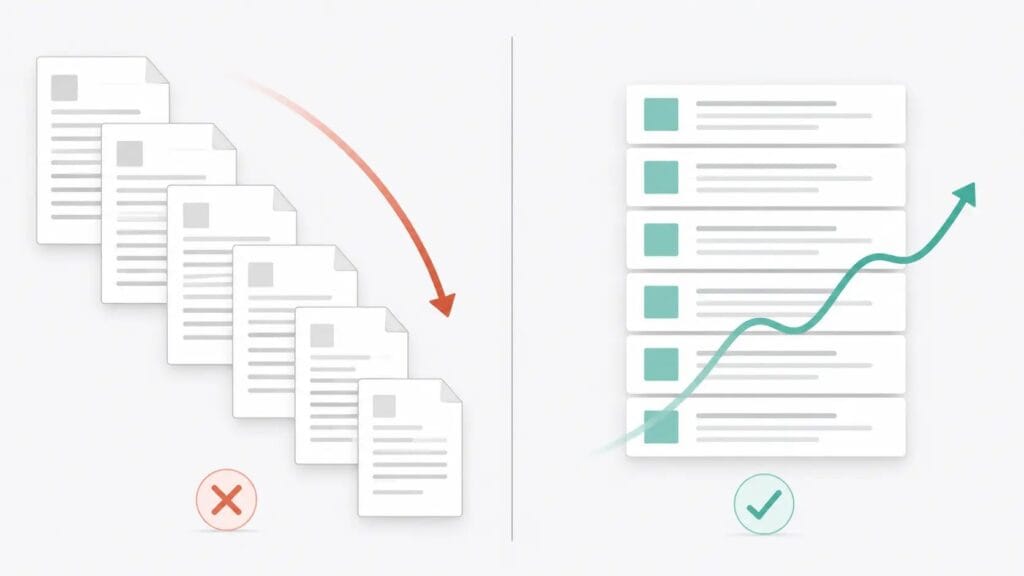
Section-by-section drafting eliminates this. Each H2 gets its own focused prompt:
“Write the [section name] section only. Approximately [X] words. First person. Do not open with a definition or a question. No filler. Context: [paste relevant notes].”
The context is the critical piece. I paste in any specific data points, examples, or angles I want included in that section before Claude writes a word. This is the difference between Claude reasoning with my knowledge and Claude filling space with its defaults.
When a section comes back weak, I don’t regenerate the whole thing. I identify the specific failure — generic opening, missing specificity, no clear position — adjust the prompt, and regenerate that section only.
Stage 5: Human Editing
This is where the real work happens. Every section goes through three passes before I move to the next stage.
Structural pass. Does this section do what it’s supposed to do? Is the logic sequential or does it loop back on itself? Does the opening sentence earn the reader’s attention or spend it? I’m not fixing sentences here — I’m evaluating whether the section is structurally sound before I invest time in the line-level work.
Voice rewrite. This is the pass most people skip. Claude writes clean, correct prose. It does not write my prose. I rewrite every section in my voice — adjusting sentence rhythm, cutting hedging language, sharpening the phrasing. A good voice rewrite doesn’t add words. It removes the distance between the draft and the author.
Compression. If the section runs long after the voice rewrite, I either cut it manually or run a compression prompt against it. I don’t pad to hit a word count and I don’t publish sections that are longer than the value they contain.
Stage 6: Internal Linking
After the draft is clean, I run:
“Here’s a list of published articles on my site: [titles + URLs]. Identify three natural internal linking opportunities in this draft. Suggest anchor text for each.”
Claude spots connective tissue I miss when I’m too close to the copy. The internal links it suggests aren’t always right, but they’re a reliable starting point — and this prompt takes 30 seconds versus the 10 minutes I’d spend doing it manually.
Stage 7: E-E-A-T Improvements
“Review this section for E-E-A-T signals. Where could I add specific examples, firsthand observations, or documented results to strengthen authority?”
This prompt surfaces gaps. It does not fill them.
That distinction matters. Claude can tell me that a paragraph about SEO workflow would be stronger with a specific client example or a documented result. It cannot provide that example, because the example doesn’t exist in its training data — it exists in my work history. The prompt is a diagnostic tool. The evidence has to come from me.
Stage 8: Final Review
Manual. I read the piece aloud from start to finish. I fix what sounds wrong. I verify every specific claim Claude generated before it touched a source. Then I publish.
Reading aloud is not optional. It catches problems that visual scanning misses — a transition that sounds logical on the page but creates a false pause when spoken, a sentence that works in isolation but is syntactically ambiguous in context, a paragraph rhythm that was punchy in Stage 4 but now feels repetitive after the surrounding sections were written. The aloud pass takes 15 minutes. It eliminates a category of errors that nothing else catches.

The Prompts I Actually Use
Search intent analysis:
“Given these top-ranking results for [keyword], what is the dominant search intent? What angle is missing entirely?”
Outline generation:
“Create an H2/H3 outline for a [word count] article on [keyword]. Primary intent: [X]. Do not include intro or conclusion headers.”
Section drafting:
“Write the [section name] section in first person. [X] words. No filler. Varied sentence length. Start with an observation, not a definition.”
Internal linking:
“Identify three natural internal linking opportunities in this draft. Suggest anchor text for each.”
Compression editing:
“Compress this section by 25% without cutting any specific examples, data points, or named frameworks.”
Each of these prompts exists because its vague equivalent failed. “Write an intro” produces generic content. “Write a 120-word first-person intro that opens with a specific problem, not a definition” produces something I can actually use. The specificity in the prompt is what separates a usable draft from a rewrite.
Where Claude Makes SEO Mistakes
Hallucinated statistics. Claude generates specific figures without sources. I verify every claim before it publishes. If I can’t verify it, I cut it.
Generic introductions. Left unprompted, Claude defaults to definitions or “In today’s world” openers. An explicit instruction in the drafting prompt fixes this every time.
Keyword stuffing. Give Claude a keyword list without context and it forces terms into sentences where they don’t belong naturally. I give context and intent instead of lists.
Weak transitions. Claude reaches for “Furthermore,” “Additionally,” and “Moreover” constantly. My Voice Profile bans these explicitly — and Claude follows explicit prohibitions better than vague stylistic guidance.
The consensus take. This is the most common failure and the hardest to catch. Claude writes the safest, most agreeable version of any argument. The fix is a single addition to your drafting prompt: “Take a clear position. Do not summarize; argue.” If generic-sounding output is a recurring problem across your AI-assisted writing, my complete AI workflow for human-like blog posts addresses that end to end.
My Human Editing Loop
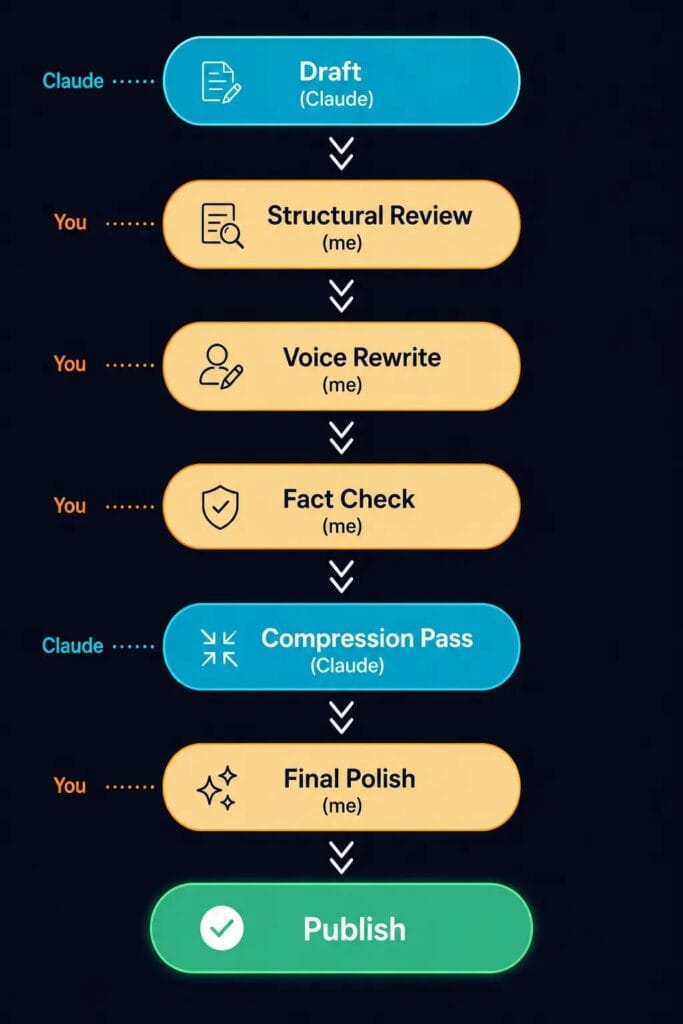
Draft (Claude)
       ↓
Structural Review (me)
       ↓
Voice Rewrite (me)
       ↓
Fact Check (me)
       ↓
Compression Pass (Claude)
       ↓
Final Polish (me)
       ↓
Publish
The compression pass is the one stage I hand back to Claude. I use Claude for exactly one editing job — cutting word count without losing depth — and I run it inside Claude Artifacts, which keeps the original draft and compressed version in the same place. Easy to compare. Easy to revert if the compression went too far.
AI doesn’t publish. I publish. That’s not a philosophical position. It’s what the workflow requires.
Final Thoughts
Claude doesn’t improve your SEO strategy. It improves your ability to execute a strategy you’ve already built.
Every writer who tells me Claude “doesn’t work for SEO” ran a one-prompt workflow: generate everything at once, publish without editing. That’s not Claude failing. That’s skipping the work.
The workflow above isn’t fast. It’s systematic. And systematic is what produces content worth publishing.
FAQ
Is Claude better than ChatGPT for SEO? For long-form SEO writing, yes — in my experience. Claude handles complex outlines, extended reasoning, and voice consistency across a 2,000-word draft better than ChatGPT. ChatGPT has the edge when live web research is core to the workflow.
Can Claude write articles that rank? Claude-assisted articles can rank — but only when the workflow includes real search intent analysis, strong human editing, and genuine E-E-A-T signals. None of that happens automatically.
Can Claude replace SEO tools like Ahrefs or Semrush? No. Claude is a drafting and reasoning tool. It works alongside your SEO stack — it doesn’t replace keyword research, rank tracking, or backlink analysis.
Does Google penalize Claude-written content? Google targets thin, unhelpful content — not AI-written content. A well-edited, information-dense article passes that standard regardless of how the draft was produced.
How do I make Claude sound more human? Build a Voice Profile before you start writing. Upload writing samples alongside it. Give Claude explicit prohibitions — what not to write — not just a general description of your style. I cover the full calibration process, including how to prevent voice drift across sessions, in my guide on training Claude to write in your voice.