Three months into ghostwriting for a content site, I sent Claude a prompt I was proud of. Two paragraphs. Clear ask. Decent context.
The draft came back readable, correct, and completely forgettable. I almost shipped it anyway — deadlines do that to you.
Instead, I opened that prompt next to one that had actually worked the week before. Same topic type. Same voice samples attached. One extra section in the working version, buried near the bottom.
That one section is where this whole framework started.
The Short Answer: The 7 Parts Every Great Claude Prompt Needs
A Claude prompt works when it gives Claude a role, a specific task, real context, reference examples, explicit constraints, a defined output structure, and a way to catch drift. Skip two or three of these and you get writing that’s technically fine and forgettable — competent, correct, and from nowhere in particular.
Here’s the full framework:
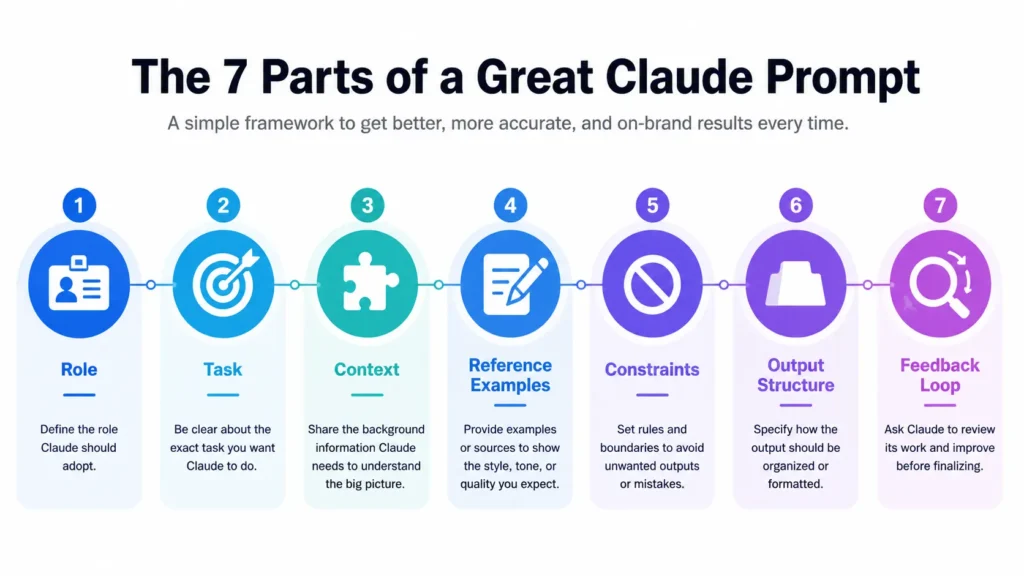
- Role — who Claude is being for this task
- Task — the specific job, not the general category
- Context — the background Claude can’t guess on its own
- Reference Examples — real writing that anchors your voice
- Constraints — the rules, especially what NOT to do
- Output Structure — the exact shape you want back
- Feedback Loop — how you’ll catch it when the output drifts
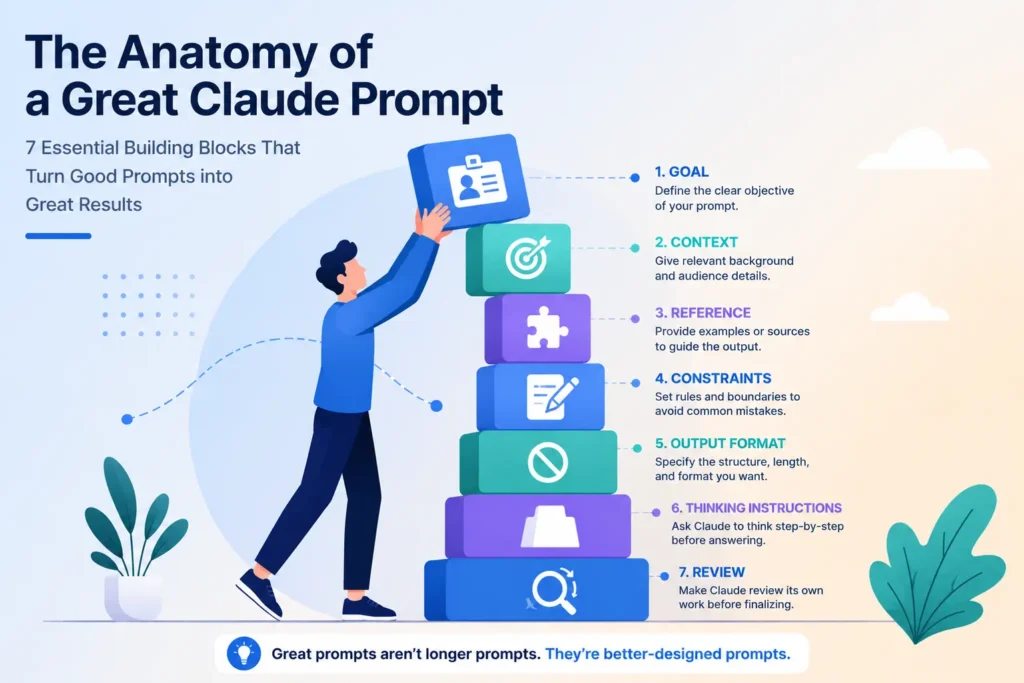
[Insert anatomy diagram: 7 stacked blocks labeled Role, Task, Context, Reference Examples, Constraints, Output Structure, Feedback Loop]
| Part | What It Does | Skip It And… |
|---|---|---|
| Role | Sets the judgment lens | Output defaults to generic-assistant tone |
| Task | Defines the real job | Claude guesses at scope and depth |
| Context | Fills in what Claude can’t know | Writing is correct but tone-deaf |
| Reference Examples | Anchors your voice | Output sounds like someone, not you |
| Constraints | Draws hard lines | Claude fills gaps with its own defaults |
| Output Structure | Shapes the deliverable | You spend more time reformatting than writing |
| Feedback Loop | Catches drift early | Small errors compound across a project |
Most prompts I see are missing three or four of these at once. Let’s go through each one.
Part 1: Role — Give Claude a Job, Not Just a Task
A role is the single most important line in any prompt. Not a task description. A job title, with a point of view attached.
“Write a blog post about X” gives Claude no lens for judgment. It doesn’t know what to prioritize, what to flag, or whose standards to apply. “You’re my developmental editor for a content site built around X” gives Claude a specific vantage point to write and evaluate from.
I learned this the slow way. My early prompts for this site went straight to the task — no role, no framing, just “write this article about this topic.” The drafts were fine. Also flat. Nothing in them sounded like it came from anyone who’d actually done the work.
The fix ended up being permanent, not a one-off line. Every project I run for this site now opens with an identity section before a single task detail — who Claude is being, what the job actually requires, whose judgment it’s supposed to apply. That one change did more for output quality than any instruction I added after it.
Before: “Write a blog post about email marketing.”
After: “You’re my email strategist with years running lifecycle campaigns for SaaS companies. Write from that vantage point — opinionated, specific, and willing to say when the standard advice doesn’t apply.”
Part 2: Task — Name the Actual Job, Not the Category
“Write a blog post” is a category. “Write a comparison for readers who already tried the obvious fix and got burned by it” is a task.
Category-level asks push Claude toward the safest, most average version of the topic — because that’s the only version that fits every possible reader. A specific task narrows the target and sharpens everything downstream.
My first drafts named a topic and stopped there — one of the most common mistakes I see writers make with Claude. The output was readable and generic in the exact way generic AI writing usually is. Once I started specifying who the reader already is, what they’ve already tried, and what decision they’re trying to make, the drafts stopped sounding like summaries and started sounding like advice.
Before: “Write about how to pick a project management tool.”
After: “Write for a solo consultant who’s outgrown a spreadsheet and is deciding between three specific tools. They don’t need a definition of project management. They need a decision.”
Part 3: Context — Fill In What Claude Can’t Guess
Context is the background information Claude has no way to infer: your audience, your purpose, where this piece sits inside a bigger content plan, and what’s already been published nearby.
Skip this and Claude will write something technically correct that either repeats ground you’ve already covered or misses the angle your specific audience actually needs.
I check every new article against what’s already live on the site before I ever open a drafting prompt. Not because it’s a nice habit — because I’ve published overlapping content before, and it cost me rankings on both pieces instead of building authority on either.
Practical context block I attach to every brief (usually living in the Project’s custom instructions, not the one-off prompt):
- Audience: who’s reading and what they already know
- Purpose: what this article does that existing content doesn’t
- Adjacent content: related pieces already published, so Claude doesn’t repeat them
- Constraint source: word count ceiling, keyword target, format requirements
Part 4: Reference Examples — Show the Voice, Don’t Just Describe It
Two or three real writing samples do more for voice-matching than any paragraph of style description.
“Conversational but authoritative” fits a thousand different voices. A sample of your actual writing fits exactly one. Claude can pull sentence rhythm, paragraph length, and vocabulary preference from real text far more reliably than from an adjective.
This is also where most people stop too early. Uploading samples alone gets you a cover-band version of your voice — close, technically accurate, missing something you can’t quite name. Pairing the samples with an explicit voice profile — what you always do, what you never do — is what closes that gap. I didn’t believe that until I tried it both ways on the same brief and compared drafts side by side.
Practical example: attach 2–3 current samples plus one short line — “match the sentence rhythm and paragraph length of these, not just the topic.”
Part 5: Constraints — The Rules, Especially What Not to Do
A banned-words list does more to kill generic AI writing than almost any positive instruction you can give.
Positive instructions describe a target. Negative instructions eliminate the wrong answers Claude would otherwise default to. Both matter, but the negative list is the one people skip.
My standing list bans the usual AI tells — words like delve, crucial, robust, seamless, leverage, utilize — along with transition words like Furthermore and Additionally that show up the moment a draft starts coasting. Every time one of those words slips through, it’s a signal the output drifted, not a spelling problem to fix in isolation.
Constraint checklist I run before any draft:
- Banned vocabulary list
- Banned transition words
- Paragraph length ceiling
- Word count range
- Tone boundaries (what’s too casual, what’s too stiff)
Part 6: Output Structure — Tell Claude the Exact Shape You Want Back
The shape of your request becomes the shape of the output. Skip a structural pattern and every section ends up as its own inconsistent mini-essay.
Naming an explicit pattern — answer first, explanation second, example third — gives Claude a repeatable shape to fill instead of reinventing structure section by section. It’s the difference between a document that reads like one person wrote it and one that reads like it was stitched together.
You’ve actually been reading a live example of this. Every section in this article follows the same four-step pattern: quick answer, explanation, experience, example. That’s not decorative. It’s the structural instruction doing its job in real time.
Practical example: name your pattern once at the top of the brief, then reference it by name in later instructions instead of re-explaining structure for every section.
Part 7: Feedback Loop — Build In a Way to Catch Drift
The best prompts include how you’ll evaluate the output, not only what you want from it.
Even a well-built prompt drifts over a long project. A defined critique step catches that before it compounds across ten more articles instead of one.
I run critique as its own pass, never bundled with the first draft, often in the same Artifact thread so I can compare versions side by side. Reading a draft with fresh eyes, separate from the writing pass, catches things I’d talk myself past if I reviewed and revised in the same breath.
Critique checklist I actually use:
- Does the opening earn attention without answering too early?
- Any banned words or transitions slipped through?
- Does every claim hold up under a real fact-check, or does something need a placeholder instead?
- Would a skim-reader understand the section from the quick answer alone?
The Real Takeaway
Great Claude prompts aren’t longer prompts. They’re better-designed prompts.
Seven parts, each doing one job. Nothing decorative, nothing padded to look thorough. The next time a draft comes back flat, the fix probably isn’t more instructions — it’s finding which of these seven you skipped.
Start treating your prompts like a system you’re designing, not a message you’re sending. That shift matters more than any single line you could add to a prompt.