
For months, every draft Claude gave me read like it was written by someone impersonating me. Correct sentences. Solid structure. Something was still missing, and I couldn’t name it.
I rewrote intros, regenerated sections, tightened paragraphs that were already tight. The article improved on paper and still felt hollow — technically finished, emotionally flat.
I blamed the model, assuming a longer prompt or a better style guide would eventually close the gap. It didn’t.
I stopped tweaking prompts and started watching my own process. The problem was never Claude — it was how I was using it.
These are the seven mistakes I made, in the order I noticed them, and what fixed each one.
Quick Answer
Most writing problems people blame on Claude are workflow problems. Generic output, voice drift, and endless editing usually trace back to how the process is built, not the model itself. A deliberate editorial workflow — real research, a working outline, a clear voice profile — consistently beats a better prompt. The seven mistakes below cover the workflow gaps that caused most of my own frustration, and exactly what fixed them.
Why Good Writers Still Get Poor Results from Claude
Two writers can use the same model and the same prompt and still get different drafts. Same input, different output. The difference isn’t skill with AI — it’s process.
Claude amplifies whatever workflow it’s given. A strong process produces a strong draft faster than a weak one, and the model doesn’t fix a broken process — it just executes it.
I cover my full setup in Claude for Writers: The 2026 Operational Guide to Better Writing, Long-Form Projects, and Professional Workflows.
Mistake #1: Asking Claude to Write Instead of Helping Me Write
What I used to do: Hand Claude a topic and ask for a complete article in one prompt.
Why it failed: The draft read fine and said nothing — no angle, no opinion, no experience behind it. Competent. Forgettable.
What I do now: I write my angle first, then hand Claude my conclusion before the assignment.
Practical takeaway: Bring the opinion. Let Claude sharpen the sentences around it.
Mistake #2: Letting Claude Build the Outline
What I used to do: Asked Claude to outline the article before I’d done any research of my own.
Why it failed: Every outline came back structurally sound and strategically empty, matching whatever already ranks. Search intent got flattened into generic subheadings instead of my reader’s actual questions.
What I do now: I research first, note what’s missing, then bring Claude the outline to stress-test structure and flow.
Practical takeaway: Research earns the outline. Claude just formats it. More on this in Claude for SEO Writing: My Complete Workflow for Creating Search-Optimized Content.
Mistake #3: Trying to Rewrite an Entire Article in One Conversation
What I used to do: Pasted a full draft into a single chat and asked for a complete rewrite, top to bottom.
Why it failed: A few exchanges in, Claude would repeat a phrase or lose a point I’d made paragraphs earlier. Long conversations drift.
What I do now: I keep research and voice rules in a Claude Project, and edit inside an Artifact, one section at a time. Both covered in How to Set Up Claude Projects for Writers and How to Use Claude Artifacts for Writing.
Practical takeaway: Edit in sections. Let the project carry the memory.
Mistake #4: Assuming Claude Automatically Knows My Writing Voice
What I used to do: Uploaded a handful of my best articles and assumed that was enough — samples in, matching voice out.
Why it failed: Claude averaged the patterns instead of replicating them — catching my vocabulary but missing what makes the writing mine: what I refuse to say, when I break a sentence on purpose.
What I do now: Samples show Claude what I’ve written, not why. I pair them with explicit rules — my opinions, my tone, the words I ban outright.
Practical takeaway: Samples are the evidence. Rules are the instructions. Full process in How to Train Claude to Write in Your Voice.
Mistake #5: Improving Wording Before Improving Information
What I used to do: When an old article underperformed, I’d ask Claude to tighten the prose.
Why it failed: Polished sentences don’t fix outdated information. If a product changed or search intent shifted, no amount of line editing closes that gap.
What I do now: I check what changed first — new features, new content, new reader questions. Update the substance, then let Claude tighten what’s left.
Practical takeaway: Fix what the article says before fixing how it says it. Full process in How I Use Claude to Update Old Blog Posts Faster (Without Losing My Voice).
Mistake #6: Treating Claude as the Final Editor
What I used to do: Once a draft read well, I published it.
Why it failed: A clean sentence isn’t the same as a correct one. Claude can fix repetition and phrasing, but it can’t verify a claim or judge whether a recommendation still holds up. That stays mine.
What I do now: Every draft runs through a check before it goes live:
- Every claim and recommendation holds up today, sourced or drawn from real experience.
- The opinions are mine, not a hedge Claude added.
- The article still reads like a person wrote it.
Practical takeaway: Claude edits the sentence. I edit the truth — the idea behind AI Workflow for Human-Like Blog Posts.
Mistake #7: Thinking a Better Claude Model Automatically Fixes Bad Writing
What I used to do: Got excited every time a new model shipped, expecting my output to level up on its own.
Why it failed: It never did — the model was never the bottleneck. A newer model writes a weak outline more fluently, but it can’t invent the experience, the argument, or research I didn’t bring.
What I do now: I stopped watching for releases and started fixing my process instead — research, angle, outline, voice, editing loop.
Practical takeaway: A better model raises the ceiling. It doesn’t rebuild the foundation. Weak writing in still comes out weak — just faster.
How My Workflow Changed
| Old Workflow | Current Workflow |
|---|---|
| Asked Claude for a finished draft | Bring my own angle first |
| Let Claude generate the outline | Research first, refine the outline |
| Rewrote full articles in one thread | Edit section by section |
| Uploaded samples, hoped voice stuck | Pair samples with editorial rules |
| Polished wording on outdated articles | Update facts before the prose |
| Published once the draft read clean | Run every draft through an editorial check |
| Waited for a better model | Fixed the process instead |
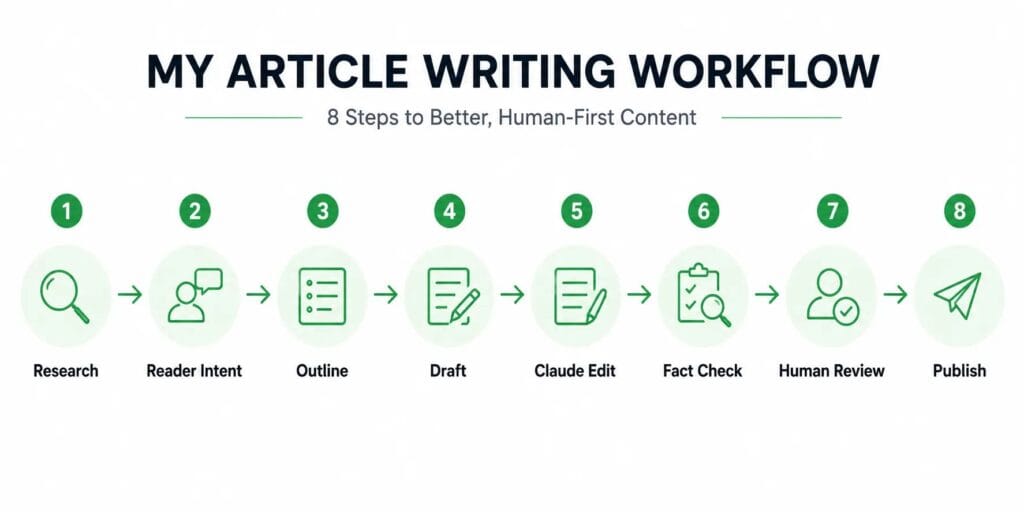
Research ↓ Reader Intent ↓ Outline ↓ Draft ↓ Claude Edit ↓ Fact Check ↓ Human Review ↓ Publish
The Principles I Follow Every Time I Write with Claude
- I own every opinion. Claude can sharpen an argument. It can’t have one for me.
- Claude edits my thinking, not my beliefs. The conclusions stay mine before they reach a prompt.
- I never publish Draft One. I’ve never once regretted a second pass.
- Facts beat confidence. A well-written sentence that’s wrong is still wrong.
- My workflow matters more than my prompts. A great prompt inside a broken process still produces a broken article.
- Voice is a rule set, not a vibe. If I can’t write it down, Claude can’t follow it.
Who This Workflow Helps Most
| Writer Type | Biggest Benefit |
|---|---|
| Bloggers | Consistent voice across every post |
| SEO Writers | Faster research-to-draft turnaround |
| Freelancers | One process that adapts across client voices |
| Editors | A reliable first-pass edit that respects the writer’s voice |
| Content Marketers | Faster updates without a full rewrite |
| Authors | Consistency across long-form projects spanning months |
What Actually Changed
None of these seven fixes needed a better model. They needed me to stop treating Claude like a finished writer and start treating it like a collaborator that needed direction.
Claude did not become dramatically better over the time I’ve been doing this. I became dramatically better at using it.
That’s not a humble-brag. It’s the plainest way to explain why my output improved while the tool stayed roughly the same. The workflow was always the lever. I just spent a long time pulling the wrong one.
Claude did not become dramatically better. I became dramatically better at using it.