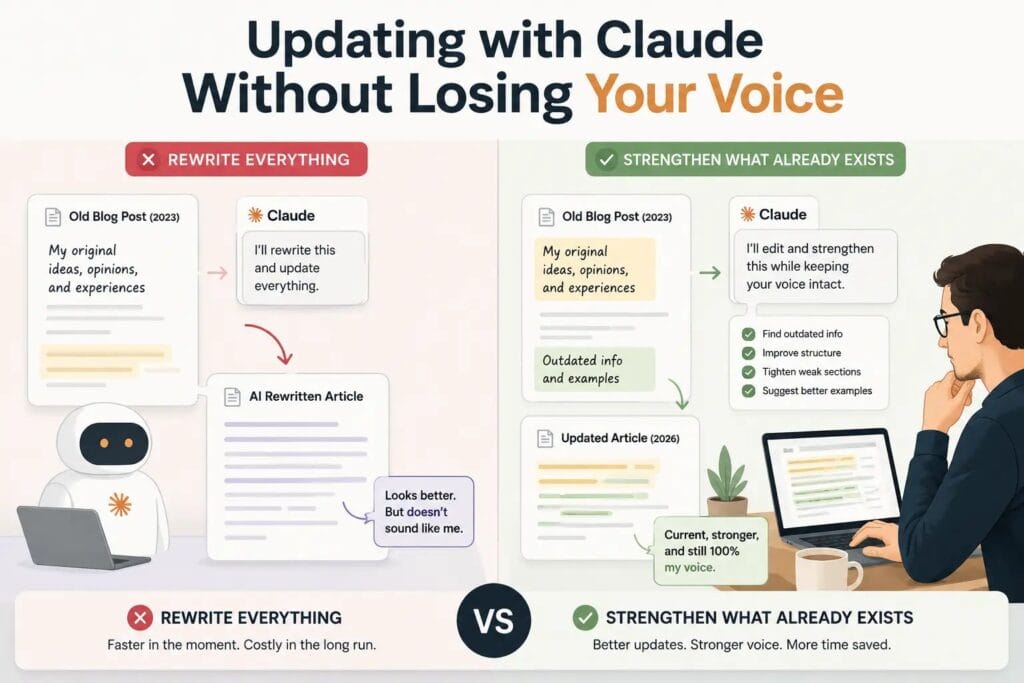
The fastest way to ruin a good blog post is to ask Claude to “refresh it.”
I’ve done exactly that.
I’d paste one of my published articles into Claude, ask it to update everything for the latest changes, and get back a cleaner draft in minutes. The facts were current. The grammar was better. The structure even felt easier to read.
But something important had disappeared.
It no longer sounded like the person who wrote the original article. You know Why?
For a while, I assumed that was simply the trade-off. If I wanted faster updates, I’d have to accept writing that felt a little less like mine.
I was wrong.
The problem wasn’t Claude. It was the job I was giving it.
Once I stopped asking Claude to rewrite my articles and started treating it like an editor instead, everything changed. My updates became faster, the important parts of my writing stayed intact, and I stopped spending hours fixing an AI rewrite that never needed to happen in the first place.
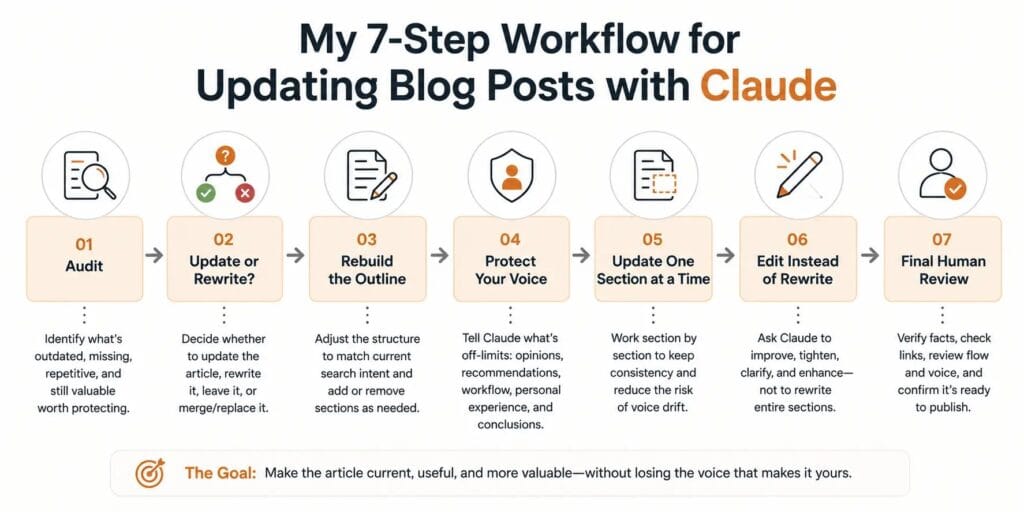
Today, every article I update follows the same seven-step workflow. Claude handles the repetitive editorial work—finding outdated information, improving structure, and tightening weak sections—while I stay responsible for the opinions, recommendations, and conclusions that make the article worth reading.
In this guide, I’ll walk you through that workflow step by step so you can update older blog posts without losing the voice that made people want to read them in the first place.
If you’re new to my overall Claude system, start with Claude for Writers: The 2026 Operational Guide to Better Writing, Long-Form Projects, and Professional Workflows. This guide focuses on one specific part of that system: keeping published content current without rewriting what makes it yours.
Why Most AI Content Updates Fail
Most AI-updated articles don’t fail because of the model.
They fail because of the prompt.
When you tell Claude to “refresh this article,” you’re giving it permission to improve everything. It doesn’t know which recommendations came from your own testing or which opinions reflect your experience. It simply rewrites the entire piece to make it read more smoothly.
That’s why so many AI-updated articles feel generic.
Strong opinions become cautious summaries. Personal experience gets replaced with information anyone could have written. The article becomes technically better but editorially weaker.
The shift that changed everything for me was simple:
A rewrite prompt creates rewrite behavior. An editing prompt creates editing behavior.
Once I stopped asking Claude to rewrite my work, my updates started sounding like me again.
I explore this idea further in AI Workflow for Human-Like Blog Posts, but updating published content requires one extra habit before you even write a prompt.
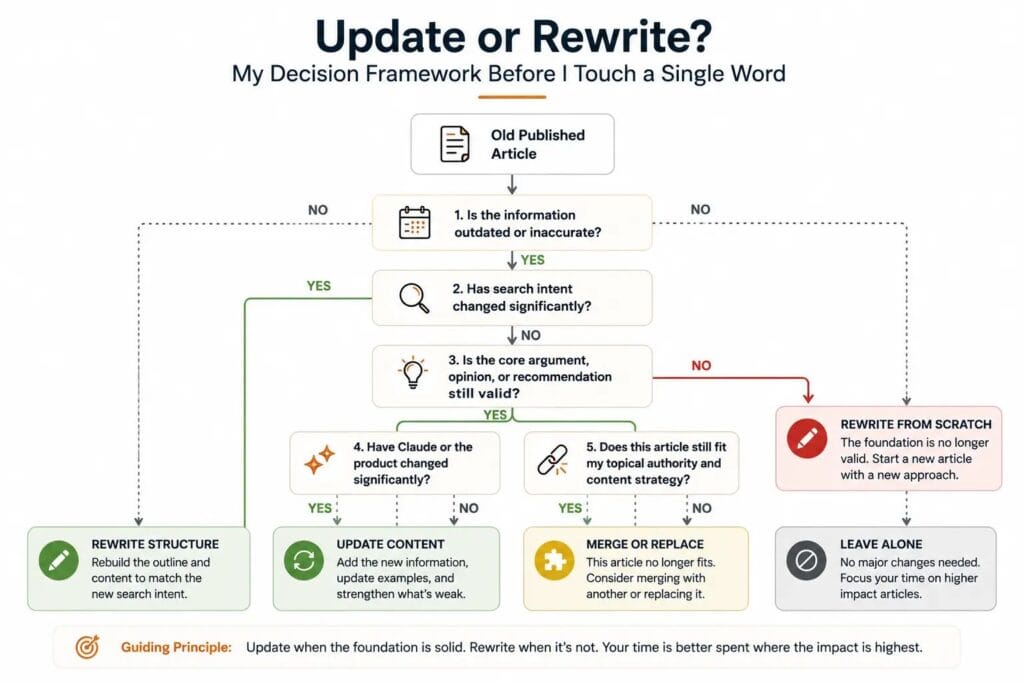
My “Update or Rewrite?” Framework
Before I open Claude, I decide whether the article deserves an update at all.
Not every old article should be refreshed. Sometimes the better decision is to leave it alone—or rewrite it from scratch.
I use this quick framework before every update.
| Question | If Yes | If No |
|---|---|---|
| Is the information outdated? | Update the article | Leave it alone |
| Has search intent changed? | Rebuild the structure | Keep the structure |
| Is the core argument still correct? | Improve it | Rewrite the article |
| Has Claude or the product changed significantly? | Add new sections | No update needed |
| Does this article still fit my topical authority? | Refresh it | Merge or replace it |
This simple check has saved me far more time than any prompt.
Updating an article only because it’s old usually creates unnecessary work. I update content when something meaningful has changed—not because the publish date has.
My Workflow at a Glance
Audit
   ↓
Update or Rewrite?
   ↓
Rebuild the Outline
   ↓
Protect My Voice
   ↓
Update One Section at a Time
   ↓
Edit Instead of Rewrite
   ↓
Final Human Review
Every step exists because I made the mistake of skipping it at some point.
In the next section, I’ll walk through each step and show you how I use Claude to improve an article without letting it rewrite what makes the article mine.
My 7-Step Workflow for Updating Blog Posts with Claude
Once I’ve decided an article deserves an update, I don’t open Claude and start editing.
I follow the same seven steps every time. The goal isn’t to make the article sound more like Claude—it’s to make it sound more like the best version of me.
1. Audit Before You Edit
My first pass has one rule: don’t change anything.
I read the article like a first-time visitor and ask:
- What’s outdated?
- What’s missing?
- What’s repetitive?
- What’s still valuable enough to protect?
The last question matters most. If I don’t identify the parts that make the article unique, they’re the first things AI accidentally smooths away.
2. Rebuild the Outline
Once I know what’s changed, I fix the structure before I touch the writing.
Sometimes readers expect new sections that didn’t exist when I first published the article. Other times, two weak sections become one stronger one.
Better wording can’t fix a weak structure.
I use the same approach when creating new articles, which I explain in Claude for SEO Writing: My Complete Workflow for Creating Search-Optimized Content.
3. Tell Claude What’s Off-Limits
Before Claude edits a single paragraph, I define the boundaries.
I explicitly tell it to preserve:
- my opinions
- my recommendations
- my workflow
- my personal experience
- my conclusions
Everything else can change.
That one instruction prevents most voice drift because Claude knows exactly what it’s improving—and what it shouldn’t touch.
If you want to make this repeatable, I’ve shared my full system in How to Train Claude to Write in Your Voice: My 4-Step Voice Profile Framework.
4. Update One Section at a Time
I never ask Claude to rewrite an entire article in one conversation.
Instead, I work section by section.
Smaller updates keep the writing consistent, make edits easier to review, and reduce the chance of subtle voice drift across a long article.
I also keep each article inside its own Claude Project so the same writing instructions stay available throughout the update. I cover that setup in How to Set Up Claude Projects for Writers.
5. Add What’s Missing Before Improving What’s Already There
This is the step I used to skip.
Before polishing a sentence, I ask what the article is missing.
That usually means adding:
- new Claude features
- updated research
- recent examples
- questions readers are asking today
- internal links to newer articles
Only after the article is complete again do I start improving the writing.
Fresh information creates value.
Better wording simply makes that value easier to understand.
6. Edit Instead of Rewrite
This mindset changed everything for me.
I no longer ask Claude to become my writer.
I ask it to become my editor.
Most of my prompts are about tightening paragraphs, improving transitions, removing repetition, or making explanations clearer—not replacing entire sections.
When I need a major rewrite, I usually do it myself and then let Claude polish the result.
7. Finish with a Human Review
The final pass is always mine.
Before publishing, I manually check:
- facts against current sources
- recommendations I’d still stand behind
- internal links
- logical flow
- consistency of voice
Claude helps me improve the article.
It doesn’t decide whether it’s ready to publish.
A Real Example from My Workflow
When I updated my Claude Projects for Writers guide, I didn’t ask Claude to rewrite the article.
I first added the latest feature changes, reorganized the outline to match what readers were searching for, and protected my original workflow recommendations. Only then did I ask Claude to tighten transitions, remove repetition, and improve clarity.
The finished article felt current—but it still sounded like something I wrote, not something AI generated.
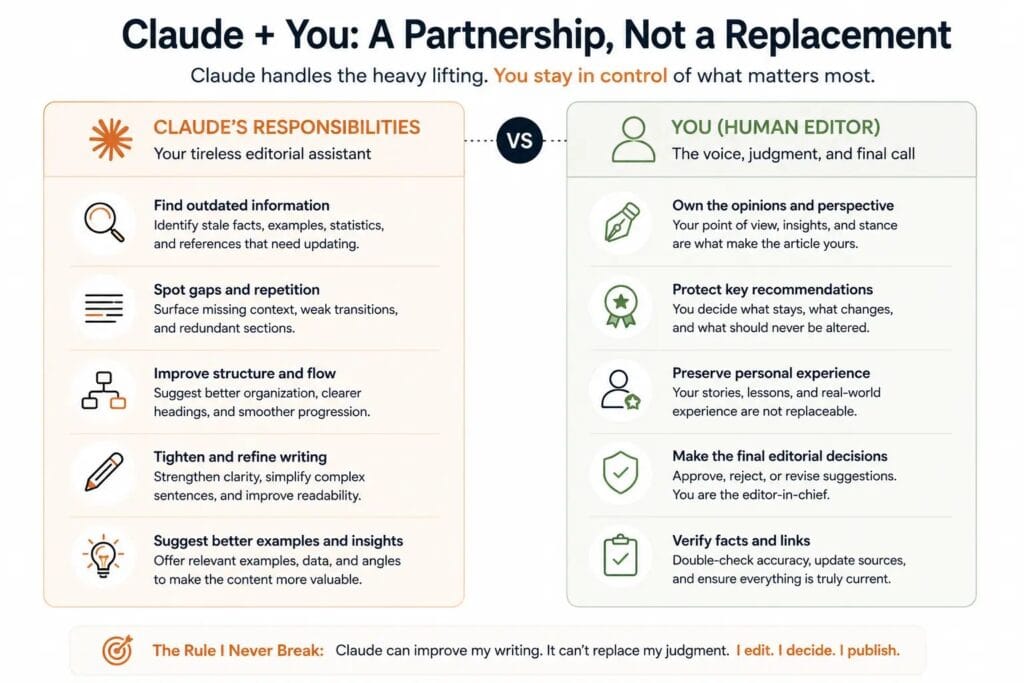
What I Never Let Claude Do
The longer I’ve used Claude, the clearer one lesson has become.
The quality of an article doesn’t depend on what Claude can do. It depends on what I refuse to delegate.
There are a few decisions I always keep for myself:
- Deciding whether an article should be updated or rewritten.
- Forming opinions and recommendations.
- Verifying facts against original sources.
- Writing the final conclusion.
- Deciding when the article is ready to publish.
Claude helps me make better editorial decisions.
It doesn’t make those decisions for me.
Before vs. After: What Changed in My Workflow
The biggest improvement wasn’t discovering a better prompt.
It was changing how I worked.
| My Old Workflow | My Current Workflow |
|---|---|
| Ask Claude to refresh the entire article | Decide whether the article even deserves an update |
| Improve wording first | Update facts and structure first |
| Rewrite everything in one pass | Work one section at a time |
| Let Claude decide what to change | Protect my opinions, workflow, and conclusions |
| Publish after AI editing | Finish with a full human review |
Looking back, every improvement came from making better editorial decisions—not from using a more advanced model.
The Biggest Lesson I Learned
When I first started using Claude, I thought the goal was to update articles faster.
I don’t think that anymore.
The real goal is to update them without making them sound like everyone else’s.
The articles that perform best on my site aren’t successful because they’re the most polished. They’re successful because they contain my testing, my workflow, and my conclusions.
Claude helps me present those ideas more clearly.
It doesn’t replace them.
That mindset changed the way I use AI for writing.
Instead of asking Claude to create my content, I ask it to improve content I’ve already taken responsibility for. The result is a workflow that’s faster, more consistent, and—most importantly—still sounds like me.
If you’re building a complete Claude writing system, these guides will help you go deeper:
- Claude for Writers: The 2026 Operational Guide to Better Writing, Long-Form Projects, and Professional Workflows — my complete writing system.
- How to Train Claude to Write in Your Voice — how I keep my writing style consistent across long-form projects.
- How to Set Up Claude Projects for Writers — the system I use to manage large writing projects.
- How to Use Claude Artifacts for Writing — my editing and revision workflow.
- Claude for SEO Writing — how I combine editorial quality with search-focused content creation.