
Most articles comparing Claude and ChatGPT spend their word count on pricing tiers, context windows, and benchmark scores. That information matters to developers and product teams. It matters a lot less to writers who need to produce 2,000 words of clean, coherent content that sounds like it was written by a human.
What writers actually care about: Does the output read well? Does it hold a consistent voice? Will the AI match a specific tone without needing constant correction? Does the edited version improve on the original or just rearrange it?
I’ve been running both tools through real writing tasks — SEO articles, blog drafts, editing passes, voice matching — for months. This is what I found.
Quick Answer: Which AI Is Better for Writers?
For most writing work, Claude is the stronger tool.
The prose it produces is more natural. It preserves a writer’s voice better when given samples. Its editing is tighter and less likely to drift from your original intent. For long-form content specifically, it maintains consistency across 1,500+ words better than ChatGPT does.
That said, ChatGPT is worth keeping around. It’s stronger for brainstorming and rapid idea generation. Its broader ecosystem — Custom GPTs, Canvas, deeper integrations — gives it an edge when writing is just one part of a larger workflow.
If writing is your primary use case, Claude is the better choice. If you need a general-purpose assistant that also writes, ChatGPT is more practical.
Table 1: Quick Comparison Summary
| Category | Claude | ChatGPT | Winner |
|---|---|---|---|
| Natural Writing | Varied sentence structure, less formulaic | Competent but pattern-heavy | Claude |
| Style Matching | Picks up subtle stylistic cues | Captures tone broadly, misses nuance | Claude |
| Editing | Tightens without over-rewriting | Can drift from original voice | Claude |
| Long-Form Content | Consistent across 2,000+ words | Occasional drift in longer pieces | Claude |
| Research Support | Strong synthesis of provided material | Web search integrated across plans | ChatGPT |
| SEO Workflow | Better for drafting and optimization text | Better for live keyword research | Tie |
| Creativity | Measured, precise | More willing to take risks | ChatGPT |
| Project Management | Projects feature works well for writers | Custom GPTs useful for structured workflows | Tie |
| Overall For Writers | — | — | Claude |
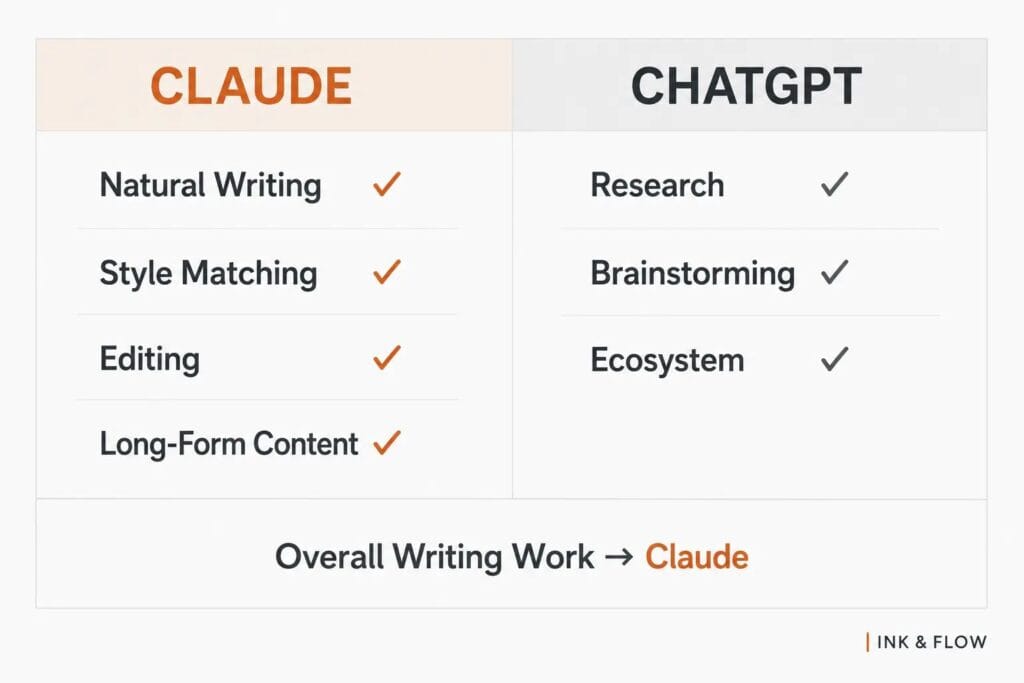
The pattern is consistent: where the task involves producing or refining prose, Claude tends to win. ChatGPT’s advantages are mostly outside of the writing itself.
Decision Box
| If you mainly do… | Choose… |
|---|---|
| Long-form article writing | Claude |
| Editing drafts | Claude |
| Voice matching | Claude |
| Brainstorming ideas | ChatGPT |
| Multi-purpose work (writing + other tasks) | ChatGPT |
| Daily writing workflows | Claude |
What I Tested
I ran both tools through the same tasks over an extended period: drafting SEO articles from outlines, rewriting weak sections of existing drafts, editing for clarity and flow, matching a target voice from writing samples, and building outlines for long-form content. The evaluation focused on output quality, not speed or pricing.
Which AI Writes More Naturally?
This is the most important question for writers, and the gap between the two tools is real.
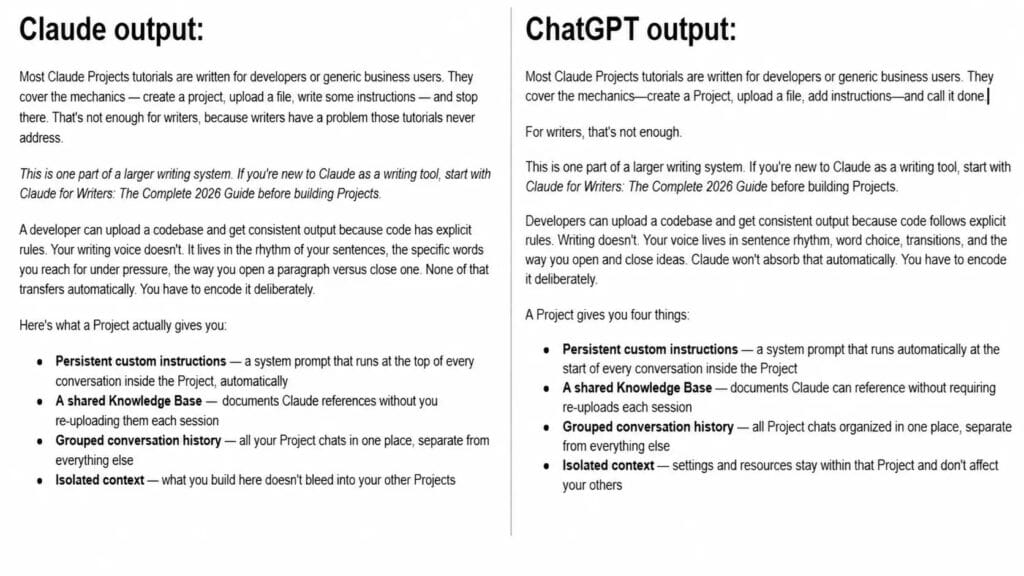
ChatGPT produces competent prose, but it has patterns. It defaults to bullet points even when you ask for paragraphs. Its sentence structures repeat. Transitions like “It’s worth noting that” and “In conclusion” appear even in casual registers. The writing is functional but often reads like it was learned from a style guide rather than from actually reading.
Claude produces noticeably more varied prose. Sentence rhythms shift. Word choices feel more considered. It doesn’t reach for bullets unless you ask. The result is less obviously AI-generated out of the box.
The difference is most obvious when you read both outputs back to back. ChatGPT’s writing looks fine at a glance. Claude’s writing reads better aloud.
Verdict: Claude.
Which AI Matches a Writer’s Voice Better?
Voice matching is where Claude genuinely separates itself.
Give both tools a 500-word writing sample and ask them to continue in that style. ChatGPT captures the general register — formal vs. casual, long vs. short sentences. But it tends to miss subtler elements: the specific vocabulary a writer favors, their tendency to use fragments for emphasis, the way they build from one idea to the next.
Claude is more precise. It picks up on patterns that aren’t obvious at first read — structural choices, punctuation habits, even tonal shifts within paragraphs. When you ask it to write in your voice, the output requires significantly less cleanup.
The clearest example came when I was writing an SEO article about Claude Projects for writers on my website. I’d stored my writing samples and style preferences inside a Project, then ran the brief. The output matched my editorial voice closely — tone especially. It didn’t just cover the topic in a neutral register, it sounded like me covering the topic. I ran the same brief through ChatGPT immediately after. The draft was competent but flat — correct information, wrong voice.
This matters practically for ghostwriters, client content producers, and anyone maintaining a consistent brand voice across a publication.
If you want to set this up properly, I cover the exact process in my 4-step voice profile framework
Verdict: Claude.
Which AI Is Better for Editing?
Both tools can edit. The question is what kind of editing they produce.
ChatGPT editing tends toward restructuring — moving sentences, breaking paragraphs differently, adding clarifying phrases. Some of it improves the piece. Some of it unintentionally drifts from the original voice.
Claude’s editing is tighter. It cuts fluff without rewriting. It improves clarity without replacing your word choices unnecessarily. When you ask it to tighten a paragraph, it tightens — it doesn’t just rearrange.
The editing difference became concrete when I tested both tools on a section from my Claude Projects article. I asked each one to tighten the passage without changing my voice. ChatGPT restructured cleanly — it made the piece more generic-editorial, more correct, less mine. A phrase I’d written deliberately — “the specific words you reach for under pressure” — got flattened to “word choice.” Claude’s edit was minimal. It cut two redundant words across the entire passage and left everything that was distinctly mine intact. Same prompt, same source text, different understanding of what editing actually means.
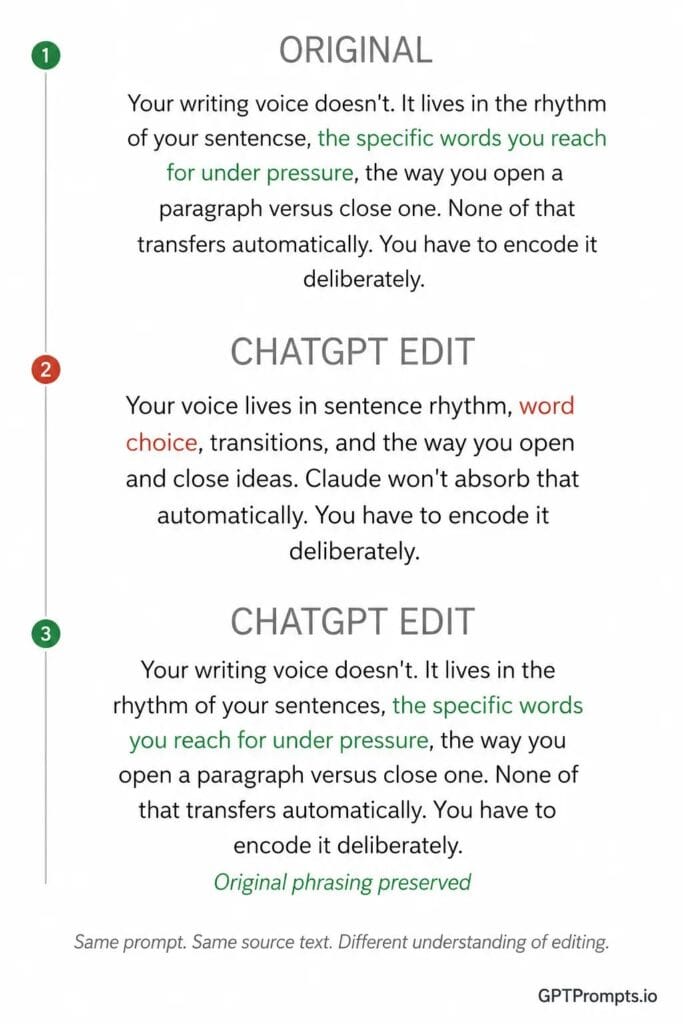
There’s also a meaningful difference in how each tool interprets writer intent. ChatGPT has a tendency to “correct” things that were deliberate stylistic choices — an incomplete sentence, an unconventional structure. Claude is more conservative about imposing its preferences on your writing.
For writers who want to maintain their voice through the editing process, Claude’s approach is significantly more practical.
Verdict: Claude.
For the full editing workflow, Claude Artifacts is where this process actually runs — I’ve covered that in detail here.
My Actual SEO Article Workflow
Here’s how I use both tools in practice for SEO content.
Step 1: Research
This is where ChatGPT earns its place. With web search enabled, it pulls current data, recent sources, and live SERP context I need for competitive articles. Claude’s standard plans don’t have live web access, which is a genuine limitation for research-heavy work.
Step 2: Outline Creation
Either tool handles this competently. If I’m already in ChatGPT from the research step, I’ll use it here too. If I want a more narrative, prose-shaped outline rather than a bullet structure, Claude produces better results.
Step 3: Drafting
Claude. I feed it the outline, keyword context, and a writing sample to match. The first draft consistently requires less editing than what ChatGPT produces for the same brief.
Step 4: Editing
Claude again. I paste the draft back in and request specific edits — tighten this section, improve this transition, make this intro less generic. The Claude Projects article test confirmed what I’d noticed in other work: Claude’s edits improve the piece without fighting your voice. It treats your word choices as intentional rather than as defaults to upgrade.
Step 5: Final Optimization
For meta descriptions, title tags, and on-page SEO elements, either tool works. Claude’s output tends to sound more natural. ChatGPT handles keyword placement reliably.
Bottom line: ChatGPT for research, Claude for everything involving writing.
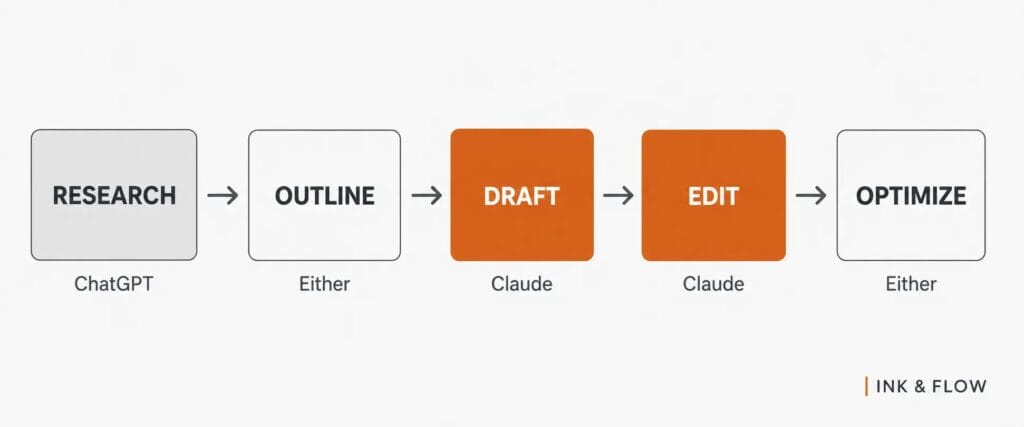
Table 2: How Each Tool Performed Across Real Writing Tasks
| Writing Task | Claude | ChatGPT | My Preferred Tool |
|---|---|---|---|
| Drafting Blog Posts | Clean, natural output | Functional but formulaic | Claude |
| Writing Long-Form Articles | Consistent tone across 2,000+ words | Occasional drift in longer pieces | Claude |
| Matching My Style | Precise, minimal cleanup needed | Captures broad tone only | Claude |
| Editing Content | Tightens without over-rewriting | Can shift voice unintentionally | Claude |
| Research Synthesis | Strong with provided sources | Better for live web research | ChatGPT |
| Creating Outlines | Better narrative outlines | Better structured outlines | Depends on format |
| Content Planning | Projects feature useful for series | Custom GPTs useful for templates | Tie |
The biggest pattern: Claude wins on anything involving actual prose. ChatGPT wins when the task requires pulling current external information.
Claude Projects vs ChatGPT Projects for Writers
Both platforms offer persistent context features. For writers, this is practically useful, not just a feature-checklist item.
Claude Projects lets you store a style guide, writing samples, and reference material that persists across sessions. You define how you write, what your publication covers, and what standards apply — and that context stays active. For writers managing multiple clients or long-running content series, this removes a significant amount of repeated setup.
ChatGPT’s Custom GPTs are more flexible in configuration. You can build specialized tools for specific writing formats — an editorial checklist assistant, a client onboarding workflow, a repurposing tool. But getting consistent voice matching through a Custom GPT requires more upfront work to configure and test.
For writers specifically, Claude Projects delivers more value with less setup. Upload your writing samples, define your style, start working.
Recommendation: Claude Projects for writing-focused work.
When ChatGPT Is Better Than Claude
ChatGPT is better for rapid brainstorming. When you need 20 headline variations in 30 seconds, or a list of article angles on a topic, ChatGPT produces more volume with less friction.
It’s also better for multi-purpose workflows. If your work spans writing, task management, image generation, and code, ChatGPT’s broader ecosystem is more practical than switching between tools.
Custom GPTs are a genuine advantage for writers who want to build specialized internal tools. And for research, its web search is more deeply integrated and reliable for pulling current data.
When Claude Is Better Than ChatGPT
Claude is better when the writing itself is what matters most.
Long-form content stays more consistent in tone and logic when drafted in Claude. Articles over 1,500 words require less structural fixing in the back half.
Editing existing content is tighter and more voice-preserving. Ghostwriting and brand voice work produces output that requires less correction. First drafts from detailed briefs are closer to publishable across most writing formats.
If you’re spending the majority of your AI time on actual writing — not research, not project management, not image generation — Claude is the right primary tool.
Table 3: Best Choice Based on Writer Type
| Writer Type | Recommended Tool | Why |
|---|---|---|
| SEO Writers | Claude (+ ChatGPT for research) | Better drafts, cleaner optimization text |
| Bloggers | Claude | More natural prose, easier voice matching |
| Freelance Writers | Claude | Better at adapting to different client voices |
| Copywriters | Claude | More precise word choice, tighter edits |
| Editors | Claude | Less likely to fight the original voice |
| Content Marketers | Both | Broader workflows require both tools |
| Authors | Claude | Long-form consistency, voice preservation |
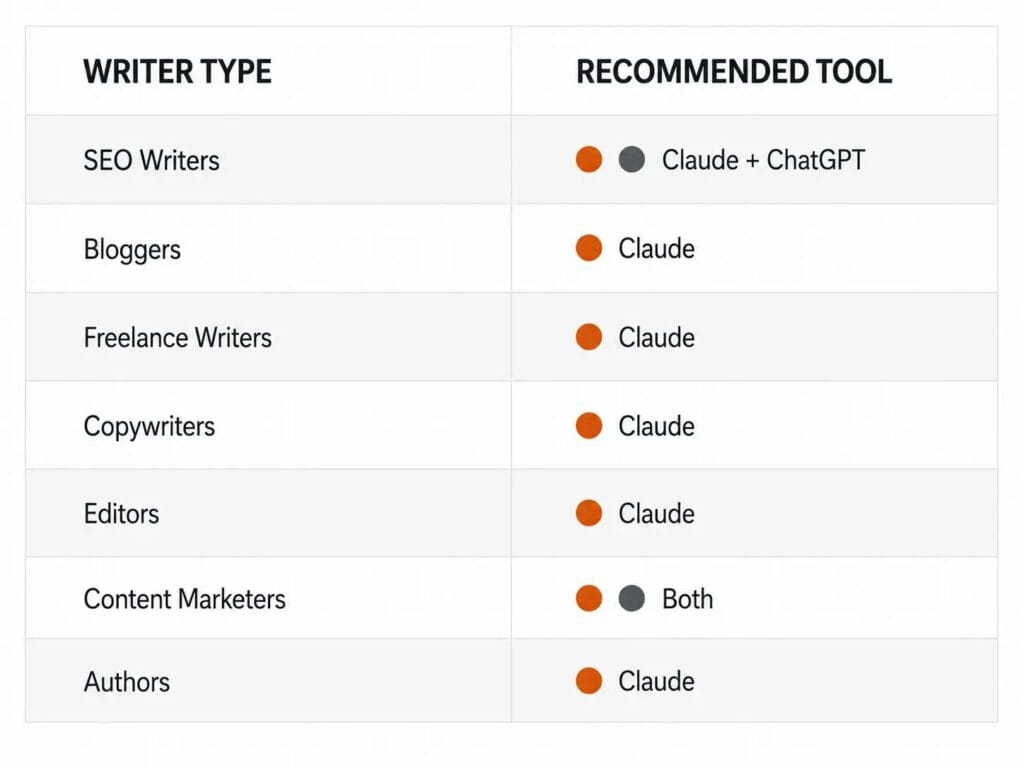
The most important note for SEO writers and content marketers: using both tools at diffeent workflow stages is more effective than committing to one exclusively.
Final Verdict
Claude is the better writing tool. The prose is more natural, the voice matching is more precise, the editing is tighter, and the consistency across long-form content is stronger. For anyone whose primary work is writing, Claude handles the majority of that workflow better.
ChatGPT is the better all-purpose assistant. Its ecosystem, integrations, and brainstorming capability make it valuable for work that extends beyond writing.
If writing is your main output, use Claude as your primary tool. Add ChatGPT where it fills genuine gaps — particularly in research and multi-format workflows. The writers who get the most out of these tools are the ones using both strategically, not the ones debating which one to commit to.