I’ve watched writers spend three months trying to make ChatGPT sound like them and failing. I’ve seen copywriters burn $500 on Jasper subscriptions and quietly cancel after six weeks. I’ve done my own share of fumbling — pasting rough drafts into generic chat windows, getting back “certainly! here’s a revised version” in that unmistakable AI cadence, then spending an hour undoing the damage.
Here is what I know now that I wish I knew three years ago: most AI writing tools are built around volume. Crank out content fast. Ship it. Repeat. The problem is that writers don’t need volume. We need precision. We need a tool that works with our thinking rather than replacing it.
Claude, used correctly, is that tool.
But “used correctly” is doing a lot of work in that sentence. Out of the box, Claude is just another capable chatbot. The writers I’ve seen get real results from it — cleaner prose, faster revisions, sustained quality across 80,000-word manuscripts — all did one thing differently. They stopped using Claude like a content vending machine and started using it like a thinking partner with a terrible memory that you have to train every single time.
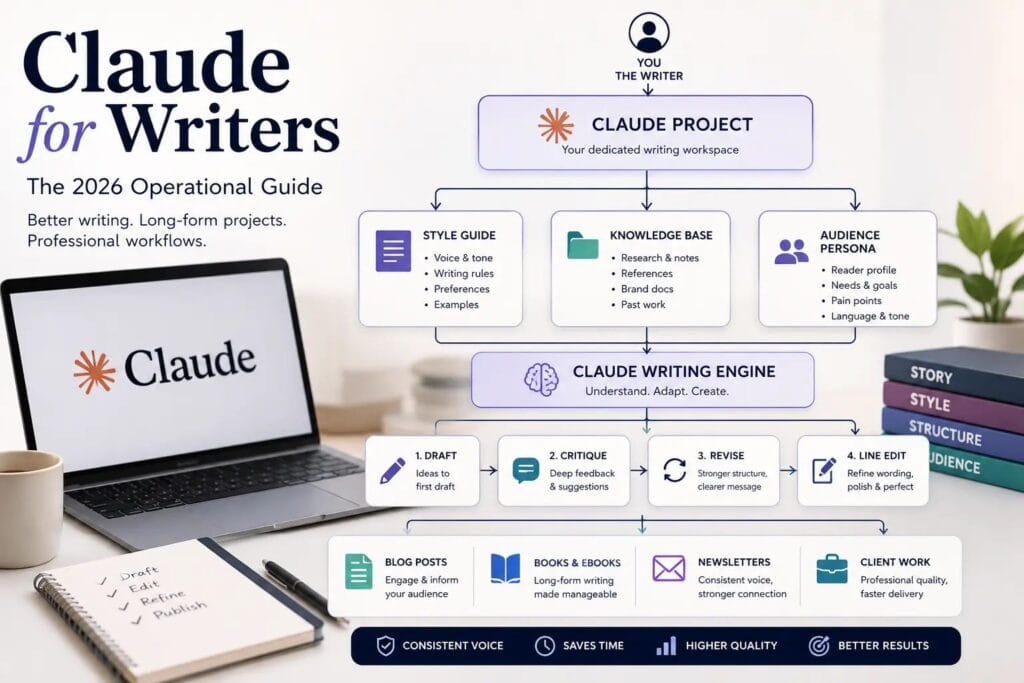
That’s what this guide covers. Not the surface-level stuff. The actual operational system — how to set up Projects, how to structure your context, how to run a proper editing loop, and how to handle a book-length project without watching everything fall apart at chapter seven.
Why Claude Wins for Creative Work
Let me make one thing clear: this is not an AI feature comparison article. I’m not going to run down a list of benchmarks and declare a winner. What I am going to do is tell you what I’ve found in practice, because that’s the only thing that matters to a working writer.
Anthropic’s engineering philosophy is different from OpenAI’s. OpenAI optimizes for capability breadth — the model that can do everything from booking a flight to writing a sonnet. Anthropic has been more deliberate about the quality of outputs in language-heavy tasks. Their Constitutional AI approach, where the model is trained against a set of principles rather than just RLHF from raters, produces writing that reads less like a press release and more like a person actually thought about it.
The practical difference? When I ask Claude to punch up a flat paragraph, I get options that actually sound like a human made a choice. When I ask it to find the logic gap in an argument, it finds it — it doesn’t validate me and move on.
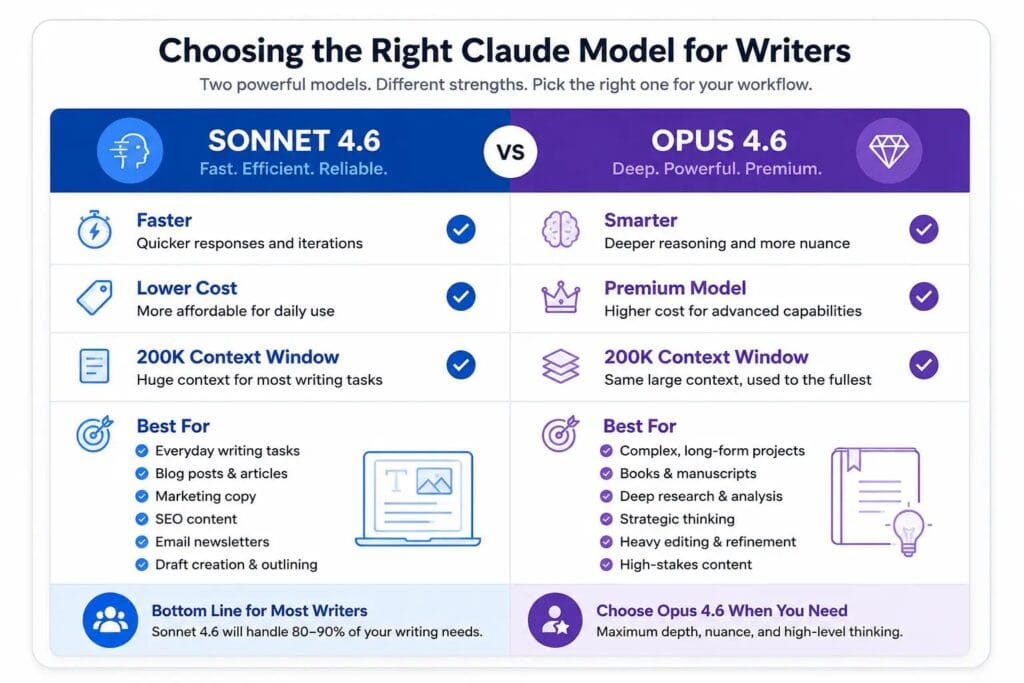
On model selection in 2026: The Claude lineup has converged significantly. Sonnet 4.6 and Opus 4.6 are now separated by just 1.2 percentage points on most benchmarks. For 80% of writing tasks — drafting, editing, voice calibration, structural analysis — Sonnet 4.6 is faster, cheaper, and good enough that you won’t notice the difference. I use it as my daily driver.
I switch to Opus 4.6 for exactly two scenarios:
- Long-context synthesis across a full manuscript (it handles 1M tokens and supports 128K output tokens per call versus Sonnet’s 64K)
- Complex structural reasoning — when I need Claude to hold an entire story architecture in mind and tell me where the logic breaks
Sonnet for execution. Opus for architecture. That’s the whole framework.
| Claude Sonnet 4.6 | Claude Opus 4.6 | |
|---|---|---|
| Speed | Fast | Slower |
| Cost | Lower | Higher |
| Context Window | 1M tokens | 1M tokens |
| Max Output | 64K tokens/call | 128K tokens/call |
| Best For | Drafting, editing, voice calibration, structural feedback, research synthesis | Full-manuscript synthesis, architectural-level reasoning, long-context analysis |
| My Daily Driver? | ✅ Yes — 80% of all tasks | ❌ Only for book-length or complex structural work |
The “Writer Operating System”: Stop Starting From Scratch
Here is the mistake almost every writer makes with AI tools. They open a blank chat, dump in their request, and then wonder why the output sounds nothing like them.
Every blank chat is amnesia. Claude knows nothing about you, your voice, your audience, your project, or your preferences. You are asking a stranger to write in your style without showing them a single example. The output will reflect that.
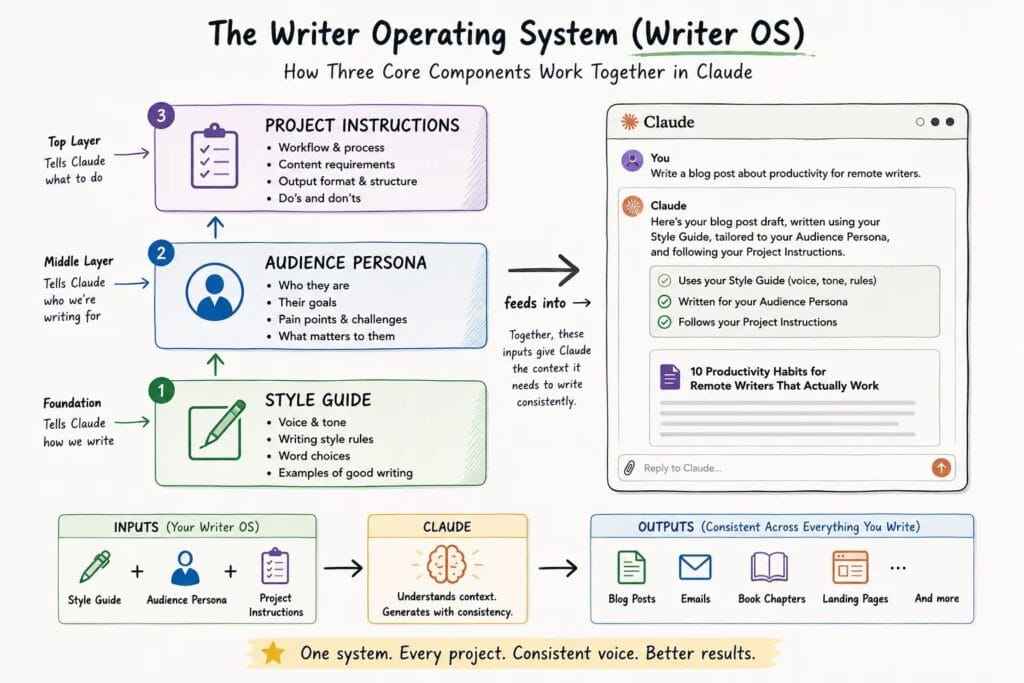
The fix is building what I call a Writer Operating System — a set of persistent instructions and documents that define who you are, how you write, and what the current project requires. You do this once. Then every conversation you have within that project benefits from it automatically.
Your Writer OS has three components:
1. The Style Guide. This is 300–500 words of your own writing, annotated. Pull from your best published work. Add notes: “I use em-dashes instead of parentheses.” “I never use ‘utilize.'” “My paragraphs are short — three sentences maximum.” “I use sentence fragments for emphasis.” The more specific, the better. Vague instructions produce vague compliance. I cover the full process for building this — from extracting your writing DNA to preventing voice drift — in my guide to training Claude in your voice.
2. The Audience Persona One paragraph. Who is the reader? What do they already know? What are they afraid of? What do they want to believe by the end of the article? This shapes every response Claude gives you. Without it, Claude writes for a generic internet user who doesn’t exist.
3. The Project-Specific Instructions What is the piece? What’s the angle? What has already been established that Claude should not contradict? This is where you prevent the drift — the slow divergence from your original intent that happens when Claude doesn’t know where you’re going.
You don’t paste all of this into every prompt. You store it in a Project. Which brings us to the most underused feature in Claude.
Claude Projects: The Multi-Work Workspace
If you’re using Claude through regular chat sessions, you’re building on sand. Every conversation resets. The voice calibration you did in Monday’s session is gone by Wednesday. The background research you fed it last week? Gone. You’re starting over, every time.
Claude Projects solves this. A Project is a persistent workspace with its own custom instructions, document library, and conversation history. Every new chat you open inside the Project inherits everything you’ve already built. Claude arrives pre-briefed.
Here is how I set up a standard writing Project:
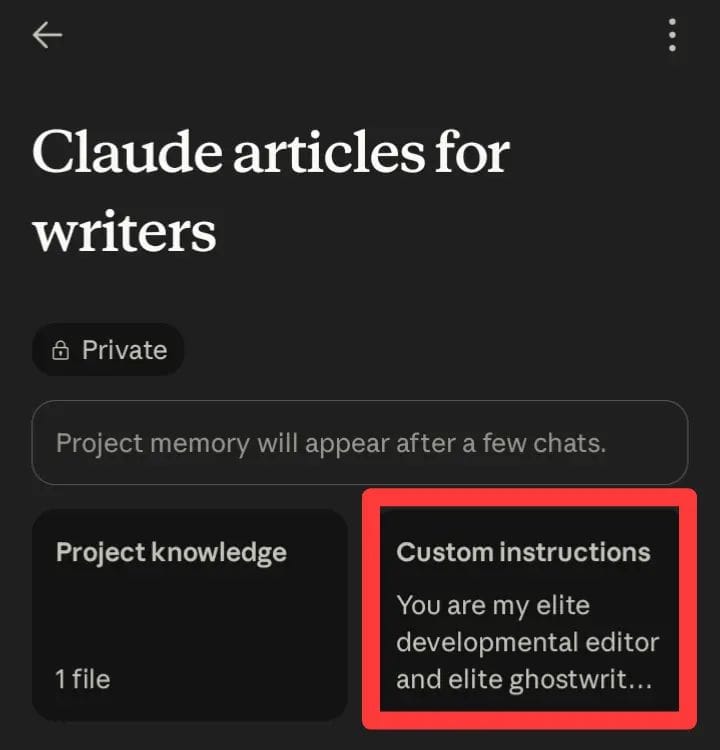
Step 1: Create the Project and write the custom instructions. This is your System Prompt. It lives at the top of every conversation automatically. Include: your name, your voice characteristics, the project type, the audience, and three or four non-negotiable style rules. Keep it under 400 words. Longer isn’t better — it dilutes the signal.
Step 2: Build the Knowledge Base. Upload your documents into the Project’s file library. For a long-form writing project, this typically means:
- Your style guide with annotated examples
- The project brief or editorial outline
- Any research documents or sources you’ll be referencing
- For fiction: character sheets, world-building notes, timeline documents
Step 3: Establish the project “handshake” prompt. The first message in any new conversation inside your Project should be a quick orientation: “We’re working on [project name]. Today’s task is [specific task]. The current state is [brief summary of where we are].” This wakes Claude up to the specific context of the session.
The result: Claude walks into each conversation knowing your voice, knowing your project, and knowing your rules. I tested this on a client’s book project — a 75,000-word business narrative. Before Projects, I was re-explaining the protagonist’s voice in every single session. After, I estimated I saved roughly six hours over the course of the project just in context re-establishment alone.
Artifacts: The Professional’s Editing Loop
One of the most useful — and most ignored — distinctions in Claude is the difference between the Chat Panel and Artifacts.
The Chat Panel is for strategy and conversation. Use it for: asking questions, exploring options, debugging your thinking, and back-and-forth dialogue. This is where you think out loud.
Artifacts are for execution. When Claude creates a document, a draft, or an edited version of your work in an Artifact, it can be revised iteratively without the surrounding conversation getting in the way. You see the clean output. You ask for changes. The Artifact updates. The chat log doesn’t bloat with successive full-document repastes.
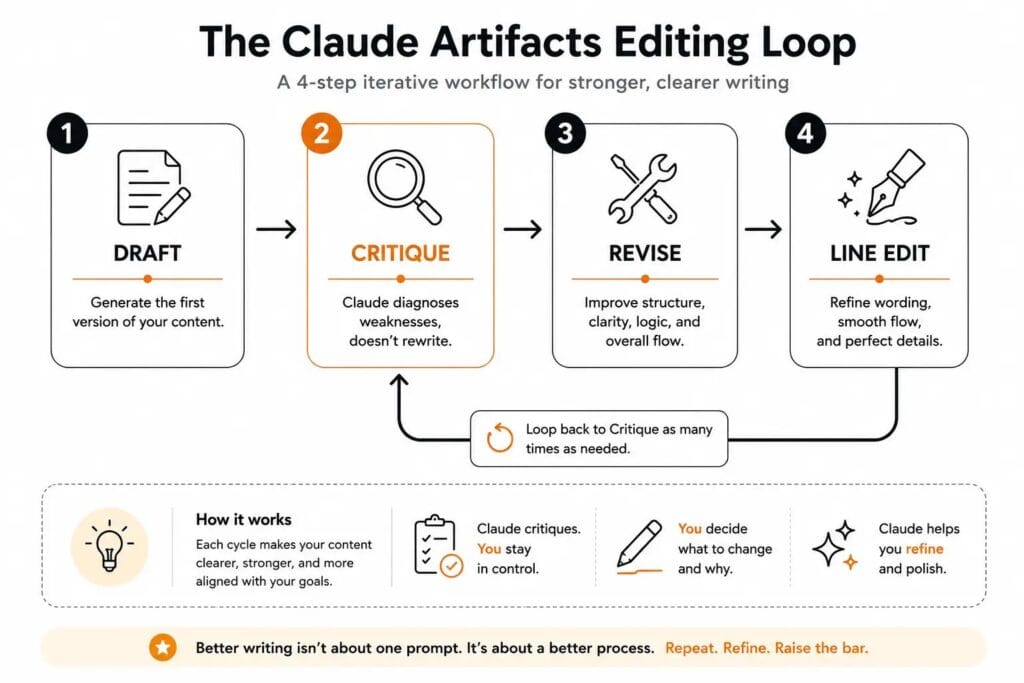
My 4-step editing loop using Artifacts:
Step 1: Draft. I write my own first draft — longhand or in a notes app — then paste it into the chat and ask Claude to format it as an Artifact for editing.
Step 2: Critique. I prompt: “Act as a developmental editor. Tell me: which sections are weak, where the argument loses momentum, and which paragraphs could be cut without losing anything essential. Do not rewrite. Diagnose only.” The diagnosis goes in the chat. The draft stays clean in the Artifact.
Step 3: Revise. Based on the diagnosis, I either revise myself or give Claude targeted revision instructions. Targeted means specific: “Paragraph four is padding. Cut it and strengthen the transition into paragraph five.” Not: “Make this better.”
Step 4: Line Edit. Once the structure is solid, I do a final pass: “Line-edit this Artifact for sentence rhythm, clarity, and voice consistency with the style guide we established. Do not change the argument or structure.”
This loop — Draft, Critique, Revise, Line Edit — produces work that requires almost no cleanup before publishing. I’ve run it on client articles, newsletter issues, and book chapters. The quality ceiling is higher than anything I get from a single “write this for me” prompt, because every stage keeps me in control of the thinking. I break down this exact editing loop, with prompt examples for each stage, in my Claude Artifacts guide.
The 100,000-Word Manuscript Framework
Long-form projects break most AI-assisted workflows. Here’s why: context rot.
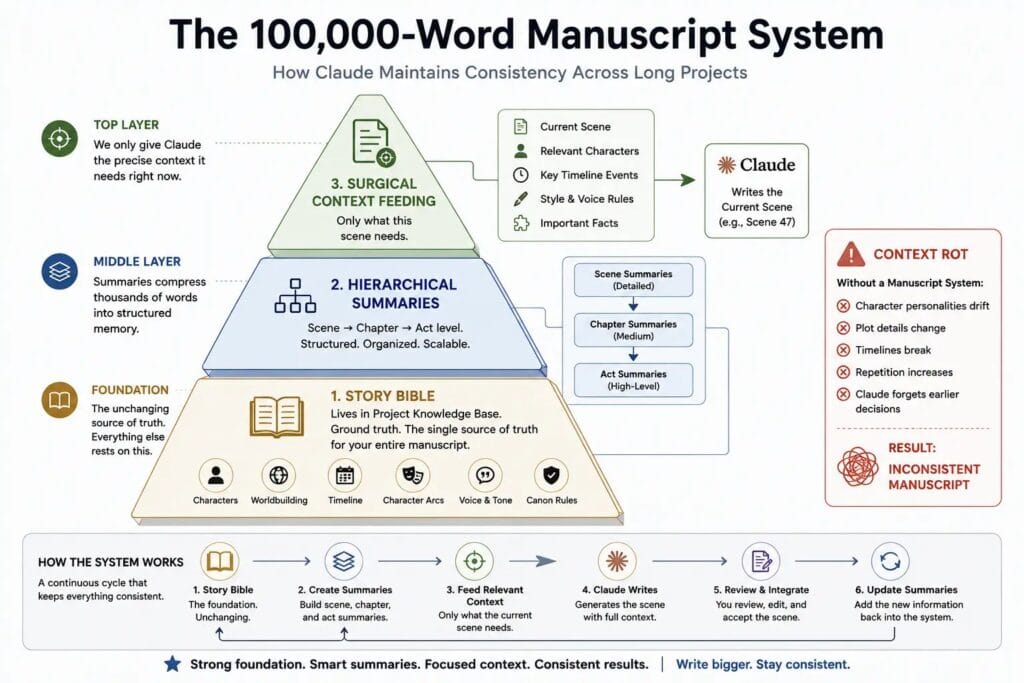
Context rot is what happens when your conversation history becomes so long that Claude starts losing track of earlier decisions. By chapter twelve, it may contradict a character detail established in chapter two. By chapter twenty, the protagonist’s voice has quietly drifted. You don’t notice until you do a full read-through and find three different versions of the same person.
I’ve been burned by this. One manuscript project, 68,000 words in, I found that a secondary character had been assigned two different professional backgrounds in different chapters — because by the time I reached the second reference, that detail was outside Claude’s effective working memory.
The solution is a three-layer system.
Layer 1: The Story Bible (or Project Bible for non-fiction) This is a living document that captures every established fact about the project. Characters, timelines, locations, established arguments (for non-fiction), key decisions already made. It lives in your Project’s Knowledge Base. It is the ground truth. When Claude tells you something that contradicts the Bible, the Bible wins.
Layer 2: Hierarchical Summaries Every time you complete a chapter or a major section, you create a summary at three levels:
- Scene/Section level: What happened? (2–3 sentences)
- Chapter level: What changed? What was established? (1 paragraph)
- Act/Part level: What does this section accomplish in the larger work? (2–3 sentences)
These summaries feed into the beginning of each new working session. You’re not pasting in raw chapters — you’re pasting in compressed, relevant context.
Layer 3: Surgical Context Feeding When working on a specific scene or section, you give Claude only what it needs for that scene. The immediately preceding scene. The character notes for the characters in this scene. The relevant Story Bible entries. Nothing else.
This sounds like more work. It is, slightly. But the alternative is a manuscript that contradicts itself — and fixing continuity errors is ten times more expensive than preventing them.
Consistency Audits are the final piece. Every 10,000 words or so, I run a dedicated audit prompt: “Here is the Story Bible and here are the last three chapter summaries. Identify any details in the recent chapters that contradict anything in the Bible. List them specifically.” Claude catches things I miss because it doesn’t have the creative blind spots I developed while writing the material.
Where Claude Still Falls Short
I’m not going to sell you on something I don’t believe. Here is where Claude will hurt you if you’re not careful.
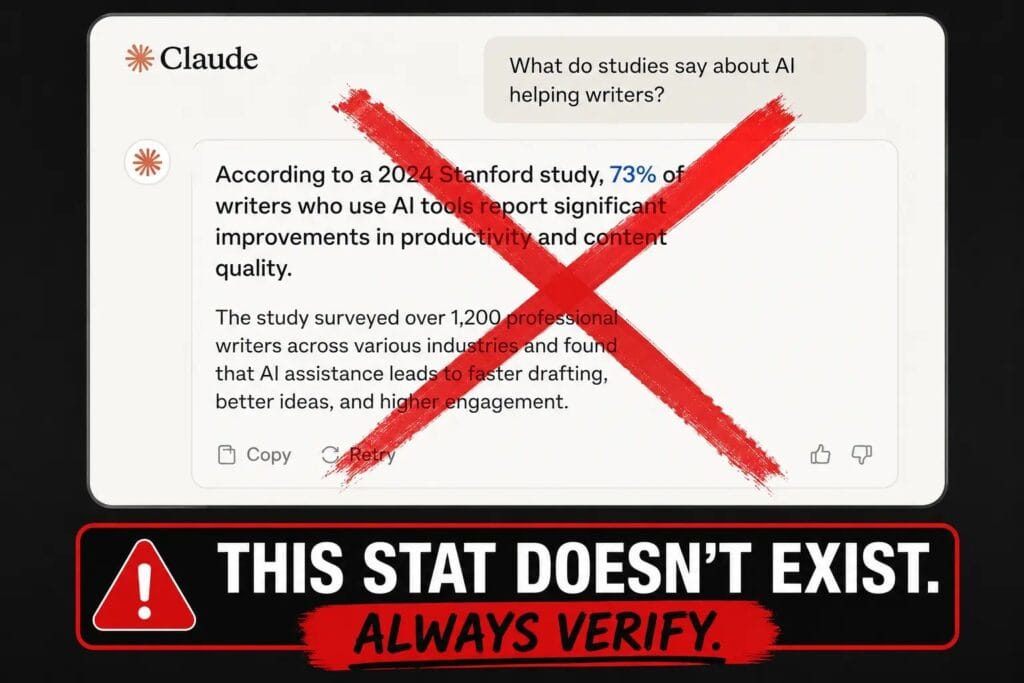
Hallucinations are real and confident. Claude will invent statistics, misattribute quotes, and cite studies that don’t exist — with no hedging, no hesitation, and no shame. It sounds exactly like a legitimate claim. This is not a bug that’s been fixed. It is a structural feature of how language models work. Every factual claim Claude generates needs to be verified against a primary source before it goes into any piece of work with your name on it. I have a rule: if I can’t point to a URL or a physical page number, it doesn’t publish. The full verification process I run before anything goes live is covered in my fact-checking process.
Memory is not what it seems. Projects improve context persistence, but they are not a substitute for human continuity. Claude doesn’t remember your project the way a human collaborator would. It retrieves from the documents you’ve uploaded and the current conversation history. If a detail isn’t in one of those sources, it doesn’t exist from Claude’s perspective. That’s why the Story Bible and the hierarchical summaries matter — they are the memory you’re building for it. Where Claude’s memory actually helps writers — and where it quietly fails them — is covered in my breakdown of Claude’s memory.
Genuine originality is yours to supply. Claude is an extraordinarily capable synthesizer of existing patterns. It is not a source of original ideas. If you ask it for a unique angle on a well-worn topic, it will give you the most competent, predictable version of that angle. The original insight — the thing that makes a piece worth reading — has to come from you. Every writer who has outsourced their intellectual contribution to Claude has produced forgettable work. That’s not an accident.
The Human-in-the-Loop requirement is permanent. Claude is a power tool. A power tool operated without judgment produces faster disasters. The writers getting consistent results from it are the ones who use their own judgment at every stage: to evaluate Claude’s suggestions, to override its instincts, to catch its errors, and to make the final call on what publishes. That requirement will not go away.
Conclusion: The Honest Assessment
Claude, used as an operational system rather than a shortcut, produces measurable improvements. Faster drafts. Cleaner structure. Better editing feedback. Continuity across long projects that would otherwise take an army of human editors to maintain.
It does not replace the writer. It does not replace critical thinking, original insight, or the judgment that comes from actually understanding your audience. Writers who have tried to replace those things with Claude have produced content that is technically correct and utterly forgettable.
The writers pulling ahead in 2026 are not the ones using AI most. They’re the ones using it precisely — with a system, a defined role for the tool, and their own intelligence firmly in charge at every stage.
If you haven’t set up your first Project yet, that’s your assignment for today. Build the custom instructions, upload your style guide, and run one session inside it. The difference in output quality will be obvious within thirty minutes.
That’s where it starts.
Frequently Asked Questions
1. Can Claude maintain my voice across an entire book-length project? Yes, but only if you build the infrastructure for it. A well-configured Project with a detailed style guide, annotated writing samples, and consistent system-prompt instructions will produce remarkably stable voice consistency. Without that infrastructure, voice drift is almost guaranteed by the midpoint of a long project. The work you put into the setup is the work that pays off at chapter twenty.
2. What is the biggest mistake writers make with Claude? Treating it like a ghostwriter instead of a thinking partner. The writers who hand Claude a vague brief and publish whatever comes back are training themselves to produce work they don’t fully understand. The writers who use Claude to stress-test their arguments, accelerate their editing, and catch their blind spots — while keeping the original thinking in their own heads — are producing better work and getting better at their craft simultaneously. The other patterns I see most often are in 7 Common Claude Mistakes Writers Make.
3. How do I stop Claude from flattening my voice? Two things. First, always start new conversations inside a Project with a calibrated style guide already in the Knowledge Base. Second, keep individual conversations short and focused. The longer a conversation runs, the more Claude’s default cadence bleeds in. When I notice voice drift, I open a new chat inside the same Project — the instructions reset, the voice sharpens back up. If this is a recurring problem for you, the seven most common causes are broken down in Why Claude Doesn’t Sound Like You: 7 Reasons.
4. Sonnet 4.6 or Opus 4.6 for writing tasks? Sonnet 4.6 for 80% of what you’ll do: drafting, editing, voice calibration, research synthesis, and structural feedback. Opus 4.6 when you’re working across a full manuscript that requires synthesizing a large amount of established context, or when you’re doing architectural-level analysis on a long-form project and need the deepest reasoning available. The performance gap for typical writing tasks is negligible. The price and speed gap is not.
5. Is Claude safe to use for client work without disclosure? This is a business and ethics question, not a technical one, and I’m not going to tell you what to do. What I will say is this: the writers building durable client relationships in 2026 are being transparent about how AI assists their process. Most clients don’t object to AI assistance; they object to being deceived. The standard is producing work that meets the agreed quality bar and discloses your process honestly. Whatever your policy is, make it a deliberate one — not an oversight.