
I used to close a writing session, open a new chat the next morning, and expect Claude to pick up exactly where we left off. It didn’t.
Here’s the direct answer: Claude remembers whatever’s in your current conversation, plus anything stored inside a Claude Project — project instructions and uploaded files. It does not automatically remember past conversations outside that Project, and it won’t know your preferences unless you’ve actually given it that context somewhere it can see. The fix isn’t hoping Claude’s memory improves. It’s building a system that doesn’t depend on memory in the first place.
Quick Answer — What Does Claude Actually Remember?
| Claude Can Remember | Claude Doesn’t Automatically Remember |
|---|---|
| Current conversation | Every past conversation |
| Project instructions | Chats outside the Project |
| Uploaded Project files | Details never added to your Project |
| Current working context | Personal preferences without context |
Claude.ai has also added a memory feature that quietly summarizes your conversations into a running, Project-specific summary, refreshed roughly once a day, so a new chat inside that Project can pick up relevant context on its own. It’s a real convenience. It’s also a summary, not the original documents — and it stays walled off from your other Projects.
Consistency comes from the system you build. Not from assuming Claude remembers everything.
The Biggest Mistake I Made
For months, I worked out of one long-running chat and treated scroll-back as my memory system. When a thread got slow, I’d start fresh and try to reconstruct everything from my own memory — which turned out to be worse than I expected.
I’d forget the specific phrase I’d banned three sessions earlier. I’d forget a client’s actual preferred paragraph length. Claude would drift back toward generic defaults, and I’d get irritated at Claude for “forgetting” something it was never formally told to keep in the first place.
That wasn’t a Claude problem. I hadn’t written any of it down. I’d handed Claude context through conversation and expected it to hold onto the parts that mattered to me specifically, without ever telling it which parts those were. I made nearly the same mistake with voice training, which I’ve covered in more detail in my Voice Profile framework.
The fix wasn’t a smarter prompt. It was a better container. I moved the work into a Claude Project, put my actual style guide and reference samples in the knowledge base, and stopped asking chat history to do a job it was never built for.
How I Keep Claude Consistent Across Writing Sessions
My current setup runs on one chain:
Research → Claude Project → Style Guide → Knowledge Base → Current Task → Writing Session → Updated Project Files
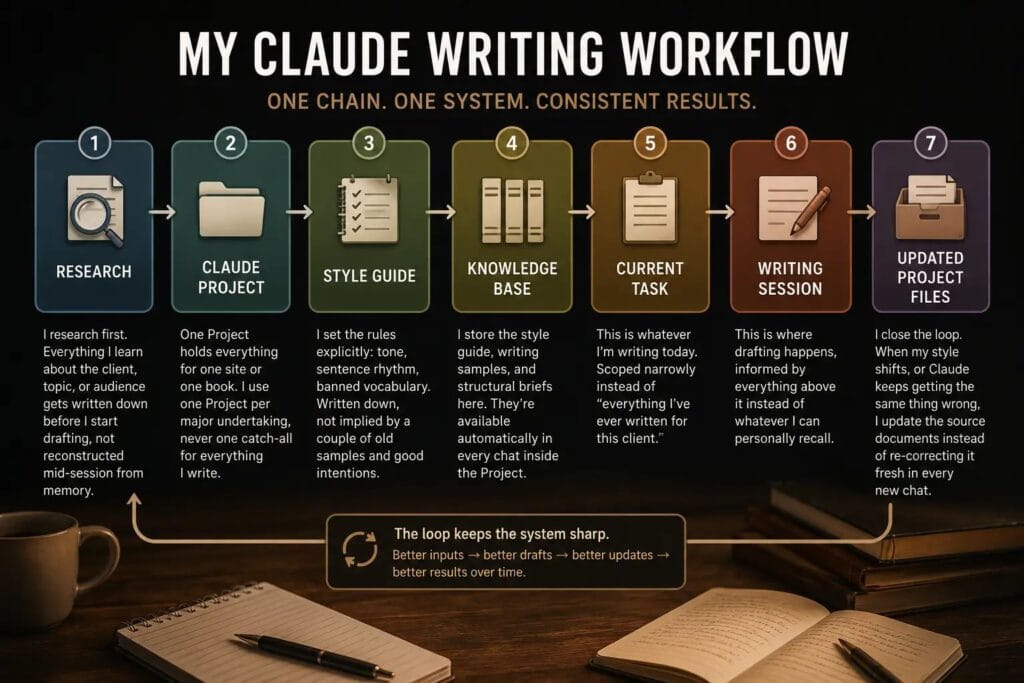
- Research happens first. Anything I learn about a client, topic, or audience gets written down before I start drafting, not reconstructed mid-session from memory.
- The Claude Project holds everything for one site or one book. I set mine up the same way I cover in my Claude Projects walkthrough — one Project per major undertaking, never one catch-all for everything I write.
- The style guide sets the rules explicitly: tone, sentence rhythm, banned vocabulary. Written down, not implied by a couple of old samples and good intentions.
- The knowledge base stores that style guide plus writing samples and structural briefs, available automatically in every chat inside the Project.
- The current task is whatever I’m writing today, scoped narrowly instead of “everything I’ve ever written for this client.”
- The writing session is where drafting actually happens, informed by everything above it instead of whatever I can personally recall.
- Updated Project files close the loop. When my style shifts, or Claude keeps getting the same thing wrong, I update the source documents instead of re-correcting it fresh in every new chat.
None of this depends on Claude remembering anything on its own initiative. That’s the point. Sessions got shorter. Less re-explaining, less context rebuilding, more actual writing.
What Writers Should Remember About Claude’s Memory
Do
- Create one Project for each major website or book.
- Store your actual writing style guide inside it, not just old samples.
- Upload the reference documents you want Claude using every time.
- Open new sessions with a short recap, even inside a well-stocked Project.
Don’t
- Assume Claude remembers chats outside your Project.
- Depend on scrolling back through history to reconstruct context.
- Let your Project files go stale as your style evolves.
- Expect perfect recall without giving Claude anything to recall from.
The Takeaway
I still think about that morning I opened a fresh chat and waited for Claude to reference a conversation it never had access to. That gap was mine to close, not Claude’s to apologize for.
Claude was never built to remember everything I’ve ever typed at it. It’s built to work well with whatever you hand it, inside whatever container you hand it in.
Build that container once. Keep it updated. Stop expecting a blank chat window to know what’s only ever lived in your head.
If you haven’t set up that foundation yet, I walk through the full system in my Claude for Writers guide. And if you’re deciding between a Project and an Artifact for a specific piece of work, I answer that separately in Projects vs. Artifacts.