I wasted the first four months of using Claude the same way every writer wastes them.
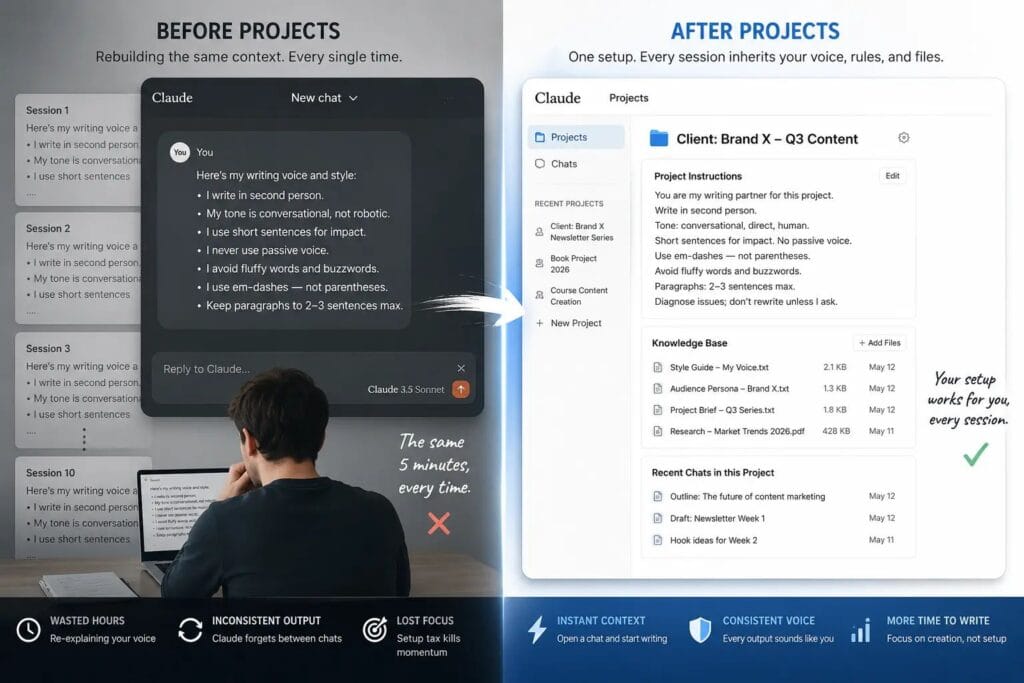
I’d open a blank chat, paste in a rough draft, spend five minutes explaining my voice, my audience, my rules — and Claude would do a decent job. Then I’d close the tab. The next day, I’d open a new chat and do the entire thing again. Same explanations. Same context. Same five minutes of setup tax, every single session.
It felt productive. It wasn’t. I was rebuilding the same foundation from scratch, over and over, because I didn’t understand that blank chats are amnesia. Claude walks in knowing nothing about you unless you tell it — and without a system, you’re telling it the same things indefinitely.
Claude Projects ended that. One setup. Every session after inherits your voice, your rules, your files — automatically.
Here is where I noticed the shift first: I was six sessions into a 75,000-word client project — a business narrative for a founder who had strong opinions about his own voice. Before Projects, I’d spend the opening ten minutes of every session repasting his writing samples and re-explaining his rules. After I moved the project into a properly configured workspace, those ten minutes vanished. The setup I’d done once was doing the work every time. By my estimate, I recovered roughly six hours across that single project.
This walkthrough covers the exact setup I use. By the end, your first writing Project will be live, calibrated, and ready.
What Claude Projects Actually Does (And Why Writers Need It Differently)
Most Claude Projects tutorials are written for developers or generic business users. They cover the mechanics — create a project, upload a file, write some instructions — and call it done. That’s not enough for writers, because writers have a problem those tutorials never address.
This is one part of a larger writing system. If you’re new to Claude as a writing tool, start with Claude for Writers: The Complete 2026 Guide before building Projects.
A developer can upload a codebase and get consistent output because code has explicit rules. Your writing voice doesn’t. It lives in the rhythm of your sentences, the specific words you reach for under pressure, the way you open a paragraph versus close one. None of that transfers automatically. You have to encode it deliberately.
Here is what a Project actually gives you:
- Persistent custom instructions — a system prompt that runs at the top of every conversation inside the Project, automatically
- A shared Knowledge Base — documents Claude references without you re-uploading them each session
- Grouped conversation history — all your Project chats in one place, separate from everything else
- Isolated context — what you build here doesn’t bleed into your other Projects
One important thing most guides get wrong: chats within a Project do not share context with each other. Only the Knowledge Base is shared across all conversations. Individual chat sessions are isolated. That distinction matters — it’s why the Knowledge Base setup is the most important step in this entire process.
A note on plans. As of early 2026, Projects are available on both free and paid Claude plans. Free users can create up to five Projects with full custom instructions and Knowledge Base access. The meaningful difference with paid plans is RAG mode — when your Knowledge Base approaches the context window limit, paid plans automatically expand capacity by up to 10x. For most individual writing projects, the free plan is enough to start. For heavy production work with large reference libraries, the paid plan’s expanded capacity becomes relevant.
The Three-File Framework: How the System Works
Before I walk you through the setup steps, I want to explain why this system works — because most writers set up Projects wrong by treating the Knowledge Base as a file dump rather than a designed architecture.
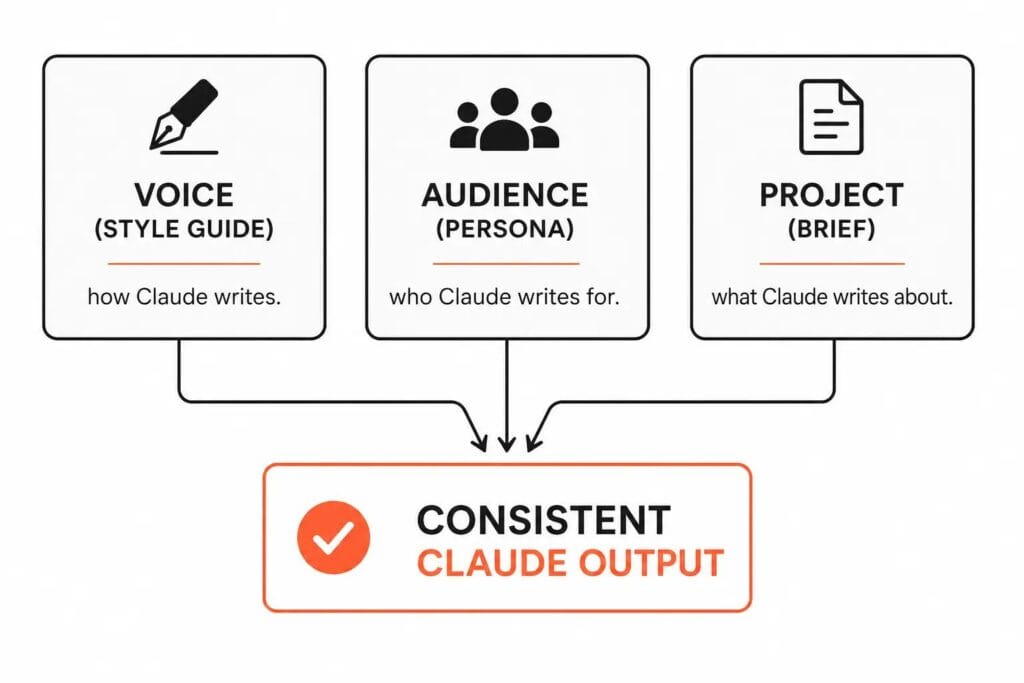
I call it the VAP Framework: Voice, Audience, Project.
- Voice (Style Guide) = how Claude writes
- Audience (Persona) = who Claude writes for
- Project (Brief) = what Claude writes about
Each file answers a different question. Together, they give Claude everything it needs to produce consistent, on-target output without guesswork. Without all three, Claude fills the gaps with its own defaults — and Claude’s defaults don’t sound like you, don’t address your reader, and don’t serve your specific project angle.
The VAP Framework is the difference between Claude producing work that needs heavy editing and Claude producing work that needs light editing.
Before You Build: Prepare Your Three Files
Don’t open Claude yet. Build these three files first.
File 1 — Your Style Guide (Voice)
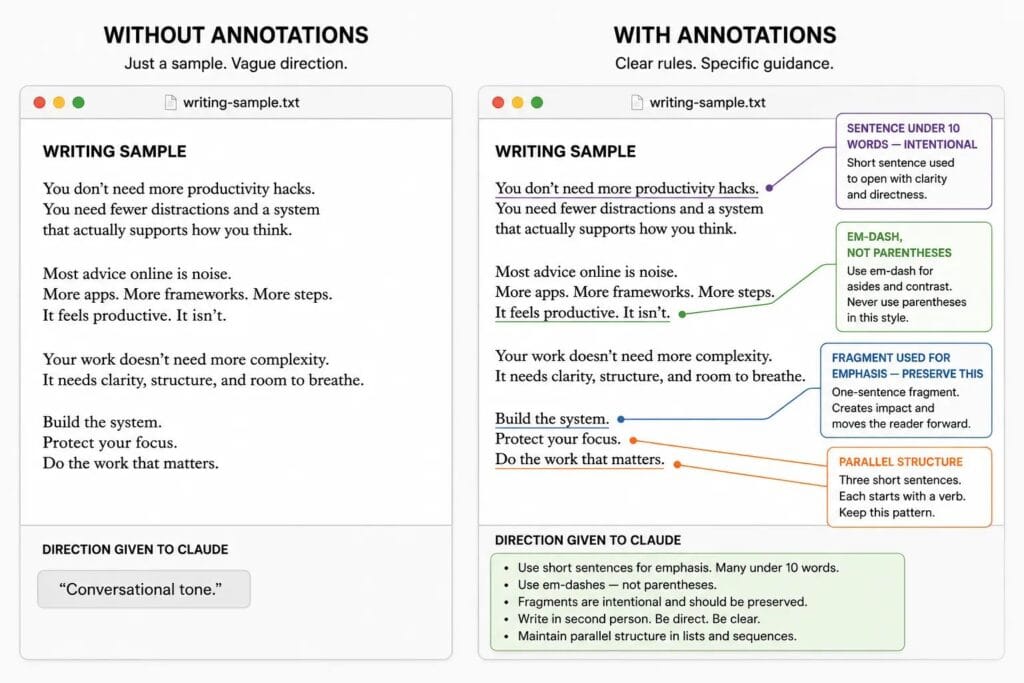
This is 300–500 words of your own writing, pulled from your best published work, annotated with explicit rules.
Not just samples. Annotated samples.
The difference matters. A raw writing sample shows Claude what your output looks like. An annotated sample tells Claude why it looks that way — and which elements are non-negotiable.
Your annotations should be direct instructions, not descriptions:
- “I use em-dashes instead of parentheses for asides.”
- “Paragraphs are three sentences maximum. Fragments are intentional — they’re for emphasis.”
- “I never use ‘utilize,’ ‘leverage,’ or ‘holistic.'”
- “I address the reader as ‘you’ in second person throughout.”
- “I vary sentence length deliberately. Short sentences land a point. Longer sentences carry the explanation that follows.”
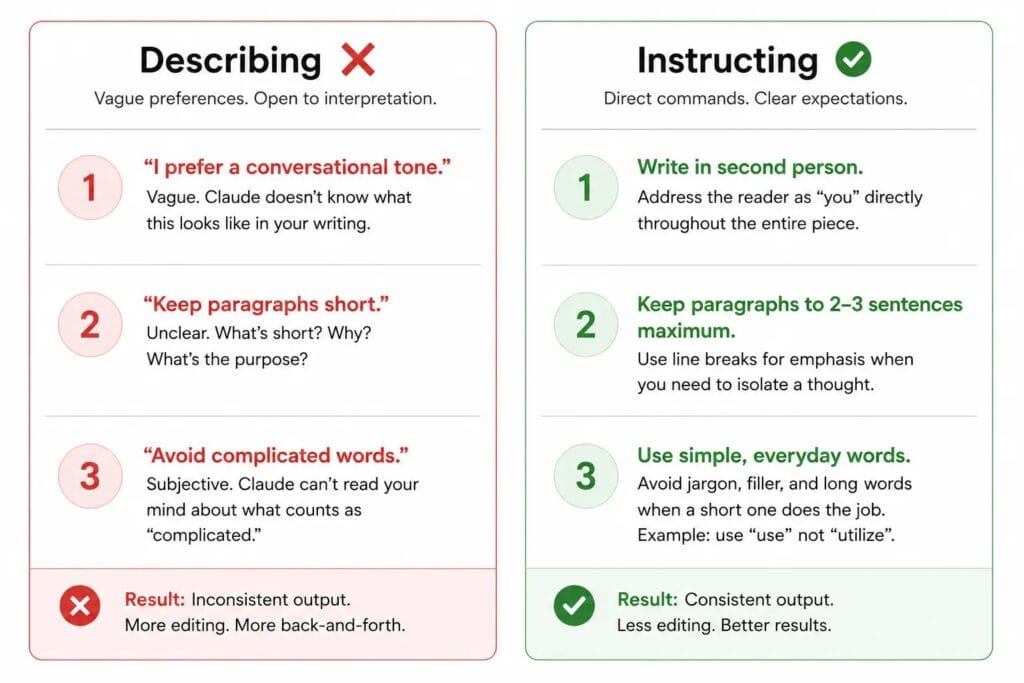
In my experience, the single highest-leverage edit I make to any style guide is converting vague preferences into direct commands. “Conversational tone” tells Claude almost nothing. “Use contractions, keep paragraphs under three sentences, and never use passive voice” tells Claude exactly what to do.
Upload this as a .txt or .md file. In my workflow, plain text and markdown process cleanest — PDF and DOCX can carry formatting artifacts that survive as noise in the Knowledge Base. This file is the compressed version of a bigger process — I walk through the full method for extracting and encoding your voice in my guide to training Claude in your voice.
File 2 — Your Audience Persona (Audience)
One paragraph. That’s all this needs to be — but it has to answer four specific questions:
- Who is this reader?
- What do they already know walking in?
- What are they afraid of or skeptical about?
- What do they want to believe by the end of this piece?
I’ve tested this repeatedly. The difference in first-draft quality between a vague audience description (“marketing professionals”) and a fully fleshed-out persona paragraph is not subtle. Claude doesn’t write for a demographic — it writes for a person. Give it a person.
File 3 — Your Project Brief (Project)
This is project-specific — you’ll create a new version for each major project. It answers:
- What are you writing?
- What is the specific angle or argument?
- What has already been decided that Claude should not contradict?
- What is the publication context — platform, tone, approximate length?
This file prevents drift. Drift is what happens when Claude doesn’t know where you’re going and starts making autonomous decisions about direction. By session eight of a long project, those decisions compound into something that’s quietly moving away from your original intent. The Project Brief is the guardrail.
Step-by-Step: Creating Your First Writing Project
You’ve built your three files. Now open Claude.
Step 1 — Create the Project
Go to claude.ai → click Projects in the left sidebar → click New Project in the upper right corner.
Claude does not read your project name — it doesn’t factor into responses. But you will read it in six months when you have ten Projects open. Name it specifically:
- Bad: “Writing” / “Work” / “Blog”
- Good: “Q3 Newsletter Series — Brand X” / “Client: [Name] — Content Retainer”
Step 2 — Write Your Project Instructions
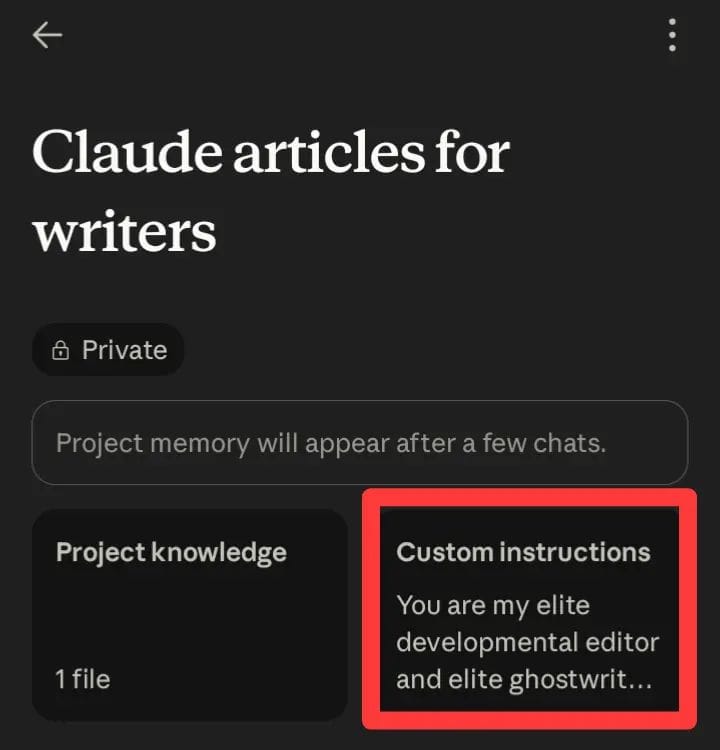
Click “Set project instructions” once your Project opens. This is your persistent system prompt — it runs automatically at the top of every conversation inside this Project.
What to include:
- Your role and project context: “I am a [type of writer] working on [specific project].”
- Your voice rules in direct, instructional language — pulled from your annotated Style Guide
- Your audience in one sentence
- Three to four non-negotiable style rules
- A short forbidden-words list
- One “never do this” line: “Do not rewrite my prose without being explicitly asked. Diagnose problems; do not fix them unless instructed.”
I’ve found keeping this under 400 words produces better compliance than longer prompts. Claude weighs all instructions roughly equally — padding the system prompt with low-priority preferences dilutes the signal of the rules that matter. Be ruthless about what makes the cut.
Step 3 — Build Your Knowledge Base
From the Project’s main page, find Files and click + to upload.
Upload in this order:
- Style Guide (.txt or .md)
- Audience Persona (.txt)
- Project Brief (.txt)
- Any research documents directly relevant to this project
For most writing projects, I keep the Knowledge Base to three to five focused files. That’s not a rule — it’s what I’ve found works. More files mean more retrieval noise. Claude doesn’t get smarter as you add documents; the signal-to-noise ratio matters more than volume. When a document becomes outdated, delete it immediately. Stale files give Claude outdated instructions it has no way to flag as outdated.
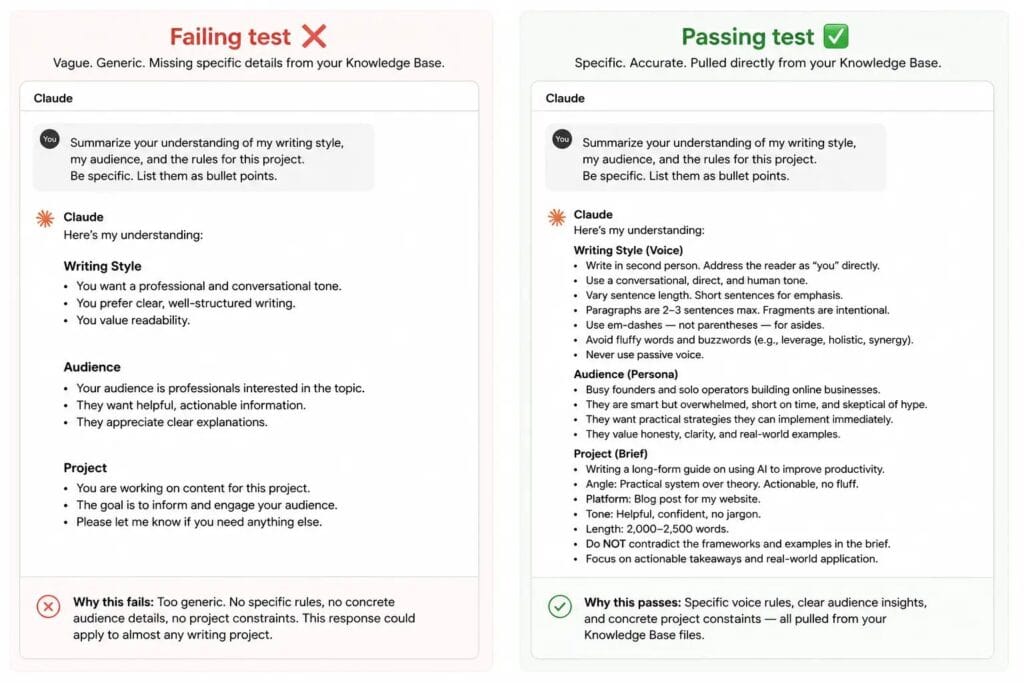
Step 4 — Run the Calibration Test
Before doing any real work, open the first chat and send exactly this:
“Summarize your understanding of my writing style, my audience, and the rules for this project. Be specific. List them as bullet points.”
A passing response names your actual voice characteristics, your actual audience, and your actual rules.
If it fails — if the response is vague, generic, or missing key details — the problem is always in one of three places:
- Voice characteristics missing → style guide annotations aren’t explicit enough
- Audience wrong → persona is too abstract
- Rules missing → system prompt is too long and key rules are being diluted
Fix it at the source. Corrections made in-chat disappear the moment you open the next session. The only fixes that stick are fixes to the Project instructions or the Knowledge Base files themselves.
The Project Instructions Template (Copy This)
I am [your role — e.g., a freelance content writer / a non-fiction author].
Current project: [One sentence describing what you’re writing.]
My audience: [One sentence: who they are, what they know, what they want.]
Voice rules:
- [Rule 1 — e.g., “Write in second person. Address the reader as ‘you’ directly.”]
- [Rule 2 — e.g., “Vary sentence length. Short sentences for emphasis. Longer for explanation.”]
- [Rule 3 — e.g., “Paragraphs are three sentences maximum.”]
- [Rule 4 — e.g., “Sentence fragments are intentional and should be preserved.”]
Forbidden words: [Your list]
Never do this: Do not rewrite my prose unless I explicitly ask. When I share writing, diagnose problems only. Wait for instructions before changing anything.
Claude Project Setups for Different Types of Writers
The VAP Framework is the same for every writer. How you populate it changes depending on your work.
Bloggers typically run one Project per content vertical. A blogger covering personal finance and one covering travel shouldn’t share a Project — the audience personas are completely different, and mixing them produces output calibrated for no one. The Project Brief for a blogger usually includes the publication’s tone guidelines and a list of topics already covered to prevent repetition.
Freelance writers benefit most from one Project per client, not per article. The Style Guide in this case documents the client’s voice rather than the writer’s own. I keep a separate “My Voice” Project for personal work. The client Projects stay strictly in the client’s register.
Copywriters often need a tighter Project Brief than other writers — campaign parameters, offer details, compliance constraints. In my experience, the more specific the Brief, the less correction happens downstream. Copywriting Projects also tend to have more files than others: brand guidelines, past campaign performance notes, competitor positioning documents.
Authors use Projects differently from everyone else. For long-form work, the Knowledge Base isn’t just about voice and audience — it’s a living project management system. Character sheets, timeline documents, chapter summaries, world-building notes. The Project Brief for a novel chapter is usually a scene-specific document rather than a high-level project overview.
Three Mistakes Writers Make With Projects
I made all three.
Mistake 1: One massive Project for everything. When you mix a newsletter, a client retainer, and a book draft into one Project, the Knowledge Base mixes signals. The SaaS client’s style guide bleeds into the newsletter voice. It sounds subtle. In practice, every output is slightly wrong for the task at hand. One Project per distinct body of work.
Mistake 2: Uploading outdated files and forgetting them. Your style guide evolves. Your Project Brief changes after a client pivot. Stale files give Claude outdated instructions it has no way to flag. I audit every Knowledge Base roughly every 30 days — it takes five minutes and prevents the kind of quiet drift that’s almost invisible until you’re ten sessions deep.
Mistake 3: Writing instructions that describe instead of instruct.
Describing: “I prefer a conversational tone.”
Instructing: “Write in second person. Use contractions. Keep paragraphs under three sentences. Never use passive voice.”
Descriptive instructions are interpretable. Direct instructions are enforceable. Every descriptive instruction is a gamble on whether Claude’s interpretation matches your intention. Most of the time, it won’t.
These three are specific to Projects. For the broader set of mistakes I see across day-to-day Claude use, see 7 Common Claude Mistakes Writers Make.
Claude follows rules. It interprets preferences — and its interpretation rarely matches yours.
The Setup Checklist
Run through this before starting any real work in a new Project:
- [ ] Project created with a specific, descriptive name
- [ ] System prompt written, saved, and under 400 words
- [ ] Instructions are direct commands, not preferences
- [ ] Style Guide uploaded as .txt or .md with explicit annotations
- [ ] Audience Persona uploaded
- [ ] Project Brief uploaded
- [ ] Knowledge Base is lean and current — nothing outdated
- [ ] Calibration test run and passed
The Real Lesson
The first time a session opens inside a properly built Project and Claude immediately responds in your voice, with your rules applied, about your specific project — without a single line of setup from you — it is a different experience entirely.
Not because Claude got smarter. Because you got more systematic.
That’s the lesson Projects keep teaching me. The tool doesn’t change. Your infrastructure around it does. Projects are not about making Claude more capable — they’re about creating a repeatable writing system that produces more consistent results every time you sit down to work.
Every Project you build is a system that pays you back across every session you run inside it. The setup work is the investment. The consistent output is the return.
When you’re ready to go further — how this Project infrastructure connects to the four-step editing loop, how to run a 100,000-word manuscript without context rot destroying your continuity, and how to use Claude Artifacts as a professional revision environment — the full operational guide is here: Claude for Writers: The Complete 2026 Guide.
Frequently Asked Questions
Can Claude Projects remember previous chats? Not automatically. Individual chats within a Project are isolated from each other — they don’t share conversation history. What is shared across all chats is the Knowledge Base. This is exactly why the Knowledge Base setup matters: any decision, character detail, or style choice you want Claude to remember across sessions needs to live in a Knowledge Base file. If it’s not there, the next session doesn’t know it happened. One caveat: Claude’s memory feature, where enabled, also builds an automatic project-specific summary from chat history — separate from the Knowledge Base. It doesn’t replace deliberate KB entries, but “nothing carries over except the Knowledge Base” is no longer the complete picture. What it actually remembers, and what it doesn’t, is covered in my breakdown of Claude’s memory.
Should every client have a separate Project? In my workflow, yes — one Project per client is the standard. Each client has a different voice, a different audience, and different rules. Mixing them produces output calibrated for no one. For freelancers on the free plan with five Project slots, prioritize your highest-volume active clients and create new Projects as others wind down.
What files should I upload first? Style Guide first, always. It’s the file that influences every output. Audience Persona second. Project Brief third. Everything else — research documents, reference materials, past drafts — only after those three are in place and the calibration test passes.
Can Claude Projects be used for book writing? Yes, and it’s where Projects add the most value for long-form work. The Knowledge Base becomes your project management system: character sheets, timeline documents, chapter summaries, world-building notes. The key discipline is keeping these documents current. A stale character sheet from chapter three causes real problems by chapter fifteen. I update Knowledge Base files every time a significant decision is made in the manuscript — not at the end of a writing session, but in the moment.
How many Projects should a professional writer maintain? As many as you have distinct, active bodies of work — but no more. I currently run four active Projects: one per major client, one for my own writing. When a project ends, I archive it rather than delete it. The Knowledge Base might be useful later. What I avoid is maintaining Projects for work I’m not actively doing — they create clutter and free plan users have a five-Project ceiling to work within deliberately.
Is Claude Projects worth using on the free plan? For most individual writing projects, yes. The free plan gives you full Projects functionality — custom instructions, Knowledge Base, isolated workspaces — with a limit of five Projects. The meaningful limitation is RAG mode, which expands Knowledge Base capacity by up to 10x and is only available on paid plans. If your projects involve large reference libraries or you’re working on something book-length with extensive world-building or research files, you’ll hit the context ceiling faster on free. Start on free, see where the limits land for your actual workflow, and upgrade when the friction is real.