Three months into ghostwriting for a content site, I sent Claude a prompt I was proud of.
Two paragraphs. Clear ask. Plenty of context.
The draft came back readable, correct, and completely forgettable.
I almost shipped it anyway. Deadlines do that to you.
Instead, I put that prompt next to one that had actually worked the week before. Same kind of article. Same voice samples. Same model.
There was one important difference.
The working prompt didn’t just tell Claude what to write. It told Claude how to approach the job.
It had a defined role, a specific task, context about the reader and article, real writing examples, hard constraints, an output structure, and a way to critique the result before I treated the draft as finished.
That comparison changed how I build Claude prompts.
I stopped trying to make individual prompts “better” by adding more instructions.
I started designing them as a system.
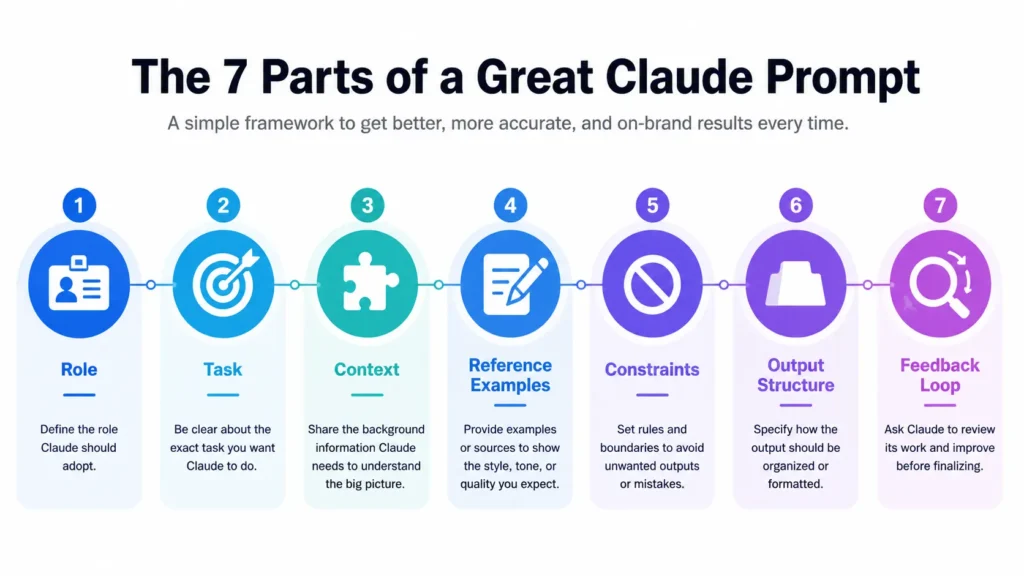
After using that approach across my content workflow, I eventually reduced it to seven parts:
- Role — the judgment lens Claude should use
- Task — the actual job, not just the topic
- Context — information Claude can’t reasonably guess
- Reference Examples — real writing that anchors the voice
- Constraints — what Claude must and must not do
- Output Structure — the shape of the finished deliverable
- Feedback Loop — how the output gets checked for drift
The point isn’t to make prompts longer.
It’s to remove the decisions Claude would otherwise have to guess.
The Short Answer: The 7 Parts Every Great Claude Prompt Needs
A strong Claude prompt doesn’t need to be huge. It needs to remove the decisions Claude would otherwise have to guess.
For serious writing tasks, I build prompts around seven parts:
| Part | What it does |
|---|---|
| Role | Gives Claude a judgment lens |
| Task | Defines the actual job, not just the topic |
| Context | Supplies information Claude can’t reasonably guess |
| Reference Examples | Anchors your voice and standards |
| Constraints | Defines what Claude should and shouldn’t do |
| Output Structure | Specifies the shape of the deliverable |
| Feedback Loop | Creates a check for errors, drift, and weak sections |
You don’t necessarily need all seven for every request. A quick question might need only a task and some context. But when I’m asking Claude to produce something important—especially a long-form article—I use the full framework.
My 7-Part Claude Prompt Template
Here’s the basic structure I use:
ROLE
You are [specific role + point of view].
TASK
Your job is to [specific outcome].
CONTEXT
Here is what you need to know:
- Audience:
- Goal:
- Background:
- Existing content:
- Important considerations:
REFERENCE EXAMPLES
Use these examples to understand:
- Voice
- Sentence rhythm
- Paragraph style
- Level of specificity
CONSTRAINTS
- Do:
- Don't:
- Avoid:
- Length:
- Tone:
OUTPUT STRUCTURE
Return the response in this structure:
1. ...
2. ...
3. ...
FEEDBACK LOOP
Before finalizing:
- Check for unsupported claims.
- Check against the constraints.
- Identify generic or repetitive sections.
- Flag anything that needs verification.
The important part isn’t copying this template word-for-word. It’s about understanding what each section is doing.
Role gives Claude a lens.
The task tells it what job to perform.
Context gives it the information it cannot infer.
Examples show what good looks like.
Constraints remove unwanted defaults.
Structure determines what the output should look like.
And the feedback loop gives Claude a way to catch problems instead of treating its first draft as finished.
Most weak prompts aren’t missing one magical instruction.
They’re missing several of these decisions entirely.
Let’s look at each part.

Most prompts I see are missing three or four of these at once. Let’s go through each one.
Part 1: Role — Give Claude a Job, Not Just a Task
Part 1: Role — Give Claude a Judgment Lens, Not Just a Task
A role tells Claude what perspective to use when making decisions.
That’s useful, but it’s not magic. Telling Claude to “act as an expert” won’t suddenly make a weak prompt good. The role becomes valuable when it gives Claude a specific job, audience, and standard to apply.
I learned this after repeatedly starting prompts with the task itself.
My early version looked something like this:
Before
Write a blog post about email marketing.
There’s nothing technically wrong with that instruction.
The problem is that Claude has to make almost every important decision itself:
- Who is the reader?
- What level of knowledge do they have?
- What kind of article is this?
- What should it prioritize?
- Should it educate, persuade, compare, or help someone make a decision?
- What standards should it use when deciding what’s worth including?
So I changed the prompt from simply describing the output to defining the job behind the output.
After
You are my email strategist for a B2B SaaS content site.
Approach this article from the perspective of someone who has
worked on lifecycle and retention campaigns.
Your job is to give practical advice, challenge generic
recommendations when they don't apply, and prioritize
specific examples over broad marketing theory.
The difference isn’t the phrase “you are an expert.”
It’s the judgment lens.
The first prompt asks for an article.
The second tells Claude how to think about the article while producing it.
What makes a useful role?
I usually define three things:
1. The job
Who is Claude being for this particular task?
Developmental editor
SEO strategist
Research assistant
Product reviewer
Content strategist
2. The perspective
What should that role prioritize?
Accuracy over speed
Practical examples over theory
Contrarian analysis over generic advice
Reader decisions over keyword coverage
3. The standard
What does good work look like from that perspective?
Challenge unsupported claims.
Point out gaps.
Prefer specific evidence.
Don’t agree with an argument simply because it sounds reasonable.
That last part is easy to overlook.
A role shouldn’t just give Claude a title.
It should give Claude a standard for making decisions.
A role I actually use for content work
For example:
You are my developmental editor.
Your job is not to make my writing sound more polished.
Your job is to identify where the argument is weak,
where the reader's question isn't fully answered,
where examples are generic, and where claims need evidence.
Be direct. If a section doesn't earn its place,
say so and explain why.
Notice what’s missing:
“You are an expert writer.”
I don’t need Claude to be told that it is an expert.
I need it to know what I expect that expertise to do.
That’s the difference between assigning Claude a role and giving it a useful judgment lens.
Part 2: Task — Name the Actual Job, Not the Category
A topic tells Claude what you’re talking about.
A task tells Claude what you need it to accomplish.
That’s a much more important distinction than it sounds.
Compare:
Topic
Project management tools
Weak task
Write a blog post about how to choose a project management tool.
Better task
Help a solo consultant decide whether to move from a spreadsheet
to a dedicated project management tool.
Compare the options based on setup time, recurring cost,
client collaboration, and reporting.
The reader already understands basic project management.
Don't spend space defining obvious terms.
The first version gives Claude a subject.
The second gives it a job.
That difference matters because a broad request forces Claude to make too many decisions on your behalf. It has to guess the audience, purpose, depth, angle, and what information deserves attention.
When I started using Claude for content, I made this mistake constantly.
I’d give it a topic and expect the model to figure out the article.
It usually produced something perfectly readable.
It also tended to produce the safest, most obvious version of the topic.
The problem wasn’t Claude’s writing ability.
I hadn’t actually told it what success looked like.
A simple test for your task
Before sending a prompt, finish this sentence:
“Claude’s job is to…”
If the answer is:
“write an article about X”
you probably haven’t defined the task yet.
Try to complete it with an outcome instead:
“Claude’s job is to help a beginner decide between X and Y.”
“Claude’s job is to identify the missing sections in this competitor’s article.”
“Claude’s job is to turn this research into a first-person tutorial.”
“Claude’s job is to critique this draft before I revise it.”
Those are tasks because they describe the work Claude needs to perform, not merely the subject it needs to discuss.
The three things I define in a task
For most writing work, I try to make three things explicit:
1. The outcome
What should exist when Claude finishes?
2. The reader or user
Who is the output supposed to help?
3. The decision or problem
What is the reader actually trying to solve?
For example:
TASK
Help a beginner who has never used Claude build their first
content workflow.
The goal isn't to explain every Claude feature.
The goal is to help the reader go from a blank topic
to a usable article outline.
Prioritize practical steps and examples over definitions.
That’s much more useful than:
Write an article about using Claude for content creation.
One more distinction: task vs. instructions
Your task doesn’t need to contain every instruction.
Keep the job clear first.
Then use the other parts of the prompt—context, examples, constraints, and output structure—to tell Claude how that job should be performed.
Think of it this way:
Topic: What are we talking about?
Task: What job needs to be done?
Context: What does Claude need to know?
Constraints: What boundaries should it respect?
Structure: What should the result look like?
Once I started separating those decisions, my prompts became shorter in some places and much more precise in others.
And the drafts became easier to evaluate because I could ask a simple question:
Did Claude actually complete the job I gave it?
Part 3: Context — Fill In What Claude Can’t Guess
Part 3: Context — Give Claude What It Can’t Reasonably Guess
Claude can work with incomplete information.
That doesn’t mean you should make it guess.
Context is everything Claude needs to understand the situation surrounding the task: who the work is for, why you’re creating it, what already exists, what you’ve already decided, and anything unusual about the assignment.
Without that context, Claude fills the gaps with reasonable assumptions.
And reasonable assumptions are often where generic output begins.
For example:
Without context
Write an article about using Claude for SEO writing.
Claude knows the topic.
It doesn’t know:
- Who the reader is
- What they already know
- What the article is supposed to help them accomplish
- Which angle you want
- What you’ve already published
- Which claims need verification
- What your article should do differently from competing pages
So Claude has to decide all of that for you.
That’s where you start getting an article that is technically correct but interchangeable with hundreds of others.
The same task with context
AUDIENCE
Content writers who already use AI tools but struggle
to turn Claude's output into publishable articles.
PURPOSE
Show them a repeatable workflow for using Claude
to improve the quality of their first drafts.
EXISTING CONTENT
We already have articles covering Claude Projects,
Claude Artifacts, and long-form article creation.
Don't repeat those tutorials unless they are directly
relevant to the workflow.
CONTENT ANGLE
Focus on the decisions the writer needs to make
before asking Claude to draft.
IMPORTANT
Separate factual claims that need verification from
your own recommendations and observations.
The task didn’t become dramatically longer.
It became less ambiguous.
That’s the point of context.
The context I actually collect before drafting
For a serious content project, I usually want at least these six things:
1. Audience
Who is reading?
Don’t settle for “writers.”
Be specific about their experience, problem, and expectations.
2. Purpose
Why does this piece exist?
Informing someone isn’t the same as helping them make a decision, complete a task, or solve a problem.
3. Existing content
What have you already published on the subject?
This prevents Claude from reinventing sections you’ve already covered and helps you identify where a new article actually belongs.
4. Relevant research
What evidence, sources, observations, or experiments should Claude work from?
Don’t expect Claude to magically know which information matters to your particular project.
5. Content boundaries
What should this piece cover—and what should it deliberately leave for another article?
This is especially useful when you’re building a group of related articles.
6. Your own experience
What have you personally tested, observed, learned, or disagreed with?
This is one of the most valuable types of context because Claude cannot manufacture your actual experience.
Context isn’t just information
There’s another distinction I found useful:
Information tells Claude facts.
Context tells Claude why those facts matter.
For example:
“The reader is a beginner.”
That’s information.
“The reader is a beginner who has already tried generic AI writing prompts and is frustrated because the output sounds repetitive.”
That’s context.
The second version changes the job Claude needs to perform.
Now it knows what the reader has already experienced, what failed, and what the article needs to address.
My practical context block
For recurring content work, I don’t rebuild this information from scratch every time.
I keep the stable information in my project instructions and add task-specific context to the individual prompt.
That gives me two layers:
Project context
Things that remain relatively stable:
- Audience
- Brand voice
- Content standards
- Existing site structure
- Recurring constraints
Task context
Things specific to this article:
- Search intent
- Article purpose
- Research
- Competitor observations
- Content gaps
- Internal links
- First-hand examples
- Claims requiring verification
That separation keeps prompts from becoming giant walls of instructions.
And it makes one principle much clearer:
Don’t ask Claude to guess information you’ve already decided. Give it the context before you ask it to make the decision.
Part 4: Reference Examples — Show Claude What Good Looks Like
If you want Claude to write in your voice, don’t rely on adjectives.
“Conversational but authoritative” sounds useful, but it could describe thousands of writers.
A real sample is much more specific.
When you give Claude a few examples of your actual writing, it can use those examples as a reference for things that are difficult to describe precisely:
- Sentence length
- Paragraph rhythm
- Vocabulary
- Level of specificity
- How you introduce ideas
- How you transition between sections
- How directly you address the reader
- How much personality you put into the writing
That’s why I prefer showing Claude examples over describing my voice with a list of adjectives.
Compare these two instructions
Description only
Write in a conversational, confident, authoritative tone.
Keep the writing engaging and easy to read.
There’s nothing wrong with this.
It’s just vague.
Now compare it with:
Reference examples
Use the attached articles as writing references.
Match their:
- sentence rhythm
- paragraph length
- level of specificity
- use of examples
- directness
Do not copy their wording or ideas.
Use them only to understand the writing style.
The second instruction gives Claude something concrete to work from.
But don’t just upload examples
This is where I made a mistake early on.
I assumed that attaching three examples was enough.
It wasn’t.
Claude could produce something that was technically similar to my writing while still missing the qualities I cared about most.
So I started pairing examples with a short voice profile.
For example:
VOICE PROFILE
Do:
- Use short, direct sentences when making a point.
- Explain technical ideas in plain language.
- Use specific examples instead of abstract claims.
- State an opinion when the evidence supports one.
- Prefer natural transitions over formal transition phrases.
Don't:
- Sound corporate.
- Over-explain obvious points.
- Use unnecessary jargon.
- Add filler introductions.
- Make every paragraph the same length.
The examples show Claude what the voice looks like.
The profile explains what to pay attention to.
I found that combination more reliable than either one alone.
How many examples should you use?
More isn’t automatically better.
For most writing tasks, I’d start with 2–3 strong examples rather than dumping every article you’ve ever written into the prompt.
Choose examples that are:
- Actually written by you
- Similar in format to the new piece
- Representative of the voice you want now
- Strong enough that you’d still publish them today
If you’re writing a tutorial, use tutorial examples.
If you’re writing a product comparison, use comparison examples.
Don’t give Claude three completely different formats and expect it to know which characteristics to carry across.
One important rule: examples are references, not sources to imitate
There’s a difference between:
“Write exactly like this.”
and:
“Use this as a reference for sentence rhythm, specificity, and structure.”
The second is what I want.
I’m not trying to make every article sound like the same article.
I’m trying to keep the underlying writing characteristics consistent while allowing the content itself to be original.
What reference examples can’t fix
Examples aren’t a substitute for a good prompt.
If you give Claude three excellent samples but don’t explain:
- who the reader is,
- what the task is,
- what the article needs to accomplish,
- what constraints matter,
you can still get a polished piece that misses the assignment.
That’s why I treat reference examples as one part of the system, not a magic “humanize my writing” button.
The examples answer:
“What should this writing sound like?”
The rest of the prompt answers:
“What should this writing actually do?”
You need both.
Part 5: Constraints — The Rules, Especially What Not to Do
A banned-words list does more to kill generic AI writing than almost any positive instruction you can give.
Positive instructions describe a target. Negative instructions eliminate the wrong answers Claude would otherwise default to. Both matter, but the negative list is the one people skip.
My standing list bans the usual AI tells — words like delve, crucial, robust, seamless, leverage, utilize — along with transition words like Furthermore and Additionally that show up the moment a draft starts coasting. Every time one of those words slips through, it’s a signal the output drifted, not a spelling problem to fix in isolation.
Constraint checklist I run before any draft:
- Banned vocabulary list
- Banned transition words
- Paragraph length ceiling
- Word count range
- Tone boundaries (what’s too casual, what’s too stiff)
Part 5: Constraints — Define the Rules, Especially the Ones That Matter
Claude is good at filling gaps.
That’s useful when you want it to make reasonable decisions.
It’s less useful when you’ve already made those decisions yourself.
That’s where constraints come in.
A constraint tells Claude where not to go.
Instead of relying on Claude to decide what is acceptable, you define the boundaries before it starts.
For example:
Without constraints
Write a conversational article about email marketing.
Claude has plenty of room to interpret “conversational.”
It might use long introductions, formal transitions, generic examples, or terminology you wouldn’t normally use.
Now add boundaries:
With constraints
Keep the writing direct and conversational.
Avoid:
- generic introductions
- unnecessary definitions
- corporate language
- exaggerated claims
- repetitive conclusions
- filler transitions
Keep most paragraphs under 4 sentences.
Use specific examples whenever making a recommendation.
If a claim requires verification, flag it instead of inventing certainty.
The second prompt doesn’t tell Claude exactly what every sentence should say.
It simply removes several bad options.
That’s what makes constraints useful.
Positive and negative constraints
I use two types.
Positive constraints tell Claude what to do.
Use specific examples.
Keep explanations beginner-friendly.
Lead with the answer.
Support important claims with evidence.
Negative constraints tell Claude what to avoid.
Don’t repeat the introduction in the conclusion.
Don’t use generic filler.
Don’t invent statistics.
Don’t add sections that aren’t relevant to the reader.
You usually need both.
If you only say what Claude should do, it still has plenty of freedom to interpret the gaps.
If you only tell it what not to do, the prompt becomes a list of prohibitions without a clear target.
The constraints I find most useful
For content work, I usually think about five categories:
1. Accuracy
What should Claude do when it doesn’t know something?
For example:
Don’t invent facts, statistics, quotes, or sources. Flag claims that need verification.
2. Voice
What writing characteristics should stay consistent?
Keep the tone direct and conversational. Avoid corporate phrasing.
3. Scope
What belongs in the article—and what doesn’t?
Don’t explain basic concepts the target reader already understands.
4. Format
What mechanical rules should the output follow?
Use H2s for major sections. Keep paragraphs concise. Include examples where useful.
5. Content boundaries
What should Claude deliberately avoid?
Don’t repeat material already covered in our Claude Projects article.
These constraints are much more useful than simply telling Claude to “make the article better.”
What about banned words?
I do keep a small list of words and phrases that I don’t want appearing repeatedly in my own writing.
Words like:
delve
crucial
robust
leverage
utilize
And certain formulaic transitions.
But I don’t treat a banned-word list as a human-writing button.
Removing “delve” doesn’t suddenly make an article insightful.
If the underlying argument is generic, replacing a few AI-sounding words won’t fix it.
For me, the list has a narrower purpose:
It catches recurring phrasing that I don’t want becoming part of my default writing style.
That’s useful.
It’s just not a substitute for better thinking.
Don’t over-constrain Claude
There’s also a point where constraints become counterproductive.
If your prompt contains 40 rules about:
- sentence length
- punctuation
- paragraph length
- vocabulary
- transitions
- headings
- formatting
- tone
- word count
- forbidden phrases
Claude can spend more effort satisfying the rules than solving the actual problem.
I prefer to ask:
What decisions have to be fixed before Claude starts?
Those are the constraints worth keeping.
Everything else can usually remain flexible.
The goal isn’t to control every sentence.
It’s to give Claude clear boundaries within which it can do the work well.
Part 6: Output Structure — Tell Claude the Shape You Want Back
Even when Claude understands the task, you can still get a frustrating result if you don’t define the shape of the answer.
That’s because “write a detailed article” still leaves Claude to decide:
- How many sections?
- In what order?
- How should each section begin?
- Where should examples appear?
- How much space should each idea get?
- Should the answer come before or after the explanation?
If you leave all of those decisions to the model, you may get a technically complete article that feels inconsistent from section to section.
So instead of only describing what Claude should write, I also describe the shape the output should take.
A simple example
Without a structure
Write a section explaining why context matters in Claude prompts.
Include examples and practical advice.
That’s a reasonable instruction.
But Claude still has to invent the structure.
Now compare it with:
With a structure
Write the section using this pattern:
1. Quick answer — explain the main point in 1–2 sentences.
2. Explanation — explain why the point matters.
3. Example — show a weak version and an improved version.
4. Application — tell the reader how to use the idea.
Now Claude isn’t starting from a blank page.
It has a repeatable pattern to fill.
The structure I use most often
For explanatory content, one pattern I return to is:
Answer → Explanation → Example → Application
The answer gives the reader the point immediately.
The explanation provides the reasoning behind it.
The example makes the idea concrete.
The application tells the reader what to do with it.
For example:
Answer: Context prevents Claude from making unnecessary assumptions.
Explanation: Without context, Claude has to infer the audience, purpose, and boundaries of the assignment.
Example: Compare a generic prompt with one that specifies the reader, goal, and existing content.
Application: Add those details to the context section of your prompt before asking Claude to draft.
That pattern is simple enough to repeat without making every section feel mechanically identical.
Structure can also control the entire deliverable
You don’t have to structure only individual sections.
You can define the shape of the whole output:
Create the article using this structure:
1. Introduction
- Problem
- Why common approaches fail
- Promise of the article
2. Main framework
- Explain each component
- Give an example
- Give a practical application
3. Common mistakes
- 3–5 mistakes
- Explain why each causes problems
4. Conclusion
- Summarize the framework
- Give the reader one next action
This is particularly useful when you’re producing long-form content.
Instead of asking Claude to “write 3,000 words,” you’re defining what those 3,000 words need to accomplish.
Structure also makes editing easier
This is an underrated benefit.
When every section follows a known pattern, I can review the draft much faster.
If one section contains:
Answer → Explanation → Example → Application
but another contains:
Three paragraphs of background → definition → conclusion
I immediately know something drifted.
The structure becomes a quality-control mechanism, not just a formatting instruction.
You’ve actually been reading a live example of this throughout this article.
Most of these sections follow the same basic rhythm:
Point → explanation → example → practical application.
That’s deliberate.
The structure makes the article easier to skim, easier to write, and easier to critique.
Don’t over-structure
There’s a limit, though.
If you tell Claude exactly how many sentences every paragraph should contain, exactly where every transition must appear, and exactly how every section must be formatted, the output can become rigid.
I don’t want Claude filling in a spreadsheet disguised as an article.
I want to give it a useful skeleton and enough freedom to think inside it.
The goal is not:
“Control every sentence.”
It’s:
“Remove unnecessary structural decisions so Claude can spend more effort on the actual content.”
Part 7: Feedback Loop — Don’t Treat the First Draft as the Final Answer
Most prompts stop at:
“Now write it.”
That’s where I think the workflow breaks down.
A good prompt can produce a strong first draft and still produce something that needs substantial work.
Instead of asking Claude only to create the output, I want the workflow to define how that output will be checked.
That’s the feedback loop.
The basic process is:
Draft → Critique → Revision
The important part is that critique is a separate step.
Why I separate drafting from critique
When Claude is asked to write and judge its own work in the same instruction, the evaluation can become too shallow.
The model has just committed to a structure and argument. Asking it immediately afterward whether everything is good doesn’t necessarily give you the strongest possible criticism.
So I prefer to separate the jobs.
Step 1: Draft
Claude produces the first version according to the brief.
Step 2: Critique
Claude switches from creator to evaluator.
Step 3: Revision
The draft is improved based on the critique.
That separation makes it easier to find problems that are easy to miss during the initial writing pass.
The critique prompt I use
For example:
Critique the draft before making any revisions.
Do not rewrite it yet.
Evaluate it against these criteria:
1. Does the opening create a clear reason to keep reading?
2. Does every section answer a real reader question?
3. Are any sections generic or interchangeable with competing content?
4. Are there unsupported factual claims?
5. Did any constraints get ignored?
6. Are examples specific enough to be useful?
7. Does the article actually satisfy the intended task?
8. What important information is missing?
For every problem you identify:
- quote the relevant passage,
- explain the problem,
- suggest what needs to change.
Do not praise the draft unless the praise is specific and useful.
Notice what this does differently.
It doesn’t say:
“Is this good?”
That’s almost useless.
It gives Claude a test.
Build the evaluation criteria before the draft
This is the part I found most useful.
Instead of finishing the article and then deciding what “good” means, define the criteria before Claude starts writing.
For example:
The draft succeeds if:
- It answers the searcher’s main question quickly.
- It contains information that isn’t just a rewrite of obvious advice.
- Important claims can be verified.
- Examples demonstrate the concepts rather than merely mentioning them.
- The structure is easy to scan.
- The article stays within its intended scope.
- The writing follows the reference style without copying it.
Now the critique has something concrete to evaluate.
My feedback loop for long-form content
For larger pieces, I use a broader workflow:
Research
Gather the information needed for the article.
↓
Intent
Define what the reader is actually trying to accomplish.
↓
Gap
Identify what existing content doesn’t adequately cover.
↓
Brief
Turn those decisions into a clear assignment for Claude.
↓
Draft
Let Claude produce the first version.
↓
Critique
Look for factual, structural, strategic, and writing problems.
↓
Revision
Fix the problems rather than simply polishing sentences.
This matters because editing and critiquing aren’t the same thing.
Editing asks:
“How can I make this sentence better?”
Critique asks:
“Should this sentence be here at all?”
The second question usually has a much bigger impact on the finished article.
Don’t let Claude become the only reviewer
There’s another limitation worth acknowledging.
Claude’s critique is still Claude’s judgment.
For factual claims, current product information, statistics, sources, and anything consequential, I still verify important information independently.
And for the final article, I make the editorial decisions myself.
The feedback loop isn’t:
Claude writes → Claude approves → publish.
It’s:
Claude writes → Claude critiques → I decide → Claude revises → I review.
That’s an important difference.
The goal isn’t to remove human judgment.
It’s to use Claude to make that judgment process more systematic.
The real purpose of the feedback loop
A prompt shouldn’t just tell Claude:
“Produce this.”
It should also tell you:
“Here’s how we’ll know whether it worked.”
Once you start thinking that way, prompts stop being isolated instructions.
They become part of a repeatable system for producing and improving work.
How I Combine All 7 Parts Into One Claude Prompt
Understanding the seven components separately is useful.
Seeing them work together is more useful.
Here’s how I’d combine them for a real content task.
Imagine I’m asking Claude to help create an article about using AI for content research.
I wouldn’t start with:
Write a 2,500-word article about using AI for content research.
That’s a topic, a format, and a word count.
It’s not much of a brief.
Instead, I’d build the prompt in layers.
1. Role
You are my content strategist and developmental editor.
Your job is to identify weak arguments, missing information,
and opportunities to make the article more useful to an
experienced content writer.
This gives Claude the judgment lens.
2. Task
Your task is to help me develop an article that shows
content writers how to use AI for research before drafting.
The goal is to give the reader a repeatable workflow,
not a list of generic AI research tips.
Now Claude knows the job.
3. Context
AUDIENCE:
Content writers who already use AI but tend to ask it
to write before doing enough research.
PURPOSE:
Show why research should happen before drafting and
give the reader a practical process to follow.
EXISTING CONTENT:
We already have articles about AI writing tools,
Claude Projects, and long-form AI writing.
Don't repeat those articles unless the information
is necessary for this piece.
MY EXPERIENCE:
I've tested several AI-assisted research workflows
and want the article to reflect practical lessons,
including where the workflows fail.
Now Claude understands the situation.
4. Reference Examples
Use the attached articles as references for my writing style.
Pay attention to:
- sentence rhythm
- paragraph length
- level of specificity
- use of examples
- directness
Do not copy wording, ideas, or structures from the examples.
Now Claude has observable evidence for the style.
5. Constraints
Follow these constraints:
- Don't invent statistics or research findings.
- Flag claims that require verification.
- Avoid generic AI marketing language.
- Don't repeat information already covered in the
existing articles.
- Don't add sections simply to increase word count.
- Prefer specific examples over abstract advice.
- Keep the tone direct and practical.
Now Claude has boundaries.
6. Output Structure
Structure the article like this:
1. Opening problem
2. Why research should happen before drafting
3. The research workflow
4. Common mistakes
5. A practical example
6. Final checklist
For each major section:
- answer the main point first
- explain why it matters
- provide a concrete example
- give the reader something they can apply
Now Claude knows the shape of the deliverable.
7. Feedback Loop
Finally, I tell Claude what happens before the draft is considered finished:
After creating the first draft, do not immediately rewrite it.
First critique it against these criteria:
- Does it satisfy the stated task?
- Is the advice specific enough to be useful?
- Are any sections generic or repetitive?
- Are important claims unsupported?
- Did the article drift outside its intended scope?
- Are the examples concrete?
- Does each section provide a clear takeaway?
List the problems and recommended changes first.
Wait for the revision step before rewriting.
Now the prompt doesn’t just describe the desired output.
It describes the entire working process.
The complete prompt
Put those pieces together and the prompt becomes a complete assignment:
ROLE
You are my content strategist and developmental editor.
Your job is to identify weak arguments, missing information,
and opportunities to make the article more useful to an
experienced content writer.
TASK
Develop an article that shows content writers how to use
AI for research before drafting.
The goal is to give the reader a repeatable workflow,
not a list of generic AI research tips.
CONTEXT
Audience:
Content writers who already use AI but tend to ask it
to write before doing enough research.
Purpose:
Show why research should happen before drafting and
give the reader a practical process to follow.
Existing content:
We already have articles about AI writing tools,
Claude Projects, and long-form AI writing.
My experience:
I've tested several AI-assisted research workflows
and want the article to reflect practical lessons,
including where the workflows fail.
REFERENCE EXAMPLES
Use the attached articles as references for my writing style.
Pay attention to sentence rhythm, paragraph length,
specificity, and directness.
Do not copy wording or ideas from the examples.
CONSTRAINTS
- Don't invent statistics or research findings.
- Flag claims that require verification.
- Avoid generic AI marketing language.
- Don't repeat existing content unnecessarily.
- Don't add sections simply to increase word count.
- Prefer specific examples over abstract advice.
OUTPUT STRUCTURE
1. Opening problem
2. Why research should happen before drafting
3. The research workflow
4. Common mistakes
5. Practical example
6. Final checklist
For each major section:
- answer first
- explain why it matters
- provide an example
- give the reader something to apply
FEEDBACK LOOP
After the first draft, critique it before revising.
Check:
- task alignment
- specificity
- repetition
- unsupported claims
- scope
- examples
- usefulness
List problems and recommended changes first.
Do not rewrite until the critique is complete.
This is much longer than:
“Write me an article about AI research.”
But notice what the extra instructions are doing.
They’re not there to make the prompt look sophisticated.
Each section removes a decision Claude would otherwise have to guess.
That’s the real purpose of the framework.
You don’t have to write this much every time
This full version is useful for a major content project.
It would be ridiculous for a simple request like:
“Give me five headline ideas.”
For smaller tasks, I might use only:
Task + Context + Constraints.
For a larger writing project, I might use all seven.
The framework isn’t a rule that every prompt must contain hundreds of words.
It’s a checklist for deciding which information Claude actually needs before it starts working.
You Don’t Need All 7 Parts for Every Claude Prompt
The seven-part framework is most useful for complex work.
It would be overkill for a simple request.
If I ask Claude:
Give me 10 headline ideas for this article.
I don’t need a full role, reference library, feedback loop, and elaborate output specification.
The task is simple.
But if I’m asking Claude to research, structure, and write a 3,000-word article, the situation changes.
There are more decisions to make, more context to provide, and more opportunities for the output to drift.
That’s when the full framework becomes useful.
Here’s how I think about it
Simple task
Use:
Task + Context
For example:
“Give me five headline options for this article. The reader is an experienced content writer, and the headline should emphasize the practical workflow rather than AI in general.”
That’s enough.
Moderate task
Use:
Task + Context + Constraints + Structure
For example:
“Turn these research notes into a 1,500-word tutorial. Don’t add unsupported claims, keep the tone direct, and structure each section as answer → explanation → example.”
Now Claude has enough information to do something more involved without needing a huge prompt.
Complex task
Use the full framework:
Role + Task + Context + Reference Examples + Constraints + Structure + Feedback Loop
That’s what I’d use for a major article, content strategy, research project, or other output where getting the first draft wrong creates a lot of downstream work.
A useful rule
Don’t ask:
“How can I make this prompt more detailed?”
Ask:
“What does Claude need to know to make the important decisions correctly?”
If Claude doesn’t need the information, don’t add it.
A 500-word prompt isn’t automatically better than a 50-word prompt.
The goal is decision clarity, not prompt length.
That’s the reason I use the seven parts as a framework rather than a rigid formula.
Use the pieces that solve the problem you’re actually giving Claude.
The Real Takeaway
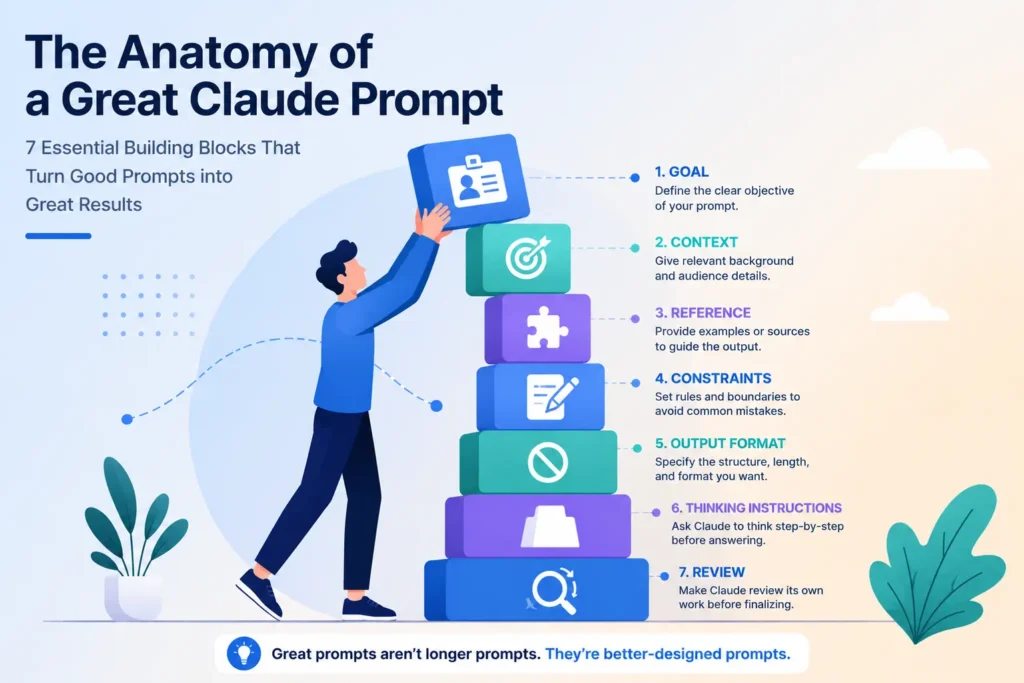
Great Claude prompts aren’t longer prompts. They’re better-designed prompts.
Seven parts, each doing one job. Nothing decorative, nothing padded to look thorough. The next time a draft comes back flat, the fix probably isn’t more instructions — it’s finding which of these seven you skipped.
Start treating your prompts like a system you’re designing, not a message you’re sending. That shift matters more than any single line you could add to a prompt.