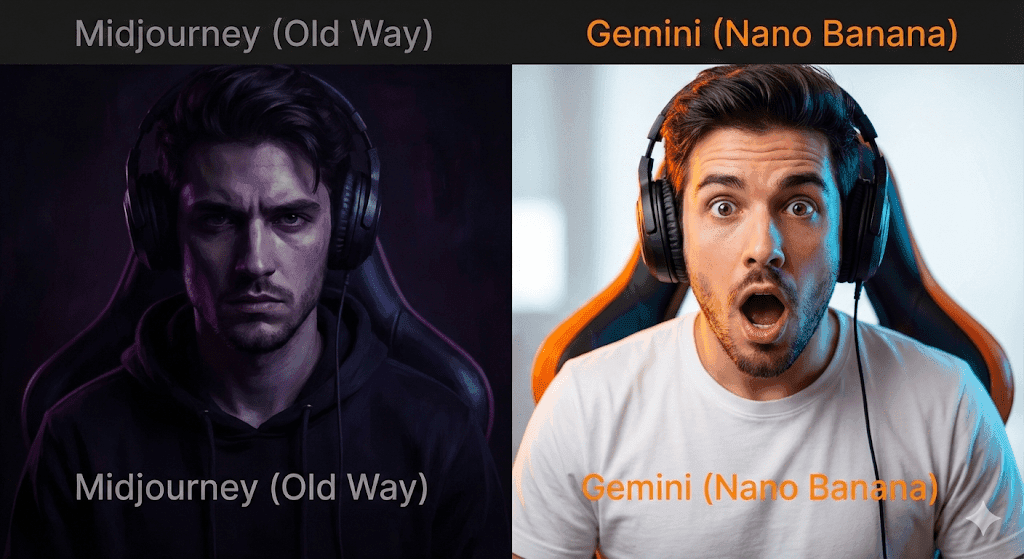
Stop overpaying for Midjourney. This is the only guide you need to hack YouTube CTR using Google’s free “Nano Banana” (Gemini) model. Includes 20+ copy-paste prompts, workflow secrets, and direct comparisons.
The $600/Year Lie You’ve Been Sold
There is a myth in the creator economy that you need to burn $50 a month on Midjourney or Adobe Firefly to get professional-looking thumbnails.
That was true in 2024. In late 2025, the game changed.
Enter “Nano Banana” the insider slang for Gemini’s advanced image generation model (Imagen 3). While everyone else is struggling with complex Discord servers, slow render times, and “fast hours,” smart creators are using Gemini to generate cleaner, brighter, and more algorithm-friendly images for zero dollars.
Here is the raw truth: YouTube doesn’t care about “art.” It cares about Click-Through Rate (CTR). And right now, Gemini is the best tool for the high-contrast, emotive imagery that actually stops the scroll on mobile devices.
You want to know How?
Read this: How to Edit Photos with Gemini Nano Banana Pro (Free Photoshop Alternative)

Part 1: The Showdown – Gemini vs. The World:
Before we get to the prompts, let’s look at the data. Why switch?
/* Basic Table Styling */
.nano-table {
width: 100%;
border-collapse: collapse;
margin: 25px 0;
font-size: 1rem;
font-family: sans-serif;
min-width: 400px;
box-shadow: 0 0 20px rgba(0, 0, 0, 0.15);
}
.nano-table thead tr {
background-color: #009879; /* You can change this color to match your brand */
color: #ffffff;
text-align: left;
}
.nano-table th,
.nano-table td {
padding: 12px 15px;
border: 1px solid #dddddd;
}
.nano-table tbody tr {
border-bottom: 1px solid #dddddd;
}
.nano-table tbody tr:nth-of-type(even) {
background-color: #f3f3f3;
}
.nano-table tbody tr:last-of-type {
border-bottom: 2px solid #009879;
}
/* Highlight the Winner Column (Gemini) */
.nano-table td:nth-child(4),
.nano-table th:nth-child(4) {
background-color: #e8f5e9; /* Light green background for the winner */
font-weight: bold;
border-left: 2px solid #009879;
border-right: 2px solid #009879;
}
| Feature | Midjourney v6 | DALL-E 3 (ChatGPT) | Gemini (Nano Banana) |
|---|---|---|---|
| Cost | $10-$60/mo | $20/mo | Free |
| Speed | Slow (~60s) | Medium (~30s) | Instant (~5s) |
| Photorealism | High (Cinematic) | Low (Plastic) | High (Commercial) |
| Text Rendering | Poor | Good | Moderate (Improving) |
| Prompt Adherence | Medium | High | Very High |
| Vibe | Dark/Artsy | Cartoonish | Bright/High-Key |
The Verdict: Midjourney is for artists. DALL-E is for memes. Gemini is for marketers. The lighting engine in Gemini naturally favors the bright, high-saturation look that dominates the YouTube homepage.
Part 2: The Anatomy of a Viral Prompt:
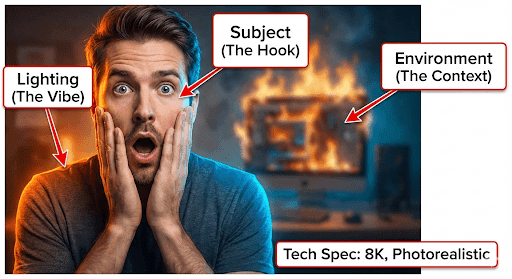
Don’t just copy-paste; understand the syntax. A viral thumbnail prompt needs four distinct elements. If you miss one, the image fails.
- The Subject (The Hook): Who or what is the focus? (e.g., Shocked man, burning laptop).
- The Environment (The Context): Where are they? (e.g., blurred office, space station).
- The Lighting (The Vibe): This is crucial for thumbnails. (e.g., Rim lighting, neon blue, high contrast).
- The Tech Specs (The Quality): telling the AI how to render. (e.g., 8k, photorealistic, 16:9 aspect ratio).
The Formula:
[Subject Action/Emotion] + [Background/Setting] + [Specific Lighting keywords] + [Technical Specs]
Part 3: The “Nano Banana” Prompt Library (Copy-Paste):
Here are the tested prompts. I have categorized them by niche.
Category A: The “Reaction Face” (High Emotion):
The #1 driver of clicks is still human emotion.
1. The “Disaster/Mistake” Face:
Prompt: Close-up wide-angle shot of a YouTuber with a terrified expression, hands on head, looking down at a broken object, dramatic studio lighting, deep red and blue rim light, dark background to make the face pop, 8k resolution, hyper-realistic skin texture.

2. The “Secret Revealed” Whisper:
Prompt: Medium shot of a person leaning into the camera lens as if whispering a secret, hand cupping mouth, mischievous expression, bright key light, blurred library background, sharp focus on eyes, YouTube thumbnail style.
3. The “Angry/Rant” Vibe:
Prompt: Low angle shot of a man shouting at a camera, aggressive gesture, veins visible, intense red lighting background, high contrast, gritty texture, 4k, action movie poster style.
Category B: Tech & Education (Clean & crisp):
These need to look expensive.
4. The “Apple Style” Product Shot:
Prompt: Futuristic floating gadget, matte black finish, soft spotlighting, reflection on glass surface, minimal white background with soft grey gradients, heavy negative space on the left, tech advertisement aesthetic.
5. The “Coding/Hacker” Setup:
Prompt: POV shot of a hacker in a dark room, wearing a hoodie, face illuminated by green monitor glow, matrix code reflection in eyes, cyberpunk aesthetic, neon lighting, mysterious vibe.
Category C: Gaming (High Saturation):
Kids click on color.
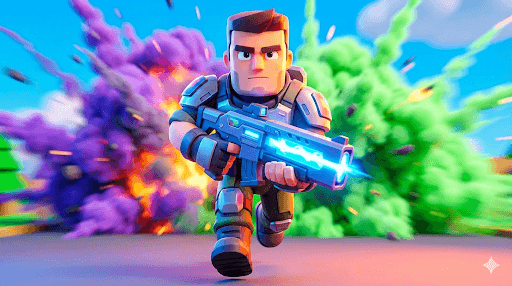
6. The “Fortnite/Battle Royale” Style
Prompt: 3D render style, stylized cartoon character holding a gold trophy, victory pose, confetti falling, bright blue sky background, saturated colors, Pixar style animation, energetic mood.
7. The “Horror Game” Scared:
Prompt: First-person view of a flashlight beam in a dark hallway, a scary monster silhouette in the distance, grain filter, vignette, terrifying atmosphere, horror gaming thumbnail.
Category D: Backgrounds (For Overlaying Text):
Use these when you want to add text in Canva.
8. The “Versus” Split Screen:
Prompt: Split screen background, left side is lava and fire, right side is ice and snow, sharp jagged dividing line in center, no text, high detail texture, wallpaper 4k.
9. The “Money/Finance” Graph:
Prompt: 3D isometric illustration of a green stock market arrow crashing through a glass ceiling, gold coins flying, luxury dark green background, success vibe, high gloss render.

Part 4: The Professional Workflow (Step-by-Step):
Novices stop at the prompt. Pros follow this workflow.
Step 1: Generation (Volume):
Don’t generate one image. Generate 10. Gemini is free spam the button. Look for the one image where the eyes are perfect. You can fix a background, but you can’t fix dead eyes.
Step 2: The “Frankenstein” Method:
Sometimes Gemini gives you a perfect face but a bad hand.
- The fix: Generate the background separately. Use a tool like PhotoRoom or Canva Pro to remove the background of your subject, and place them onto the clean background you generated separately.
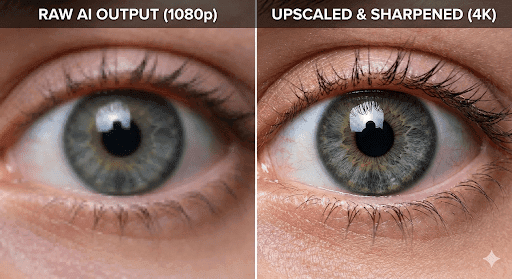
Step 3: Upscaling (Crucial):
Gemini images can be soft at 1080p.
- Tool: Use Upscayl (Free, Open Source) or Magnific AI (Paid) to upscale the image by 2x or 4x. This adds the “crispy” texture that top YouTubers have.
Step 4: Color Grading:
Gemini outputs are good, but flat.
- Open the image in Lightroom or Canva.
- Increase Contrast (+15)
- Increase Saturation (+10)
- Sharpen (+20)
- Why? Because on a tiny phone screen, subtle colors look grey. You need punch.
Part 5: Troubleshooting “Nano Banana” Glitches:
Even the best models fail. Here is how to fix common Gemini errors.
- Problem: “Plastic/Wax Skin.”
- Fix: Add keywords like “skin texture,” “pores,” “slight sweat,” or “imperfect skin” to your prompt.
- Problem: “The text is gibberish.”
- Fix: Stop trying. Do not use AI for text. It looks unprofessional. Do your typography in Canva.
- Problem: “Too many fingers.”
- Fix: Hide the hands. Change the prompt to “portrait shot, head and shoulders only” or put an object in the hands to mask the fingers.
Part 6: FAQ:
Q: Can I get monetized using AI thumbnails?
A: Yes. YouTube does not ban AI thumbnails. However, you must click the checkbox “Altered Content” only if the AI depicts something real that didn’t happen (like a deepfake of a celebrity). For generic reaction faces, you are safe.
Q: Is Gemini Image Generation truly free?
A: As of late 2025, the standard Gemini model allows for free image generation with limits. The “Advanced” tier offers higher resolution, but for thumbnails, the free tier is sufficient.
Q: What is the best aspect ratio for Gemini prompts?
A: Always add “16:9 aspect ratio” to your prompt. If you forget, it generates a square (1:1), and cropping that for YouTube will ruin your composition.
Final Word: The Algorithm is Visual:
Your video could be the best piece of content ever filmed, but if the thumbnail is boring, nobody watches.
“Nano Banana” gives you the power of a graphic design team for free. But remember: The tool is only as good as the prompt. Use the library above, experiment with the lighting, and never, ever settle for a boring image.
Now, go generate.