Part 1: The Reality Check
Scheduling tools didn’t kill reach. Lazy content did.
There’s a version of “automation” that still gets sold in every $97 course online: connect your RSS feed to a scheduler, let it post three times a day, watch the traffic roll in. That version is dead. Not slowing down. Dead.
Every major platform LinkedIn, Instagram, Pinterest, Reddit, TikTok has deployed AI moderation systems in the past 18 months that are specifically trained to identify templated, low-effort, high-volume publishing. They don’t care that you used a different tool than the person they shadowbanned yesterday. They care about behavioral patterns. Bulk posting windows. Identical caption structures. Accounts that publish without ever genuinely engaging.
The accounts surviving and growing in 2026 are not the ones that stopped using AI. They’re the ones that stopped using AI badly.
This guide is not about which tool to buy. It’s about building an automated workflow rather than automated publishing. The distinction matters more than anything else in this document.
An automated publishing system pushes content. An automated workflow handles the mechanical, time-consuming work research, transcription, formatting, resizing, scheduling so the human behind the account can spend 100% of their visible effort on what algorithms now measure most: genuine, specific, experience-based expression.
What you’ll walk away with:
- A technically sound prompt framework that strips AI markers from generated text
- Platform-specific survival guides for the two most under-discussed minefields: Pinterest and Reddit
- A traffic strategy that builds email and AdSense revenue without triggering link penalties
- A complete content cascade workflow tested against the 2026 algorithm environment
No fluff. No tool affiliate spam. Let’s get into it.
Part 2: The Algorithm Environment What the Real Data Shows
Before any workflow makes sense, you need an honest picture of where each platform stands right now.
LinkedIn: 360Brew Changed Everything
In late 2024, LinkedIn scrapped its legacy ranking infrastructure and replaced it with an AI system called 360Brew. The platform’s own data and independent audits confirmed what creators were already feeling in their analytics.
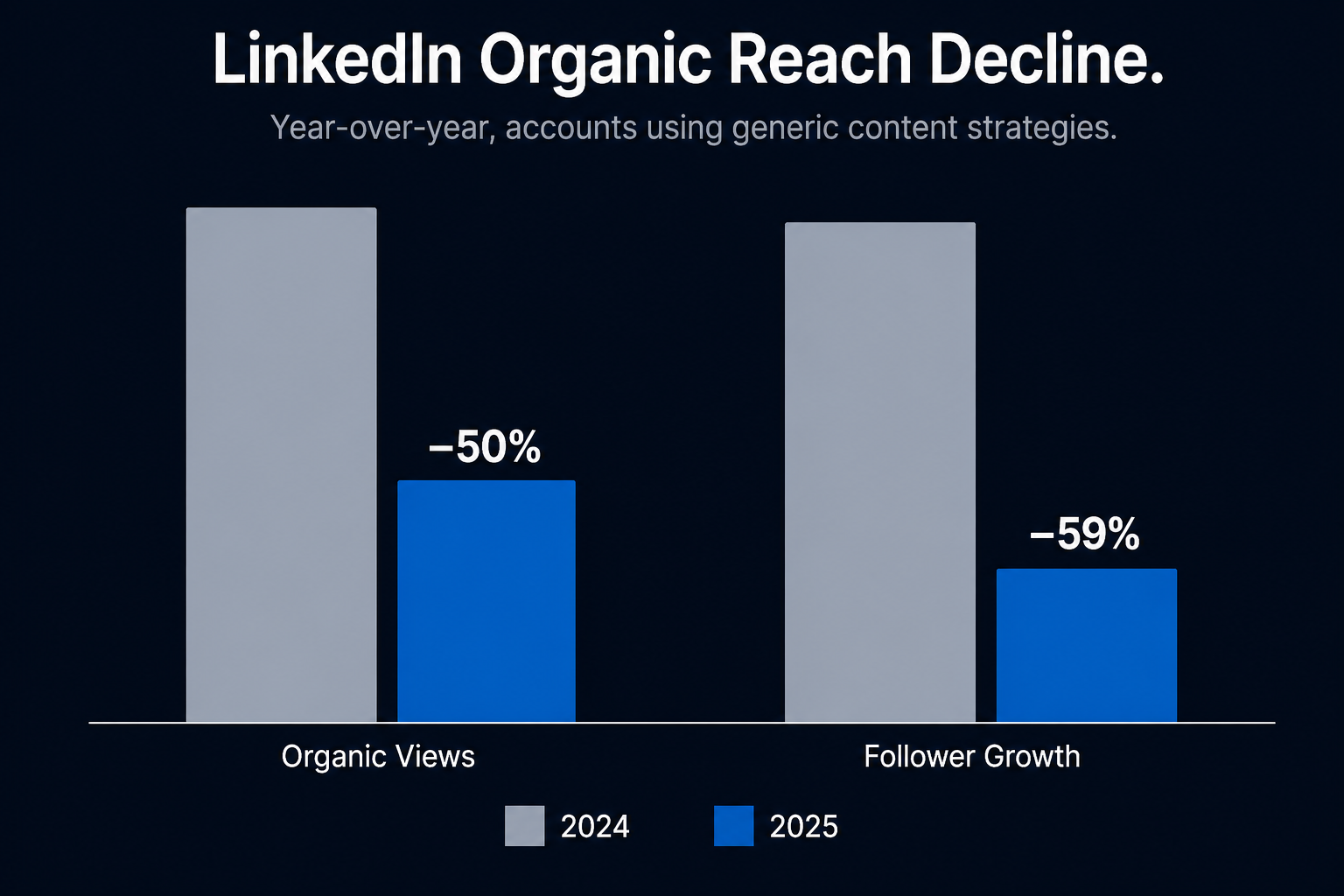
According to Richard van der Blom’s Algorithm Insights Report, organic views dropped 50% year-over-year for accounts using generic content strategies. Follower growth declined 59%. Company pages now receive approximately 5% of feed allocation, while personal profiles account for 65% of content consumption.
That sounds catastrophic. It’s actually an opportunity.
360Brew does something the old algorithm couldn’t: it measures depth of attention, not just volume of engagement. The system tracks how long a user pauses on your post, whether they expand the text, how much time they spend in the comments, and whether they save the post or share it via direct message. A post with 200 quick likes and a two-second average dwell time gets throttled. A post with 40 saves and substantive comment threads gets amplified sometimes days after it was published.
What’s actually working on LinkedIn right now:
- Document posts (PDF carousels) are generating 6.60% engagement rates the highest of any format on the platform. Text-only posts are averaging below 2%.
- Posts with external links receive approximately 60% less reach. The “link in first comment” workaround has also been penalized as of early 2026.
- Personal profiles with a clear, single-topic niche outperform brand pages on every metric.
- Posts that earn saves and comments 24–72 hours after publishing perform 4–6x better over their full lifecycle. 360Brew interprets late engagement as a signal of lasting value. Don’t delete slow-starting posts.
Instagram: The Attention Economy Got More Ruthless
Instagram runs multiple separate AI ranking systems one each for Feed, Reels, Explore, and Stories. They don’t share the same logic, which is why the same post can reach thousands through Reels and almost no one through Feed.
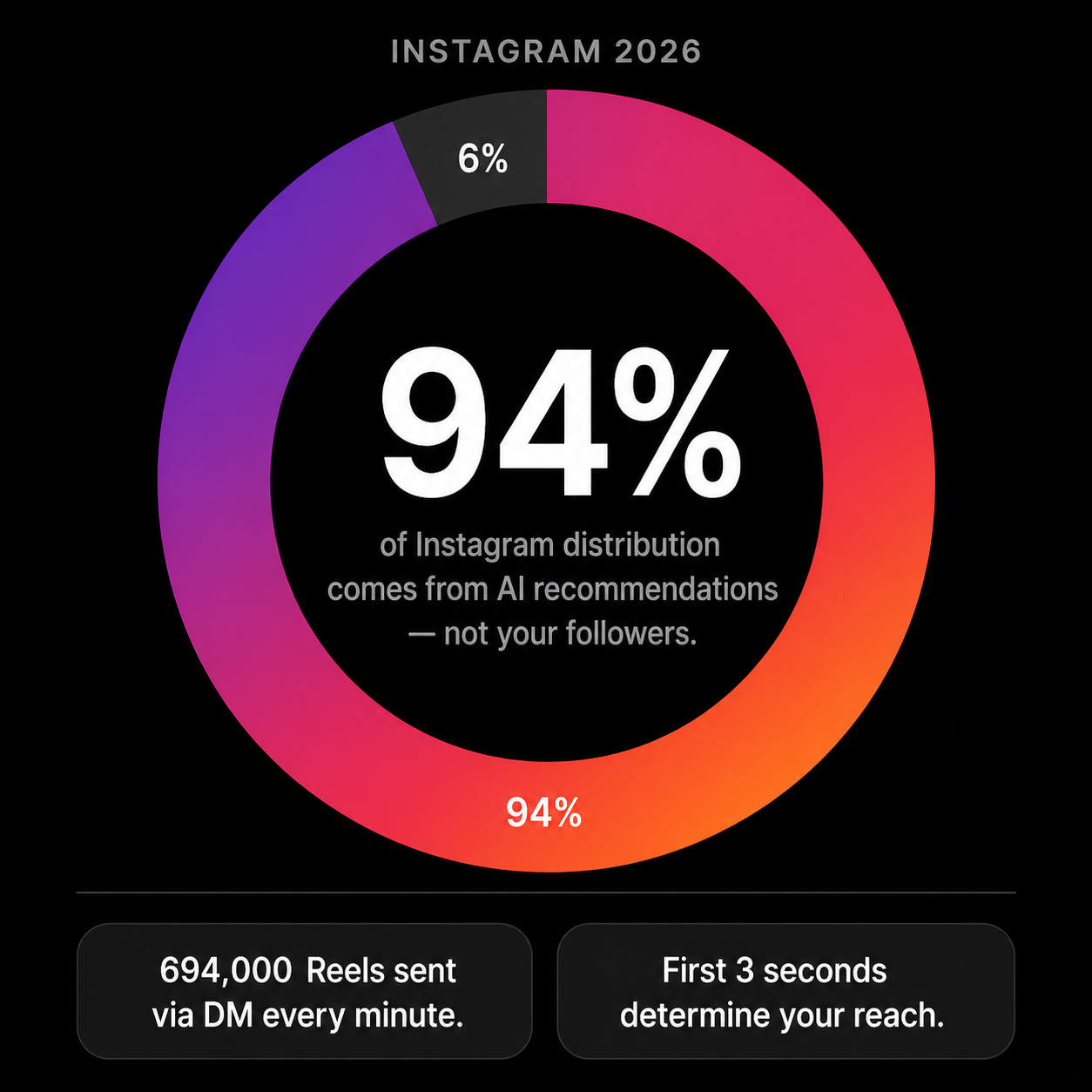
The headline stat: 94% of Instagram distribution now comes from AI recommendations, not from your follower network. The algorithm decides whether you’re worth showing to people who’ve never seen you before. That decision gets made in the first three seconds of your Reel.
What Instagram’s algorithm actually penalizes:
- Content that has already been posted elsewhere. Instagram’s visual AI performs frame-by-frame analysis and cross-references against indexed content. Reposted clips from TikTok get suppressed in favor of the original source.
- Recycled caption templates with identical sentence structures across accounts.
- Any automation that generates comments that don’t add genuine context to a thread.
What it rewards:
- Watch time and completion rate on Reels more important than likes.
- DM sends (shares via direct message). Instagram’s own data shows 694,000 Reels are sent via DM every minute. Content that earns DM shares gets aggressive distribution to new audiences.
- Saves. Particularly for carousels and educational content.
There is no “Originality Filter” that specifically targets AI-written captions. That claim circulates constantly and has no official Meta documentation behind it. What does get penalized is soulless content generic, brand-voice-free text that generates no meaningful attention signals regardless of how it was produced.
Part 3: The Minefields Pinterest and Reddit
Most automation guides skip Pinterest and Reddit entirely, or mention them in a single sentence. That’s a mistake if either platform is part of your traffic strategy.
Both have undergone serious algorithmic and moderation changes in 2025–2026. Both will ban or suppress your account faster than LinkedIn if you approach them with a bulk-posting mindset. And both, used correctly, can drive significant, high-intent traffic to a self-hosted site.
Pinterest: The Over-Tuned AI Moderation Problem
Pinterest has one of the most aggressive AI auto-moderation systems of any platform, and it’s currently misfiring at a significant rate.
Here’s what’s actually happening: In late 2024 and through 2025, Pinterest deployed a new spam detection model aimed at stopping pin farms accounts that bulk-pin affiliate links and SEO-optimized landing pages en masse. The model works. It also catches legitimate creators in the process.
The specific behaviors that trigger suppression or domain blocking:
- Bulk pinning sessions. Pinning more than 15–25 pins in a 30-minute window triggers behavioral flags, even if every pin is original. Pinterest’s system reads volume as automation.
- Pinning directly to a new or low-authority domain.If your website is less than six months old or has limited inbound authority, Pinterest’s AI may flag your domain as a spam destination and suppress all pins linking to it without notifying you.
- Identical or near-identical pin descriptions across multiple pins. Even minor variations of the same template structure get caught. The system identifies syntactic patterns, not just duplicate text.
- Creating multiple boards in rapid succession. Board creation velocity is a secondary spam signal.
How to diagnose if you’ve been affected:
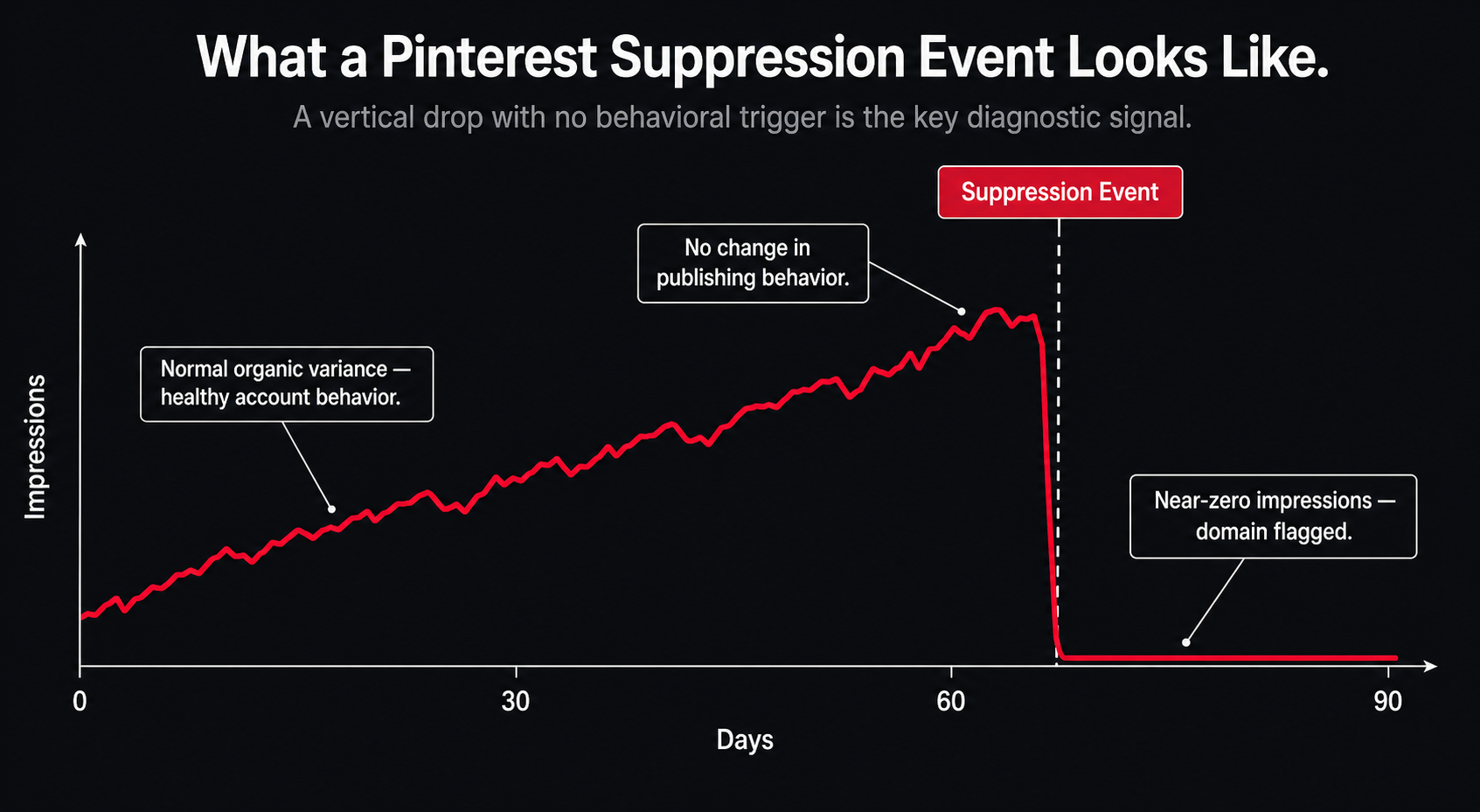
Go to your Pinterest analytics. If your impression curve dropped vertically over a 48–72 hour window without any corresponding change in your publishing behavior, you’re likely dealing with a suppression event, not organic decline. Pin one piece of content manually and track its distribution over 24 hours. If a pin to a well-established external domain (Medium, a news site) gets normal traction but your own domain’s pins get near-zero impressions, your domain has been flagged.
The workaround framework:
1. Manual appeal through the Business Help Center. This actually works, but you need to be specific. Submit a support ticket identifying the domain, the approximate date suppression began, and examples of your pinned content. Generic appeals get ignored. Specific, documented appeals typically get reviewed within 3–5 business days. Request that your domain be re-evaluated for spam classification.
2. Domain warm-up protocol. If you’re building a new site, don’t pin directly to it for the first 60 days. Pin to third-party content you’ve contributed to (guest posts, featured articles) that links back to your site. Let Pinterest index your domain indirectly before making it the primary destination.
3. Metadata discipline. Every pin should have: a unique title that contains the primary keyword naturally, a description of 100–300 words written as genuine editorial context (not keyword stuffing), and a destination URL that loads fast. Pinterest’s crawler evaluates page load speed as a trust signal.
4. Pacing your publishing. 10–15 pins per day, spread across a 6–8 hour window, is the safe zone for an account under six months old. Use Tailwind’s interval scheduling to distribute pins not to bulk-schedule them.
5. Board structure signals trust. Pinterest’s algorithm gives more distribution weight to pins published to thematically cohesive boards with established engagement history. Don’t create a board and immediately flood it with 50 pins. Build boards slowly, with a mix of your own content and high-quality repins from established accounts in your niche.
What AI is legitimately useful for on Pinterest:
- Generating keyword-rich pin descriptions from a URL or article summary
- A/B testing title variants for the same piece of content
- Identifying trending search terms within a niche using a tool like Pin Inspector
What AI should never do on Pinterest:
- Bulk-generate 100 pin descriptions from the same template
- Auto-schedule pins in high-volume batches
- Replicate pin designs with only color or text changes Pinterest’s visual similarity detection will merge them into the same impression pool and suppress the duplicates
Reddit: The Authenticity Purge
Reddit banned 8,000+ accounts in a coordinated moderation sweep in Q3 2025. The common thread was not malware. It was promotional content that didn’t look promotional AI-polished posts designed to appear organic while ultimately driving traffic to external sites.
Reddit’s moderators and its automated detection systems have gotten significantly better at identifying this pattern. The tells are consistent: accounts with no comment history outside of link-sharing, posts that open with a personal anecdote and then pivot to a recommendation, karma profiles that are disproportionately high for account age.
Reddit’s value as a traffic channel is real. Threads on major subreddits can send thousands of visitors to a site in 24 hours. That value disappears permanently the moment your account or your domain gets flagged.
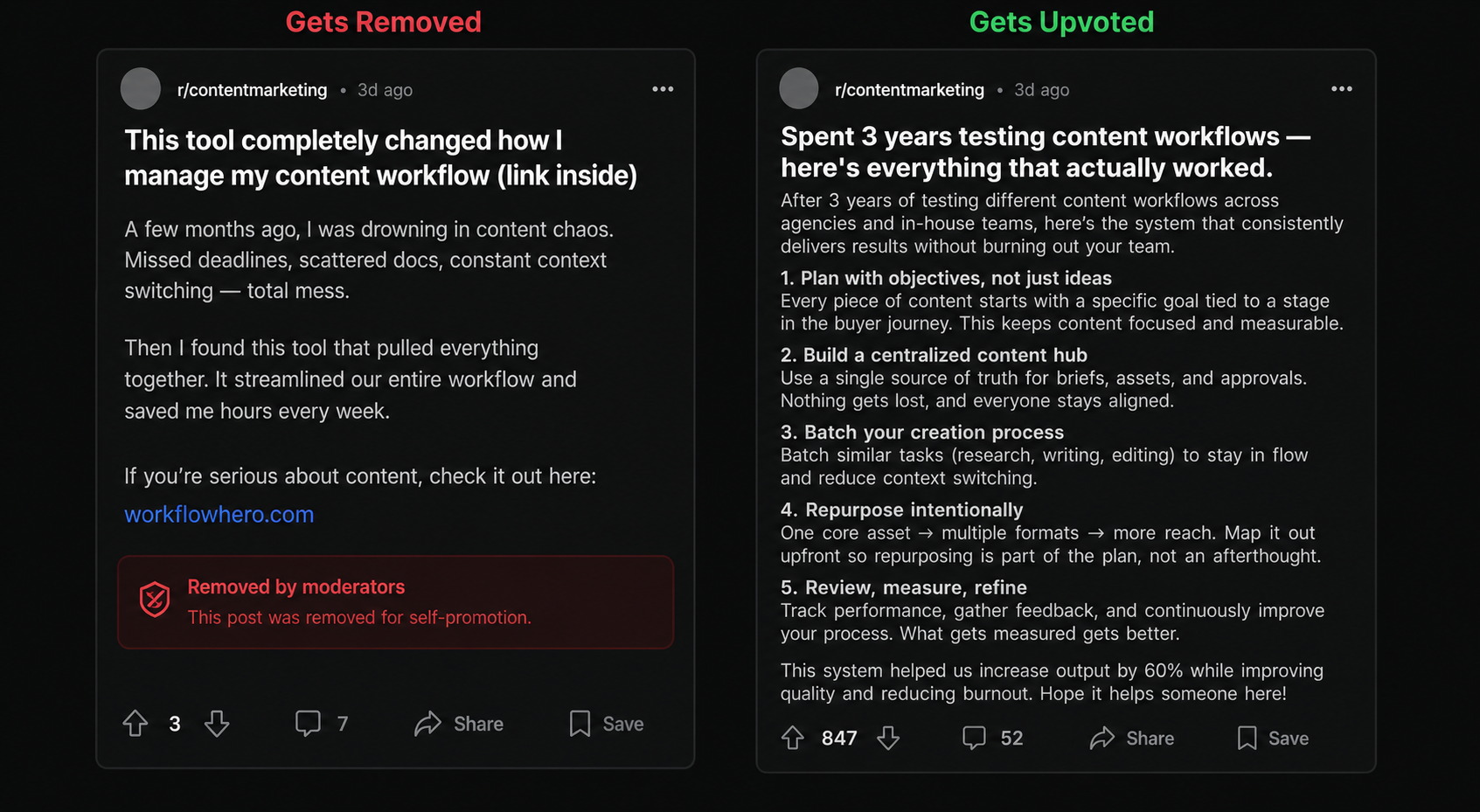
The core principle you have to accept before using Reddit for any business purpose:
You cannot automate Reddit engagement. Full stop. Any attempt to use AI to generate comments, simulate community participation, or systematically upvote content will end your account. Reddit’s community moderators are not automated systems. They are humans who have been in these subreddits for years and can identify artificial behavior patterns immediately.
How to use Reddit without getting banned:
Build the account first, promote nothing. A Reddit account needs a minimum of 3–6 months of genuine activity comments, questions, responses before it can post a link to anything you own without triggering suspicion. This is not optional. Accounts with low karma and no comment history get removed automatically in most moderated subreddits.
Understand each subreddit’s written and unwritten rules. Most large subreddits have explicit rules about self-promotion. Many limit promotional posts to 1 in every 10 contributions (“the 9:1 rule“). Some ban promotional content entirely. Read the sidebar of every subreddit you want to participate in before posting anything.
Value-first posting. When you do share content, the post itself needs to be genuinely useful in isolation not a teaser that requires clicking through to get the actual insight. Write the full answer in the Reddit post. If people want to go deeper, they’ll find your site. This approach actually drives higher-quality traffic because users arrive already knowing what you produce.
Where AI fits in the Reddit workflow:
- Research only. Use AI to analyze a subreddit’s most upvoted posts from the past year. What formats, what topics, what angles are consistently rewarded?
- Topic ideation. Identify gaps between what your audience asks about and what’s already been thoroughly addressed.
- Drafting your post offline. Write with AI assistance, then rewrite manually in your own voice before posting. Reddit users can identify AI prose. The platform’s average user is more technically literate than most social media audiences.
What to never do:
- Use any automation tool to post, comment, upvote, or follow on Reddit
- Create multiple accounts for the same brand or site
- Post the same content across multiple subreddits within the same 24-hour window
- Respond to negative comments with AI-generated text the deflection is immediately recognizable and will get your thread locked.
Part 4: The Advanced Prompt Protocol
Basic prompt advice “write like a human,” “be conversational,” “avoid jargon” is no longer useful. It was never precise enough to be actionable.
What follows is a modular prompt framework designed to produce text that doesn’t trigger AI detection patterns and doesn’t read as synthetic. Each module targets a specific failure point in AI-generated social content.
Module 1: The Constraint Stack
Before asking AI to write anything, define hard constraints. These are not style preferences. They are structural rules the output cannot violate.
Paste this block at the top of every prompt. It acts as a pre-filter that eliminates the most common AI tells before generation begins.
Module 2: The Voice Anchor
Generic AI outputs sound generic because they have no reference point for a specific human voice. The Voice Anchor module gives it one.
The sample pastes are the critical variable. Three paragraphs of your own existing writing anchors the output to your actual voice. Without this, you get a generic approximation of “direct and authoritative” that still reads as AI.
Module 3: The Specificity Injection
AI defaults to generalizations because generalizations are always technically accurate. Specificity is what makes content useful and what makes it read as written by someone who has actually done the thing.
This forces the output to show you exactly where it would have fabricated data if left unconstrained. You then fill those gaps with real information your own experience, sourced statistics, verified tool comparisons. The result reads as deeply researched because it is.
Module 4: The Format Enforcer
Inconsistent formatting across posts is a secondary AI signal it suggests the text was generated without a clear structural template. The Format Enforcer locks down output structure before generation.
The last line matters. AI tools habitually add meta-commentary around outputs. Any “Here is your post:” opening is a tell if you ever accidentally paste it into a publishing tool.
Module 5: The Final Pass Prompt
Run every output through a secondary prompt before using it:
This review pass treats AI like a first draft, not a final output. Every flag is something you fix manually. It takes 5–10 minutes. It’s the difference between content that gets 40 saves and content that gets suppressed.
Part 5: Zero-Click Monetization and the Link Penalty Problem
Here’s the situation if you’re monetizing a self-hosted WordPress site through AdSense or display advertising:
Organic search traffic is under sustained pressure. AI-powered answer engines are intercepting informational queries before users click through to source content. For certain query types how-to guides, definition articles, comparison posts direct traffic from search has declined significantly.
Simultaneously, every social platform penalizes outbound links. LinkedIn reduces reach by approximately 60% on posts with external URLs. Instagram doesn’t allow clickable links in captions at all. Reddit bans accounts that post links without community history. Pinterest suppresses domains it hasn’t verified.
Posting links is becoming a net-negative action on most platforms. The traffic still exists, but you can’t just drop a URL and expect it to perform.
The strategy that actually works: build native authority, let audiences self-navigate
The goal is not to drive people to your site. The goal is to build enough authority within a platform that people actively seek your site out.
This sounds abstract.
Here’s what it looks like concretely:
On LinkedIn: Post your best insight as a full PDF carousel the entire framework, the real data, the specific steps. At the end of the carousel, the final slide says: “I publish more frameworks like this at [site name like; gptpromptsio]. Search it.” No link. No UTM parameter. Just the name of the destination. People who want more will find it. Those who find it this way are higher-intent than people who clicked a link without choosing to.
On Instagram: Put your site URL in your bio and nowhere else. End every Reel with a verbal CTA: “Full breakdown is on the site link in bio.” The verbal CTA gets engagement in comments from people asking for the link, which is an engagement signal that helps distribution. The click to bio is a separate intentional action that signals high intent.
On Pinterest: Every pin links directly to a specific, relevant piece of content on your site. The pin description answers one specific question. The article it links to answers it in depth and contains AdSense placements. Pinterest’s search intent is high people searching for a specific topic are more likely to click through and read a full article than people who encounter your content in a social feed.
On Reddit: Never post your link. Build your reputation by answering questions thoroughly, in full, inside Reddit threads. Mention your site only when directly asked where you publish, or in a Weekly Thread specifically designated for self-promotion. Your Reddit bio can include your URL people who look you up will find it.
Building the Email List Without Looking Desperate
The email list is the only audience you own. Social platforms can suppress, ban, or deprioritize your account without notice. A list of 2,000 high-intent subscribers is worth more than 20,000 social followers in any monetization context.
ManyChat for Instagram: When someone comments a specific keyword on a post (“GUIDE,” “TEMPLATE,” “LIST”), they receive an automated DM with a link to a lead magnet on your site. Setup takes approximately 90 minutes. It runs indefinitely without maintenance. The comment creates an engagement signal that boosts distribution, and the DM captures an email. One workflow, two outputs.
LinkedIn Newsletter: LinkedIn’s native newsletter feature indexes articles in Google Search. Every newsletter issue is a content asset with independent SEO value. Newsletter subscribers get direct notifications bypassing the 360Brew distribution system entirely. Use the newsletter for your most in-depth content. Use regular posts to build the audience that subscribes to it.
Pinterest-to-email: A lead magnet landing page linked from a Pinterest board dedicated specifically to free tools and templates performs consistently well. Pinterest search intent is high enough that users actively looking for a template are ready to exchange an email for it. The page needs to load in under two seconds Pinterest’s crawler and users both abandon slow pages.
The Full Cascade Workflow
This is the operational system. One recording produces the week’s content across every platform.
Step 1: The Source (30–60 minutes)
Record yourself explaining one specific, narrow topic. Narrow matters. “How I reduced my Etsy customer service time by 70% using one automation” is a better source video than “AI tools for Etsy sellers.” Narrow topics generate higher-retention clips because the audience is already bought in.
10 minutes of good talking is enough. You don’t need production equipment. Decent lighting and a phone mic on a lapel clip is sufficient.
Step 2: Transcription and Clip Extraction (Automated)
Upload to Opus Clip. Let its AI identify the three to seven highest-retention segments moments where the argument peaks, where you make a specific claim, where there’s a natural emotional beat. These become your Reels and TikTok drafts.
Review every clip before it goes anywhere. The AI is good at identifying engagement patterns. It is not good at understanding context. A clip that sounds compelling out of context but misleads the audience will generate comments correcting you, which is a negative signal.
Step 3: The Text Layer (Human-Guided AI)
Take the full transcript. Run it through Claude using the Constraint Stack and Voice Anchor modules from Part 4. Prompt it to extract the single best argument from the transcript and format it as a LinkedIn carousel outline headline, five supporting points, one conclusion.
Build the carousel in Canva or Adobe Express. Export as PDF. The visual design should be simple and consistent your brand colors, one font, data-forward slides. Carousels that try to look like infographics underperform carousels that look like well-formatted documents.
Step 4: Pinterest and Blog Distribution (Scheduled)
Take the written summary of the video topic and expand it into a 1,200–1,800 word article for your WordPress site. This is where AdSense revenue comes from. The article is the long-term SEO asset. Everything else drives initial traffic to it.
Create 3–5 pin designs from the article, each targeting a different search query angle. Schedule them through Tailwind at 10–12 per day maximum, spread over a 6-hour window.
Step 5: Reddit (Manual Only)
If the topic is relevant to any subreddit you actively participate in, write a full post summarizing the key insight not linking to the article, not teasing it. Write the complete insight in Reddit’s native format. If your Reddit presence is established, this will generate genuine discussion. That discussion is the signal. Not the link.
Part 6: The Maintenance Layer
Automation breaks. Algorithms shift. A workflow you set up in January will need adjustment by April.
Monthly audit checklist:
- Pull your LinkedIn analytics for the past 30 days. Compare carousel performance against text-only posts. If the gap has narrowed significantly, test a new format.
- Check Pinterest analytics for domain suppression signals (vertical impression drop over 48 hours).
- Review Opus Clip outputs if completion rates on your clips are below 50%, the source material needs to change, not the tool.
- Run one piece of content through two AI detection tools (Originality.ai and GPTZero). If it scores above 40% AI probability after your manual editing, your editing pass isn’t thorough enough.
- Check your email subscriber growth rate. If ManyChat triggers are still firing but subscriptions have plateaued, your lead magnet needs updating.
The single most important metric:
Saves. Not likes, not impressions, not follower count. Saves on every platform indicate that someone found your content useful enough to return to. That is the only signal that correlates with long-term algorithm favor, audience loyalty, and conversion to owned channels.
Track it every week. Build content specifically designed to earn it.
The Honest Bottom Line
The accounts losing reach in 2026 are not losing because they used AI. They’re losing because they treated automation as a replacement for thinking bulk-scheduled content with no specificity, no genuine insight, and no reason for anyone to pay attention.
The accounts growing are running tighter operations, not bigger ones. They’re publishing less frequently and earning more engagement per post. They’re using AI for the mechanical work transcription, formatting, keyword research, scheduling and spending their actual creative energy on the one thing AI still cannot do: having a specific, real, lived-in point of view.
That’s not a competitive advantage that expires when the next algorithm update drops.
It’s the only one that doesn’t.
{
“@context”: “https://schema.org”,
“@type”: “FAQPage”,
“mainEntity”: [
{
“@type”: “Question”,
“name”: “Is it safe to use AI for LinkedIn comments?”,
“acceptedAnswer”: {
“@type”: “Answer”,
“text”: “No. LinkedIn’s 2026 spam filters are aggressive. If you use AI to leave generic comments like ‘Great insights!’, your account may be flagged for automation abuse.”
}
},
{
“@type”: “Question”,
“name”: “Which tool is best for beginners with $0?”,
“acceptedAnswer”: {
“@type”: “Answer”,
“text”: “CapCut Desktop (Free) for editing and Claude 3.5 Sonnet (Free) for scripting. You won’t get the automated ‘Virality Scores’ of Opus Clip, but you can do the manual work yourself.”
}
},
{
“@type”: “Question”,
“name”: “Does Instagram ban AI avatars?”,
“acceptedAnswer”: {
“@type”: “Answer”,
“text”: “No, but you must label it. Instagram requires you to tag content as ‘AI Generated.’ If you don’t tag it and they catch you, they suppress the video reach by up to 80%.”
}
}
]
}